DonationCoder.com forum
 
Read-only archive. This is a static copy of the DonationCoder.com forum. Reading and searching work as before; logging in, posting and private messages do not.
Archive of 2026-10-21 · About this archive · Main site

Author Topic: rename from FARR window  (Read 8,966 times)

cedardoc

  • Participant
  • Joined in 2008
  • *
  • Posts: 36
rename from FARR window
« on: August 13, 2008, 05:11 PM »
What's the best way to do this?  When I right click an item and select "Shell Context menu", the "rename" item doesn't do anything.  If I right click and select "Explore here", the folder is brought up but the individual file is not selected, which means I have to search for it all over again.

Is there something obvious I'm missing, or maybe a setting somewhere I have to change?

Thanks,

Dave P

mouser

  • First Author
  • Administrator
  • Joined in 2005
  • *****
  • Posts: 40,931
    • Gathering Badge
    • Plugin Coding Medal
    • Participated in NANY Challenge Seventeen Times
    • Cody Award
    • Coding Snacks
    • Volunteers/Staff
Re: rename from FARR window
« Reply #1 on: August 13, 2008, 06:00 PM »
I hadn't noticed that rename from shell context doesnt work but you are right it doesnt.
what bout trying right-click -> properties
and then change name in top editbox.

cedardoc

  • Participant
  • Joined in 2008
  • *
  • Posts: 36
Re: rename from FARR window
« Reply #2 on: August 13, 2008, 07:33 PM »
nothing happens there either.  I also seem to have the up to date version (2.30.01), i.e. my DC updater isn't flashing.

Dave

herojoker

  • Participant
  • Joined in 2008
  • *
  • Posts: 124
Re: rename from FARR window
« Reply #3 on: August 13, 2008, 11:44 PM »
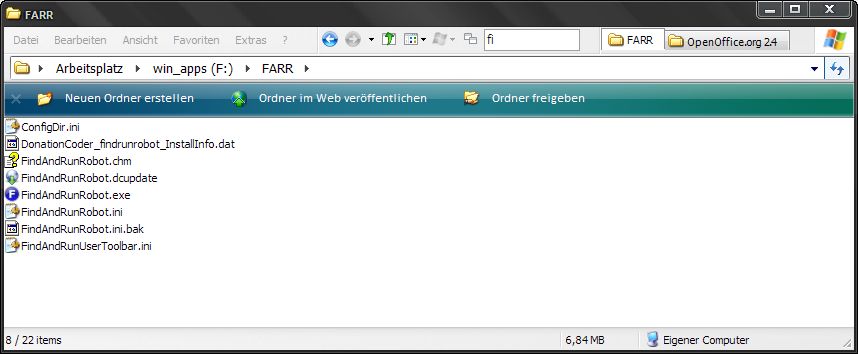
This is not really on-topic but I just wanted to mention the following application: QTTabBar
Once installed, there is a nice little search bar available which filters the current's folder contens by what you type.
I've attached a screenshot from my current WinXP configuration with QTTabBar and QTAdressBar (and BricoPack Vista Inspirat 2). In the example I typed "fi" into the search bar which results in all entries not containing "fi" being filtered out.
« Last Edit: August 13, 2008, 11:47 PM by herojoker »

d4ni

  • Supporting Member
  • Joined in 2008
  • **
  • Posts: 129
Re: rename from FARR window
« Reply #4 on: August 24, 2008, 11:58 PM »
Farr can do it too, I never use Windows Explorer to navigate and search files anymore anyway so I wouldn't use this. But I guess some people would like this, thanks for sharing :)

Kinda lame to make XP look like Vista though ;)

herojoker

  • Participant
  • Joined in 2008
  • *
  • Posts: 124
Re: rename from FARR window
« Reply #5 on: August 25, 2008, 10:17 PM »
I just liked the look. The fact that it resembles Vista is not important to me...

d4ni

  • Supporting Member
  • Joined in 2008
  • **
  • Posts: 129
Re: rename from FARR window
« Reply #6 on: August 27, 2008, 11:29 PM »
Just kidding, no offense was intended :-*

Original address: https://www.donationcoder.com/forum/index.php?topic=14408.0