DonationCoder.com forum
 
Read-only archive. This is a static copy of the DonationCoder.com forum. Reading and searching work as before; logging in, posting and private messages do not.
Archive of 2026-10-21 · About this archive · Main site

Author Topic: windows volume control setting  (Read 18,530 times)

techidave

  • Supporting Member
  • Joined in 2007
  • **
  • Posts: 1,046
windows volume control setting
« on: July 08, 2008, 11:43 AM »
I am trying to set the wave volume for all users who log in to a computer.  By default it is set to zero so there are certain programs that don't have any sound.  The computers are XP Pro SP3 that log into a Windows server in a grade school setting.  It seems after they log in and it is set, then it stays but I am trying to save the computer teacher a lot of time by setting it in advanced.

This particular computer uses the SoundMax Digital Audio software.  I have also tried setting it in control panel but the results are the same.  I have looked in to gpedit but cannot find any setting there either.

any ideas?

techidave

  • Supporting Member
  • Joined in 2007
  • **
  • Posts: 1,046
Re: windows volume control setting
« Reply #1 on: July 08, 2008, 12:21 PM »
Apparently some/one of the software we use changes the default setting to zero.  I just logged into another computer  that has no software installed on it and the wave setting is as high as it will go. 

I am going to set up my default user and copy it to the other computer and see what happens.  I will post back the result.

Would there be a registry setting that would accomplish the same thing???

Dave

mouser

  • First Author
  • Administrator
  • Joined in 2005
  • *****
  • Posts: 40,931
    • Gathering Badge
    • Plugin Coding Medal
    • Participated in NANY Challenge Seventeen Times
    • Cody Award
    • Coding Snacks
    • Volunteers/Staff
Re: windows volume control setting
« Reply #2 on: July 08, 2008, 01:19 PM »
actually this is a fantastic idea for a coding snack, a tool that runs on windows startup and forces the volume and wav volume settings to a specific value.

lanux128

  • Global Moderator
  • Joined in 2005
  • *****
  • Posts: 6,277
    • Coding Snacks
    • Volunteers/Staff
    • Gathering Badge
    • Participated in NANY Challenge Once
    • Linux User
Re: windows volume control setting
« Reply #3 on: July 09, 2008, 01:28 AM »
if you want a certain level of volume to be set on start, try NirCmd. the following code will create a shortcut in the startup folder which will set the system volume to the max.

Code
nircmd.exe cmdshortcutkey "~%folder.desktop%" "Max Volume" setsysvolume 65535

mouser

  • First Author
  • Administrator
  • Joined in 2005
  • *****
  • Posts: 40,931
    • Gathering Badge
    • Plugin Coding Medal
    • Participated in NANY Challenge Seventeen Times
    • Cody Award
    • Coding Snacks
    • Volunteers/Staff
Re: windows volume control setting
« Reply #4 on: July 09, 2008, 01:29 AM »
nice.

techidave

  • Supporting Member
  • Joined in 2007
  • **
  • Posts: 1,046
Re: windows volume control setting
« Reply #5 on: July 09, 2008, 01:38 AM »
actually i need a certain "wave volume" set for each user that logs in to the computer for the first time.  But I will check this one out.

lanux128

  • Global Moderator
  • Joined in 2005
  • *****
  • Posts: 6,277
    • Coding Snacks
    • Volunteers/Staff
    • Gathering Badge
    • Participated in NANY Challenge Once
    • Linux User
Re: windows volume control setting
« Reply #6 on: July 09, 2008, 01:41 AM »
i missed the "wave volume", so it's not system volume. ;D btw, is it ok if the wave volume is the same as system volume?
techidave

  • Supporting Member
  • Joined in 2007
  • **
  • Posts: 1,046
Re: windows volume control setting
« Reply #7 on: July 09, 2008, 01:47 AM »
that would be fine.  They will have head phones on most of the time anyway.

lanux128

  • Global Moderator
  • Joined in 2005
  • *****
  • Posts: 6,277
    • Coding Snacks
    • Volunteers/Staff
    • Gathering Badge
    • Participated in NANY Challenge Once
    • Linux User
Re: windows volume control setting
« Reply #8 on: July 09, 2008, 02:07 AM »
ok, watch this space. looks good. give it a try & let me know..

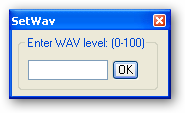
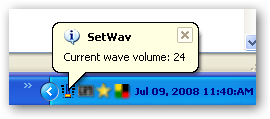
SetWav
• set system's WAV level on startup.
• output change in percentage (0-100).
• EXE only due to creation of link in the startup folder.

ws-SetWave.png

ws-SetWave1.png
« Last Edit: July 09, 2008, 03:56 AM by lanux128 »

Target

  • Honorary Member
  • Joined in 2006
  • **
  • Posts: 1,840
    • Coding Snacks
Re: windows volume control setting
« Reply #9 on: July 09, 2008, 02:35 AM »
AHK is your friend...

the following 2 lines set the master and WAV volumes to 50%

Code
soundset, 50
soundsetwavevolume, 50

you can change pretty much all the sound controls this way.  Code could be compiled and added to the startup directory

The AHK helpfile also includes a soundcard analysis script which may be of use/interest...
Alcohol is photoshop, bottled
Askhole - someone who ask for advice, then ignores it
"Look wise, say nothing, and grunt. Speech was given to conceal thought" - Sir William Osler

techidave

  • Supporting Member
  • Joined in 2007
  • **
  • Posts: 1,046
Re: windows volume control setting
« Reply #10 on: July 09, 2008, 02:57 AM »
Thanks Lanux for your "setwav" box, but can/could it be added to the startup folder?

Target, a coder I am not.  I have looked at the authotkey website several times but do not understand much of what they talk about.  So compiling code is out of the question for me.

lanux128

  • Global Moderator
  • Joined in 2005
  • *****
  • Posts: 6,277
    • Coding Snacks
    • Volunteers/Staff
    • Gathering Badge
    • Participated in NANY Challenge Once
    • Linux User
Re: windows volume control setting
« Reply #11 on: July 09, 2008, 03:27 AM »
Thanks Lanux for your "setwav" box, but can/could it be added to the startup folder?

actually, i meant to say that i'm working on it. ;) this is how it'll work: upon startup, the script will retrieve and set the WAVE volume from an INI file. if it doesn't find the INI file then it'll ask for the input then save the value for the following boot-ups. what do you think?

lanux128

  • Global Moderator
  • Joined in 2005
  • *****
  • Posts: 6,277
    • Coding Snacks
    • Volunteers/Staff
    • Gathering Badge
    • Participated in NANY Challenge Once
    • Linux User
Re: windows volume control setting
« Reply #12 on: July 09, 2008, 05:26 AM »
btw, here is the source for those interested..

Code
; Set wave volume upon startup
; Source: hxxp://www.donationcoder.com/forum/index.php?topic=13989.0
; Note: compile the script to get the startup link working
#SingleInstance, force
#NoEnv
SendMode, Input

appname=SetWav
ini_file=%appname%.ini
Gosub, Get_INI
If WavLevel <> 0
  {
  FileCreateShortcut, %A_WorkingDir%\%appname%.exe, %A_StartupCommon%\%appname%.lnk, %A_WorkingDir%
  GoSub SetWave
  }
Else
  {
  ;other tasks here..
  }
Return

SetWave:
  SoundSetWaveVolume, %WavLevel%
  TrayTip,%appname%,Current wave volume: %WavLevel%,,1 
  Sleep, 5000 
  GoSub GuiEscape ;exit
Return

Get_INI:
IfNotExist, %ini_file%
{
  GoSub, ShowGUI
}
Else
{
  IniRead,WavLevel,%ini_file%,Settings,WavLevel,100
  If WavLevel>100
    WavLevel=100
}
Return

ShowGUI:
Gui, +ToolWindow
Gui, Add, GroupBox, x6 y6 w140 h54, Enter WAV level: (0-100)`%
Gui, Add, Edit, x16 y30 w80 h20 vNewWavVol Limit3 Number, 
Gui, Add, Button, x100 y30 h20 Default, OK
Gui, Show, , %appname%
Return

GuiClose:
ButtonOK:
  Gui, Submit
  comments=
  comments=`;%A_Space%Ini settings for SetWav script.
  comments=%comments%`n`;%A_Space%
  comments=%comments%`n`;%A_Space%This file contains the configurable settings.
  comments=%comments%`n`;%A_Space%--------------------------------------
  comments=%comments%`n`;%A_Space%You may edit this file but not while the script is running.
  comments=%comments%`n`;
  FileAppend,%comments%,%ini_file%
  If NewWavVol>100
    NewWavVol=100
  IniWrite,%NewWavVol%,%ini_file%,Settings,WavLevel
  FileAppend,`n,%ini_file%  
Return

GuiEscape:
ExitApp

Target

  • Honorary Member
  • Joined in 2006
  • **
  • Posts: 1,840
    • Coding Snacks
Re: windows volume control setting
« Reply #13 on: July 09, 2008, 05:34 AM »
not to trump lanux here, his app sounds more a little more capable???

the attached zip file includes the setsound script and the aforementioned sound card analysis script both compiled and ready to go

Setsound_50.exe does what it says, sets the master and wave volumes at 50% then closes (50% was a nominal figure - if you want something else let us know).  Copy it to your startup folder and that should be it...

EDIT: updated the setsound script to toggle the mute status off (if it's already on...)
Alcohol is photoshop, bottled
Askhole - someone who ask for advice, then ignores it
"Look wise, say nothing, and grunt. Speech was given to conceal thought" - Sir William Osler
« Last Edit: July 10, 2008, 11:16 PM by Target »

techidave

  • Supporting Member
  • Joined in 2007
  • **
  • Posts: 1,046
Re: windows volume control setting
« Reply #14 on: July 09, 2008, 10:45 AM »
thank you  Lanux and Target for your apps!  I will give them a try.

Dave

techidave

  • Supporting Member
  • Joined in 2007
  • **
  • Posts: 1,046
Re: windows volume control setting
« Reply #15 on: July 19, 2008, 10:50 AM »
I did give these a try.  For some reason, probably user error, I couldn't get the setting to save.  So I tried Target's and it worked since that setting was already hard coded.

I went back and reread lanux's post and then placed a setting in the ini file and all is well.  I did like the idea that his automatically saved to the startup folder.

Other than that they are both capable programs..

thanks again and I will be awarding credits to both.

lanux128

  • Global Moderator
  • Joined in 2005
  • *****
  • Posts: 6,277
    • Coding Snacks
    • Volunteers/Staff
    • Gathering Badge
    • Participated in NANY Challenge Once
    • Linux User
Re: windows volume control setting
« Reply #16 on: July 20, 2008, 03:05 AM »
I did give these a try.  For some reason, probably user error, I couldn't get the setting to save.  So I tried Target's and it worked since that setting was already hard coded.

I went back and reread lanux's post and then placed a setting in the ini file and all is well.  I did like the idea that his automatically saved to the startup folder.

@techidave: thanks for the credit. but i'm curious about the error that you mentioned. does the program saves the value to the INI file or you manually had to edit?

techidave

  • Supporting Member
  • Joined in 2007
  • **
  • Posts: 1,046
Re: windows volume control setting
« Reply #17 on: July 20, 2008, 12:51 PM »
When I checked the ini file, there was no setting there. So I manually put 50 in, saved and then when I logged back in, the wav settng was at 50% when before that it was at 0.  Like I said, it was user error on my part.  When the box first came up asking for a value, I was thinking it already had a value in it so I left it blank. By the time I realized it didn't, then I couldn't get the box to come back up. It was on re-reading your post that I discovered it used an ini file for settings.

oh well...its another day here in Kansas with the high temps to be 101!  I hope the a/c don't fail. 

Target

  • Honorary Member
  • Joined in 2006
  • **
  • Posts: 1,840
    • Coding Snacks
Re: windows volume control setting
« Reply #18 on: July 21, 2008, 11:25 PM »
many thanks for the credits (really not necessary  :-[)

did you get the amended version (toggles mute status off)?

and I wondered if a lesser volume setting would be better (as 50% is potentially quite loud...)
Alcohol is photoshop, bottled
Askhole - someone who ask for advice, then ignores it
"Look wise, say nothing, and grunt. Speech was given to conceal thought" - Sir William Osler

Original address: https://www.donationcoder.com/forum/index.php?topic=13989.0