DonationCoder.com forum
 
Read-only archive. This is a static copy of the DonationCoder.com forum. Reading and searching work as before; logging in, posting and private messages do not.
Archive of 2026-10-21 · About this archive · Main site

Author Topic: Queueing downloads in firefox  (Read 19,334 times)

mediaguycouk

  • Supporting Member
  • Joined in 2007
  • **
  • Posts: 247
Queueing downloads in firefox
« on: July 06, 2008, 11:29 AM »
Wonder if any of you geniuses can help me.

I've been downloading a bunch of 100-200MB files off a server recently and I normally like to, because of the time involved, click on a bunch of downloads then go do something else.

What I have found though is that if I click on 10 files they will all download at an equal speed. Sometimes that means that when I leave for work in the morning I have 10 files at  90% complete and I have to cancel them all.

Is there an option or addon in firefox that could force downloading two files at a time, so that I am more likely to get complete files downloading slightly more slowly but with less chance of the download being in vain.

Thanks!
Learning C# - Graham Robinson

housetier

  • Charter Honorary Member
  • Joined in 2005
  • ***
  • Posts: 1,321
    • Gathering Badge
Re: Queueing downloads in firefox
« Reply #1 on: July 06, 2008, 12:47 PM »
Maybe one of these download manager addons for firefox can help. I haven't used any of them, so I won't recommend a particular one.

I am quite confident there is a queue-able extension among them :)

f0dder

  • [Well, THAT escalated quickly!]
  • Charter Honorary Member
  • Joined in 2005
  • ***
  • Posts: 9,153
    • Participated in NANY Challenge Once
Re: Queueing downloads in firefox
« Reply #2 on: July 06, 2008, 01:20 PM »
The built-in download engine in FireFox3 has had a number of improvements compared to FF2, namely that it's now able to resume downloads. I don't think you can do queing per se, but at least you can (manually :-\ ) pause some of your downloads right after adding...

Personally I use flashget, the "classic version", when I need to download large stuff (several-hundred megabytes) - does a pretty decent job. It doesn't do pre-allocation of files, though, so big downloads are usually horribly fragmented.
- carpe noctem

4wd

  • Pedantic Old Bastard
  • Supporting Member
  • Joined in 2006
  • **
  • Posts: 5,652
    • Coding Snacks
Re: Queueing downloads in firefox
« Reply #3 on: July 06, 2008, 01:58 PM »
The built-in download engine in FireFox3 has had a number of improvements compared to FF2, namely that it's now able to resume downloads.

You're not wrong - as I found out today.

I had a download running in FirefoxPortable 3.0 and I had to reboot.  When I started FF after the reboot, the download resumed and the file came through without any errors - an excellent enhancement IMO.

Also, there might possibly be a variable you can enter into about:config to make FF only download one at a time but you'd have to ask in the appropriate Mozilla forum.
"I will not follow where the path may lead, but I will go where there is no path, and I will leave a trail." - Muriel Strode, 1903
« Last Edit: July 06, 2008, 02:01 PM by 4wd »

rjbull

  • Charter Member
  • Joined in 2005
  • ***
  • Posts: 3,217
Re: Queueing downloads in firefox
« Reply #4 on: July 06, 2008, 09:13 PM »
Why not use Free Download Manager (FDM) or Internet Download Manager (IDM) or one of the other similar programs?  Both those two can queue downloads, and make them as fast as possible.  You can integrate them with Firefox, or not, as you choose.

lanux128

  • Global Moderator
  • Joined in 2005
  • *****
  • Posts: 6,277
    • Coding Snacks
    • Volunteers/Staff
    • Gathering Badge
    • Participated in NANY Challenge Once
    • Linux User
Re: Queueing downloads in firefox
« Reply #5 on: July 07, 2008, 01:56 AM »
for a Firefox user, between FlashGot and FDM, you'd have all the bases covered.

mediaguycouk

  • Supporting Member
  • Joined in 2007
  • **
  • Posts: 247
Re: Queueing downloads in firefox
« Reply #6 on: July 07, 2008, 10:44 AM »
https://addons.mozilla.org/en-US/firefox/addon/201

Download them all has proved to be brilliant. Out of the way when I don't want it and powerful when I do.
Learning C# - Graham Robinson

sri

  • Honorary Member
  • Joined in 2006
  • **
  • Posts: 689
Re: Queueing downloads in firefox
« Reply #7 on: July 07, 2008, 11:11 AM »
DownThemAll! is what you want.

kimmchii

  • Honorary Member
  • Joined in 2005
  • **
  • Posts: 360
Re: Queueing downloads in firefox
« Reply #8 on: July 11, 2008, 02:55 AM »
for a Firefox user, between FlashGot and FDM, you'd have all the bases covered.
thats what i use too.
If you find a good solution and become attached to it, the solution may become your next problem.
~Robert Anthony

steeladept

  • Fettucini alfredo is macaroni & cheese for adults
  • Supporting Member
  • Joined in 2006
  • **
  • Posts: 1,061
    • Linux User
    • Military Service Badge - US Air Force
Re: Queueing downloads in firefox
« Reply #9 on: July 16, 2008, 07:34 AM »
DownThemAll! is what you want.

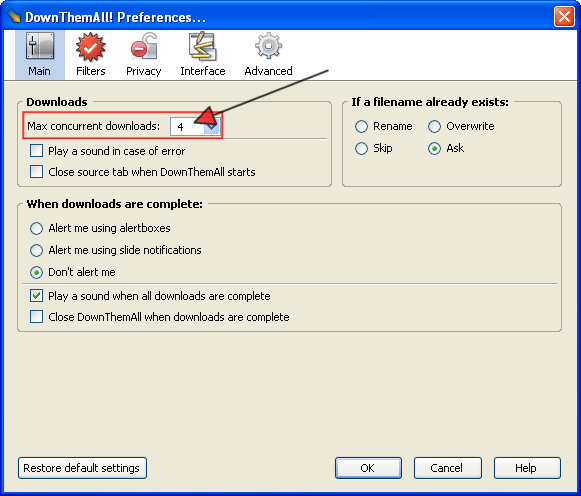
I too use DownThemAll!  I used to use GetRight, and I still love its feature set and interface, but DownThemAll! has all the same features (well they both have the ones I use is a better way of saying it) and is better integrated in Firefox.  Now a GetRight extention that embeds itself - hey, I should look into that  ;)

Anyway, the way I do what you are saying is by throttling the number of simultaneous downloads.  Both of these managers do this.  Unfortunately I am at work and can't show you GetRight, but in DTA, it is here (pic from their web site & edited w/ a nice little proggy called Screenshot Captor.  Anyone hear of it? :P):

[attach]
« Last Edit: July 16, 2008, 07:38 AM by steeladept »

Curt

  • Supporting Member
  • Joined in 2006
  • **
  • Posts: 7,565
Re: Queueing downloads in firefox
« Reply #10 on: July 16, 2008, 08:11 AM »
You didn't tell us which browser you are using!??

If you are using Firefox the answer is even more simple than all these wise fellow dudes have implied. InBasic is offering the Auto-Shutdown application for Firefox Built-in Download Manager. You click download as usual, and you click Auto-Shutdown, and then you just leave home or whatever you would wanna do. When the downloads are all finished, InBasic will gently close, auto-shutdown, both Firefox and the computer. Nice and very easy!

http://www.inbasic.co.nr/Home
Auto Shutdown Tool for Firefox Built-in Download Manager
https://addons.mozilla.org/da/firefox/addon/5452

mediaguycouk

  • Supporting Member
  • Joined in 2007
  • **
  • Posts: 247
Re: Queueing downloads in firefox
« Reply #11 on: July 16, 2008, 08:12 AM »
Title is 'queueing downloads in firefox' :p

I have a socket with all my computer bits on it and I turn off the power by the plug each day, but an interesting plugin nevertheless.
Learning C# - Graham Robinson

Original address: https://www.donationcoder.com/forum/index.php?topic=13967.0