thanks wep! the newer version works fine. 


 Topic: WinKey Enhancement Project (WEP) (Read 79,353 times)


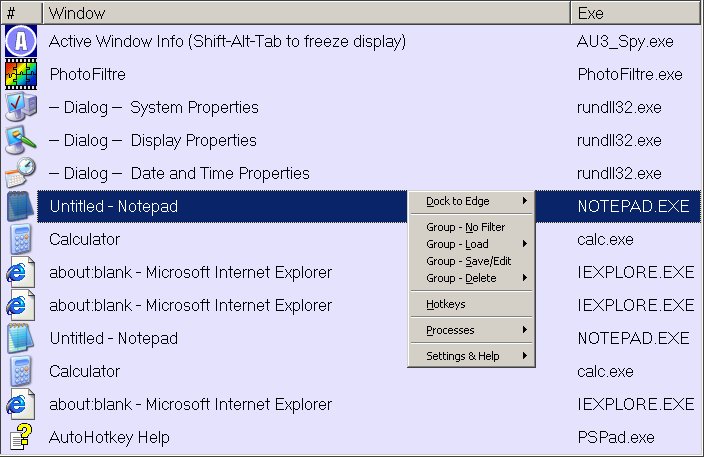
Try new MouseScroll! You can switch in the Alt+Tab menu to next or previous item only by <Win>+scroll wheel up or down.
If you release the <Win>-key, then selected item(window) will activated. To escape Alt+Tab menu just press down <Esc> while you holding <Win>.
Also one very useful preview feature I found, testing MouseScroll: if you press down <Alt> while <Win> is holds you can see (check) the selected item(window). It will be activated, but Alt+Tab menu do not hide. If selected item is not you want to switch to, you can continue to scroll mouse, selecting other items in the Alt+Tab menu and preview them by <Alt>.


i am too obsessed with hoekey

Hi Wep.
Could you increase the functionalbility of WinMouseTipCalc by adding the % function to the setup if at all possible
it's a great little program non intrusive but at your fingertips if you pardon the pun.
it's a great little program non intrusive but at your fingertips if you pardon the pun.

it's a great little program non intrusive but at your fingertips if you pardon the pun.
The calculations made by means of Win...Calc not precise. Because "In case it's of interest, AutoHotkey stores intermediate expression results as 64-bit floating point numbers (or integers if there's no decimal portion). However, when the final result is stored in a variable (or for use by a command), the default precision is 6 decimal places." as said Chris
on the (Autohotkey forum).
So, I must to inform you about this bug.
realize what you are saying as when you do a dollars and cents equation that happens.
I just need the % to quicken up GST calculations at present I have to go the long way around
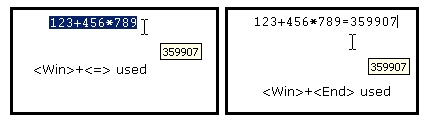
I do find that the (win + end) and (win + = ) in WinMouseTipCalc don't work as stated.
The rest of the commands do.

maybe you could perhaps allocate the page up key to be the % key so it becomes a single press key whilst holding down the Win-key
If you can have an option to reduce the 14.00000 (final calculation) to 14.00 that would be great. I really only need the numbers
re win/mousescroll-
just to report it doesnt work with Media Player Classic where the scrollwheel is used to adjust the volume
What problem you was found? Sound volume do not changes, or windows do not switches?sorry for not explaining properly!

But in the next releases I may reassign PageDown and PageUp to the "history of the calculations" function.
Last version of the WinMouseTipCalc have better precision of calculations.
I’m using WinMouseTipCalc almost everyday now and have a suggestion ---is it possible to make the windows key stay on , perhaps toggle off and on, so that you can free one hand (the one holding down the Win key) it would make reading figures from papers etc easier like turning pagesHi nogojoe
Something to think about for your next release
nogojoe
 I try to generally use Win+Smth. keys for system-global shortcuts as well. (Of course, some programs won't recognise them...)
 (with apologies for being smart!)
Original address: https://www.donationcoder.com/forum/index.php?topic=13896.0