DonationCoder.com forum
 
Read-only archive. This is a static copy of the DonationCoder.com forum. Reading and searching work as before; logging in, posting and private messages do not.
Archive of 2026-10-21 · About this archive · Main site

Author Topic: Apps won't open?  (Read 15,993 times)

CodeTRUCKER

  • Bush Flying... where I'd rather be.
  • Supporting Member
  • Joined in 2006
  • **
  • Posts: 1,086
    • Participated in NANY Challenge Once
    • Military Service Badge - US Navy
Apps won't open?
« on: June 24, 2008, 05:44 PM »
I have two apps that have just stopped opening on my HP Laptop 3GB RAM Vista 32 Home Premium...

Both are Java-based apps, I believe.  When I try to execute the apps the "busy" mouse shows for a second and then... nothing. 
No other programs seem to have this issue.  What can cause this?

FYI - XoftSpy and Avast! show no malware.  Also, no problem opening Open Office.

<edits>

DISCLAIMER - I have made and make many threads for questions and even project posts across the Internet. Unfortunately, many are in limbo because I cannot remember where they are at. If anyone knows of an open thread or an unanswered inquiry, please PM me. Thank you.
   
Notice: Unless stated otherwise, I receive no compensation for anything I post here.
« Last Edit: June 24, 2008, 05:47 PM by CodeTRUCKER »

Lashiec

  • Member
  • Joined in 2006
  • **
  • Posts: 2,374
Re: Apps won't open?
« Reply #1 on: June 24, 2008, 10:09 PM »
Problems with Java, maybe? Try to launch the programs from the commandline (if they're being executed from .JAR files), using "java -jar <filename>.jar", or reinstall the JRE.

CodeTRUCKER

  • Bush Flying... where I'd rather be.
  • Supporting Member
  • Joined in 2006
  • **
  • Posts: 1,086
    • Participated in NANY Challenge Once
    • Military Service Badge - US Navy
Re: Apps won't open?
« Reply #2 on: June 24, 2008, 10:28 PM »
Problems with Java, maybe? Try to launch the programs from the commandline (if they're being executed from .JAR files), using "java -jar <filename>.jar", or reinstall the JRE.

I've already installed the JRE, but will try the cmd line suggestion and get back.  A question in general is what is Windows actually doing when it is not opening an exec?
DISCLAIMER - I have made and make many threads for questions and even project posts across the Internet. Unfortunately, many are in limbo because I cannot remember where they are at. If anyone knows of an open thread or an unanswered inquiry, please PM me. Thank you.
   
Notice: Unless stated otherwise, I receive no compensation for anything I post here.

CodeTRUCKER

  • Bush Flying... where I'd rather be.
  • Supporting Member
  • Joined in 2006
  • **
  • Posts: 1,086
    • Participated in NANY Challenge Once
    • Military Service Badge - US Navy
Re: Apps won't open?
« Reply #3 on: June 24, 2008, 10:42 PM »
Looks like something was corrupted, but by what?

C:\Users\CJWVISTA>java -jar c:\progra~1\moneydance07\moneydance.jar
Exception in thread "main" java.lang.ExceptionInInitializerError
        at javax.swing.JPanel.updateUI(Unknown Source)
        at javax.swing.JPanel.<init>(Unknown Source)
        at javax.swing.JPanel.<init>(Unknown Source)
        at javax.swing.JPanel.<init>(Unknown Source)
        at javax.swing.JRootPane.createGlassPane(Unknown Source)
        at javax.swing.JRootPane.<init>(Unknown Source)
        at javax.swing.JFrame.createRootPane(Unknown Source)
        at javax.swing.JFrame.frameInit(Unknown Source)
        at javax.swing.JFrame.<init>(Unknown Source)
        at com.moneydance.apps.md.controller.Main.initializeApp(Main.java:278)
        at com.moneydance.apps.md.controller.Main.main(Main.java:189)
        at Moneydance.main(Moneydance.java:7)
Caused by: java.lang.IllegalArgumentException: -167772160 incompatible with Text
-specific LCD contrast key
        at java.awt.RenderingHints.put(Unknown Source)
        at sun.awt.windows.WDesktopProperties.getDesktopAAHints(Unknown Source)
        at sun.awt.windows.WToolkit.getDesktopAAHints(Unknown Source)
        at sun.awt.SunToolkit.getDesktopFontHints(Unknown Source)
        at sun.awt.windows.WDesktopProperties.setDesktopAAHints(Unknown Source)
        at sun.awt.windows.WToolkit.initializeDesktopProperties(Unknown Source)
        at java.awt.Toolkit.getDesktopProperty(Unknown Source)
        at javax.swing.UIManager.<clinit>(Unknown Source)
        ... 12 more

C:\Users\CJWVISTA>
DISCLAIMER - I have made and make many threads for questions and even project posts across the Internet. Unfortunately, many are in limbo because I cannot remember where they are at. If anyone knows of an open thread or an unanswered inquiry, please PM me. Thank you.
   
Notice: Unless stated otherwise, I receive no compensation for anything I post here.

cmpm

  • Charter Member
  • Joined in 2006
  • ***
  • Posts: 2,026
Re: Apps won't open?
« Reply #4 on: June 24, 2008, 10:56 PM »
Uninstall all Javas from add/remove.

Check the file downloaded programs in c:/Windows/DownoadedPrograms
Remove all Java entries.

Reinstall Java.

http://filehippo.com/download_java_runtime/

See if that helps.

PhilB66

  • Supporting Member
  • Joined in 2007
  • **
  • Posts: 1,522
Re: Apps won't open?
« Reply #5 on: June 24, 2008, 11:18 PM »
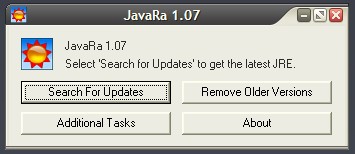
JavaRa anyone?

Quote
JavaRa is a small program that checks for updates of the Java JRE and removes old potentially vulnerable versions. Simply click "Check for Updates" or "Remove Older Versions" to start the process.

[attach]

jgpaiva

  • Artificial Idiocy
  • Global Moderator
  • Joined in 2006
  • *****
  • Posts: 4,727
    • Cody Award
    • Participated in NANY Challenge Once
    • Coding Snacks
    • Portugal Inhabitant
    • Linux User
Re: Apps won't open?
« Reply #6 on: June 24, 2008, 11:27 PM »
Interesting Phill! I'd never seen such thing.
Have you succesfuly solved any java-related problem with it? Does it really work?

CodeTRUCKER

  • Bush Flying... where I'd rather be.
  • Supporting Member
  • Joined in 2006
  • **
  • Posts: 1,086
    • Participated in NANY Challenge Once
    • Military Service Badge - US Navy
Re: Apps won't open?
« Reply #7 on: June 24, 2008, 11:33 PM »
Interesting Phill! I'd never seen such thing.
Have you succesfuly solved any java-related problem with it? Does it really work?

I can't answer for Phill, but since if I can't get my progs working, it's re-image time.  I'll let you know it turns out.

<Calvin takes deep breath, holds nose and jumps from the high-dive>
DISCLAIMER - I have made and make many threads for questions and even project posts across the Internet. Unfortunately, many are in limbo because I cannot remember where they are at. If anyone knows of an open thread or an unanswered inquiry, please PM me. Thank you.
   
Notice: Unless stated otherwise, I receive no compensation for anything I post here.

cranioscopical

  • Friend of the Site
  • Supporting Member
  • Joined in 2006
  • **
  • Posts: 4,776
    • Cody Award
    • Official Forum Clown
    • rotten turkey sandwich - Rotten Turkey Sandwich
Re: Apps won't open?
« Reply #8 on: June 24, 2008, 11:34 PM »
Interesting Phill! I'd never seen such thing.
Have you succesfuly solved any java-related problem with it? Does it really work?

FWIW: I have; yes, it does -- or, more accurately, it did for me.

Chris

CodeTRUCKER

  • Bush Flying... where I'd rather be.
  • Supporting Member
  • Joined in 2006
  • **
  • Posts: 1,086
    • Participated in NANY Challenge Once
    • Military Service Badge - US Navy
Re: Apps won't open?
« Reply #9 on: June 24, 2008, 11:34 PM »
JavaRa anyone?

Quote
JavaRa is a small program that checks for updates of the Java JRE and removes old potentially vulnerable versions. Simply click "Check for Updates" or "Remove Older Versions" to start the process.
(see attachment in previous post)
JavaRa is an excellent tiny tool, free and open-source.
Read me
Forums
Download

Thanks, Phill  :Thmbsup:
DISCLAIMER - I have made and make many threads for questions and even project posts across the Internet. Unfortunately, many are in limbo because I cannot remember where they are at. If anyone knows of an open thread or an unanswered inquiry, please PM me. Thank you.
   
Notice: Unless stated otherwise, I receive no compensation for anything I post here.

BigJim

  • I have seen the light!
  • Supporting Member
  • Joined in 2007
  • **
  • Posts: 178
Re: Apps won't open?
« Reply #10 on: June 24, 2008, 11:35 PM »
It has been working for me for several months on three machines. It seems to do the job as advertised and without problems. It also answered the question that I sent into the black hole of Java Support and never got a reply: Do I have to keep all those old/previous versions hanging around? Seems that you not only don't need them but it's a liability to have them hanging around ... and using up a not inconsiderable amount of disc space!
TruckerJim says "You can go down a hill too slow a thousand times. But too fast only once."

PhilB66

  • Supporting Member
  • Joined in 2007
  • **
  • Posts: 1,522
Re: Apps won't open?
« Reply #11 on: June 24, 2008, 11:39 PM »
My reply would be redundant (tnx. cranioscopical & BigJim) but I would add that it works like a charm and it's portable.

jgpaiva

  • Artificial Idiocy
  • Global Moderator
  • Joined in 2006
  • *****
  • Posts: 4,727
    • Cody Award
    • Participated in NANY Challenge Once
    • Coding Snacks
    • Portugal Inhabitant
    • Linux User
Re: Apps won't open?
« Reply #12 on: June 24, 2008, 11:40 PM »
;D Whoa, 3 affirmative answers in so little time, i guess that really must work :D

BigJim: Up until this point, jre is fully backwards compatible, thus, keeping olders versions isn't necessary. It might be in the future, though, if they decide to change something in the virtual machine. (which i'm very doubtful they'll ever do, since they've been avoiding it at all costs)

Grorgy

  • Supporting Member
  • Joined in 2007
  • **
  • Posts: 821
Re: Apps won't open?
« Reply #13 on: June 25, 2008, 12:14 AM »
I read somewhere, sorry i forget where, but the old JRE versions do pose a security risk even if not being used, I don't understand how or why this could be the case, but it prompts me to clean them up.

CodeTRUCKER

  • Bush Flying... where I'd rather be.
  • Supporting Member
  • Joined in 2006
  • **
  • Posts: 1,086
    • Participated in NANY Challenge Once
    • Military Service Badge - US Navy
Re: Apps won't open?
« Reply #14 on: June 25, 2008, 12:32 AM »
Phill and cmpm... no dice.  The JavaRa funcioned as expected, but my execs will still not open.  :(
DISCLAIMER - I have made and make many threads for questions and even project posts across the Internet. Unfortunately, many are in limbo because I cannot remember where they are at. If anyone knows of an open thread or an unanswered inquiry, please PM me. Thank you.
   
Notice: Unless stated otherwise, I receive no compensation for anything I post here.

cmpm

  • Charter Member
  • Joined in 2006
  • ***
  • Posts: 2,026
Re: Apps won't open?
« Reply #15 on: June 25, 2008, 12:51 AM »
hmmm...
Vista....Isuggest-
Post the prob on this site.
There are more resources as in knowledgeable people.

http://www.geekstogo.com/forum/Windows-Vista-f79.html&s=0649cdb21f2506026f9bef312c6e1087

PhilB66

  • Supporting Member
  • Joined in 2007
  • **
  • Posts: 1,522
Re: Apps won't open?
« Reply #16 on: June 25, 2008, 01:01 AM »
Maybe removing Universal Village & Money Dance and then reinstalling would fix this issue?

CodeTRUCKER

  • Bush Flying... where I'd rather be.
  • Supporting Member
  • Joined in 2006
  • **
  • Posts: 1,086
    • Participated in NANY Challenge Once
    • Military Service Badge - US Navy
Re: Apps won't open?
« Reply #17 on: June 25, 2008, 01:08 AM »
I am getting more odd behavior...

Tried to uninstall Moneydance and UVC.  Moneydance will NOT uninstall, even from Vista Add/Remove.  It exhibits the same behavior as executing the prog... the mouse goes busy for a second and nothing.  As far as UV, when attempting to remove the shorcut icon from the Desktop, Vista tells me that it doesn't exist.  Not that the program doesn't exist, but the shortcut doesn't exist, eventhough I am sitting here looking at it.  Weird.

cmpm - thanks for the link.
DISCLAIMER - I have made and make many threads for questions and even project posts across the Internet. Unfortunately, many are in limbo because I cannot remember where they are at. If anyone knows of an open thread or an unanswered inquiry, please PM me. Thank you.
   
Notice: Unless stated otherwise, I receive no compensation for anything I post here.

CodeTRUCKER

  • Bush Flying... where I'd rather be.
  • Supporting Member
  • Joined in 2006
  • **
  • Posts: 1,086
    • Participated in NANY Challenge Once
    • Military Service Badge - US Navy
Re: Apps won't open?
« Reply #18 on: June 25, 2008, 05:21 PM »
Thanks to all for the help.   :Thmbsup:

As additional issues kept presenting themselves it became apparent that the shortest route was to cut my losses and start over.  I have re-imaged my drive and am back in business.  I will be watching very closely as I duplicate the actions of the last couple of days.  If anything of note is discovered,  I will report back.

A very nice day to all!
DISCLAIMER - I have made and make many threads for questions and even project posts across the Internet. Unfortunately, many are in limbo because I cannot remember where they are at. If anyone knows of an open thread or an unanswered inquiry, please PM me. Thank you.
   
Notice: Unless stated otherwise, I receive no compensation for anything I post here.

Original address: https://www.donationcoder.com/forum/index.php?topic=13811.0