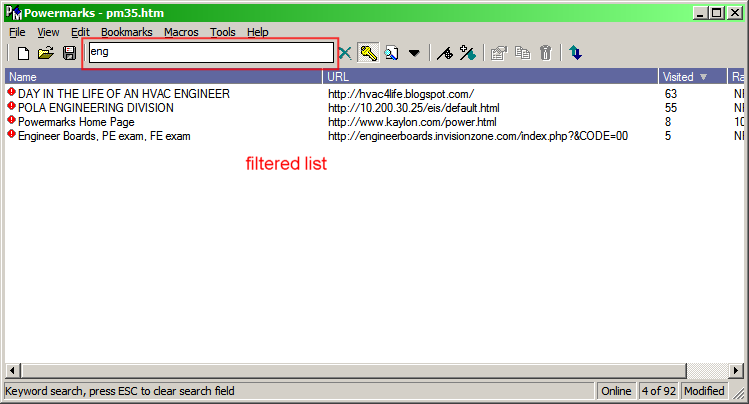
I noticed some people have figured out how to transfer their Powermarks bookmarks into Firefox 3 converting the keywords into tags. Can anyone share the procedure for doing this?

Superboyac, I'm am also a long time user of Powermarks and ever since switching to Firefox 3, I have been looking for a way to overcome what we long time users of Powermarks are facing.
I've look long and hard and I thought I had found a solution with combination of TagSifter and HandyTag
TagSifter
"Firefox 3 lets you tag your bookmarks, but it doesn't give you a great way to browse your bookmarks by their tags. TagSifter tries to. Select a group of tags in the sidebar or menu, and TagSifter shows you all the related tags and bookmarks. Or search your bookmarks with set operators, like "tag1 - (tag2 + !tag3)". Comes with a tool to help tag your existing bookmarks as you move to Firefox 3."
https://addons.mozilla.org/en-US/firefox/search?q=tagsifter&cat=all
Handytag
Search Add-ons :: Firefox Add-ons
"HandyTag simply providing a complete set of most relevant keywords in the bookmark's edition panel. These keywords are retrieved from many different sources."
https://addons.mozilla.org/en-US/firefox/search?q=handytag&cat=all
BUT, I keep thinking that a lot of the convenience I was experiencing with Powermarks was still missing.
Besides, I have not figured out how to backup all these Tags I'm entering into Firefox.
But guess what, I think I have hit upon a solution - with just a couple of small steps missing.
This is what I'm doing :
You will need to have a few things to accomplish this.
1. Powermarks
2. Firefox 3
3. Turnon Global HotKeys - enable you to hit the hot key to bring Powermarks to the foreground
Make sure you assign an unused key combination to "Add Bookmark from Clipboard" such as Alt+Shift+P
Chapter 8 - Powermarks User Guide
" 8.1.7 Hotkeys
Switch to Powermarks
Display the Powermarks window
Add Bookmark to Browser
Add the current browser URL to the Powermarks bookmark list and allow for editing.
Fast Add Bookmark from Browser
Adds the URL currently in the Browser to the Powermarks bookmark list.
Add Bookmark from Clipboard
Searches the clipboard for a URL and adds it the Powermarks bookmark list. Powermarks will attempt to contact the site and retrieve the name, keywords and description of the new bookmark. "
http://www.kaylon.com/help/chapter_8.htm#SystemTray
4. Chapter 8 - Powermarks User Guide
"8.1.12 Browsers"
http://www.kaylon.com/help/chapter_8.htm#browsers
If you look at your actual Option Screen in your Powermarks program, you will see an additional line item - Firefox which is not shown in the online Powermarks User Guide.
Make sure you tell Powermarks where to find Firefox 3.
Your are almost all set for a test run now.
5. Using Firefox, do you usual surfing on the web.
Let's say you are at
https://addons.mozilla.org/en-US/firefox/search?q=handytag&cat=all
And you want this url plus whatever keywords to be captured in Powermarks.
(Note: Do make sure Powermarks is loaded and it could also be minimized in the backgroud)
a. Press Crtl+L - this highlights the URL bar in Firefox 3 (Note that Alt+D also works in same way)
b. Press Crtl+C - this places https://addons.mozilla.org/en-US/firefox/search?q=handytag&cat=all into the clipboard.
c. Press Shift+Alt+P - this executes "Add Bookmark from Clipboard" which you configured in Step 3 above such as Alt+Shift+P
Step 5c tells Powermarks to store retrieve https://addons.mozilla.org/en-US/firefox/search?q=handytag&cat=all into the database together with the associated keywords.
And all this time, Powermarks remain in the background until you invoke it with say Crtl+Alt+P Hotkey you assigned (See 8.1.7 Hotkeys in Chapter 8 - Powermarks User Guide)
Presto - you are done - back in business with Powermarks. Clicking on a url in Powermarks would launch the url in a new tab (if you set the options correctly) in Firefox (if it had been set as the default browser.)
Now of course Steps 5.a, 5.b and 5.c can all be combined as a single command if someone can write a Autohotkey script and compile it into and exe and attach it to a Button on Firefox - This part I have not figured out as yet - but it certainly can be done. Once the script has been written and compiled, it could possibly be launched by
"Launch External Windows Applications Directly From Firefox
http://www.inspiredgeek.com/2008/01/28/launch-external-windows-applications-directly-from-firefox/
But take note that "Launch External Windows Applications Directly From Firefox" does not seem to operate properly with Firefox 3. [See How to add a Button (to execute a AutoHotkey script or an exe) to Firefox 3 - DonationCoder.com
"I would like to execute a particular command from within Firefox 3.
This could be calling a AutoHotkey script or the same script compiled into a DoThis.exe"]
http://www.donationcoder.com/forum/index.php?topic=14850.0
Perhaps someone with Greasemonkey script (if that is the thing to use) could figure this out.
Take note that "Alt+Ins Add URL from clipboard" does not quite work - It would have completed the picture for people like us.
Chapter 10 - Powermarks User Guide
"Alt+Ins Add URL from clipboard"
http://www.kaylon.com/help/chapter_10.htm#ShortcutKeys
Do tell me what do you think - no more worries that Firefox 4, 5, or 6 would break it !!!
Yes no doubt it is not as convenient right now, but it works !!!
Anyone would like to craft a Autohotkey script for us poor Powermarkers and figure out how to use "Launch External Windows Applications Directly From Firefox"
I mentioned a while back that the ""Launch External Windows Applications Directly From Firefox" does not seem to operate properly with Firefox 3."
Well, I just discovered that the Firefox Add-On extension IE Tab has an option that allows you to launch an External Application.
It works when you Crtl+Click the IE Tab BUTTON.
This could be used to launch a compiled Autohotkey script such as the one written by Twinkler.
So this could be THE solution for the clickable button solution that I was looking for.
When I can find sometime to work this out, I'll post again.
But of course whoever wants to beat me to this is most welcomed.
I suspect there may be other Add-ons that has a hidden option to launch an external program that we are not aware of.
That it happened to be part of the IE Tab Add-on is just a conincidence.


Advanced URL Catalog as a Bookmark Manager allows you to do:
* Advanced URL Catalog will help you store, organize, annotate, delete and check your favorite Internet pages. You can do all kinds of operations to the database.
* It's compatible with all browsers. You can import / export urls to / from Internet Explorer, Opera, Netscape, Mozilla, FireFox, NetCaptor, Avant Browser, MyIE2, iRider, CSV Files, HTML files and all kinds of text files.
* The bookmark data files is encrypted and compressed so you can protect your information.
* Advanced URL Catalog can handle huge urls over 1.000.000.
* Advanced URL Catalog creates thumbnail images of your favorite websites.
* Have convenient modification and updating functions for the Urls and catalogs. Support the drag-and-drop to organize the bookmarks.
* You can protect your bookmarks with a password.
* Advanced drag-and-drop function allows the moving the bookmarks from a category to another and moving a category to another, also opens the databases with drag-and-drop operations..
* Search the needed bookmarks and deleting, modifying, copying the listed bookmarks directly from the search result.
* Allow the bookmarks to be arranged easier and quicker on categories.
* You can grab urls from all active sessions of Internet Explorer, Opera, Netscape, Mozilla, FireFox, NetCaptor, Avant Browser, MyIE2, iRider browsers.
* You can select with what browser you want to open the bookmarks.
* Drop Basket for faster browsing and URL addition.
* You can check the urls for validation and automatically update Title and Description of urls from meta tag.
* You can automatically delete all the urls that are no more valid and remove all duplicate urls.
* You can store user names / passwords (login information) and comments for every url.
* User defined rating system and comments..
* System-wide hotkeys for easy use, even when working with another application
* Is simple to use and will make your browsing really efficient and much more enjoyable.
The Good
* Straightforward and fairly easy to use.
* Can import bookmarks from Internet Explorer, Firefox, Opera, Chrome, HTML file, and Del.icio.us.
* Can export bookmarks to Internet Explorer, Firefox, Opera, Chrome, HTML file, Del.icio.us.
* Can grab URLs, and add them, from all active browsers.
* Allows you to create multiple different databases/profiles.
* Has a built in search tool.
* Can check for, and remove, dead links and duplicates.
* Allows user to add website login information (if applicable), and comments for each bookmark.
* Can “auto check” for bookmark validity on a scheduled basis.
The Bad
* Grabbing URLs does not work with Opera (v10.00).
* Sometimes has trouble detecting when Firefox tabs are no longer open (when grabbing URLs).
* Fairly RAM intensive.
* Has a built in web browser but the browser does not have any sort of direct link (for adding bookmarks) to the bookmark portion of the program so what is the point of the browser?
* Lacking any sort of password protection feature.
* Can’t find some features the developer claims to have included such as “creates thumbnail images of your favorite websites” or the “drop basket”.
* No Help file (local or remote).
Free Alternatives
Linkman Lite
Xmarks
URL Gather
For final verdict, recommendations, and full review please click here.


Finally tried PowerMarks and have to admit that first impression is very good. I've tried a few bookmark managers before, but as you've already said there's something so simple yet powerful about PowerMarks. It just works... By far the best initial impression I've had from any of the bookmark managers I've tried.Yes, it's true. Powermarks is one of the best little programs I've ever come across. I'm using Linkman right now, but there are two small features that are still lacking:
And since I'm using Opera and google chrome, PowerMarks works just fine


And since I'm using Opera and google chrome, PowerMarks works just fine
Yes, it's true. Powermarks is one of the best little programs I've ever come across. I'm using Linkman right now, but there are two small features that are still lacking:
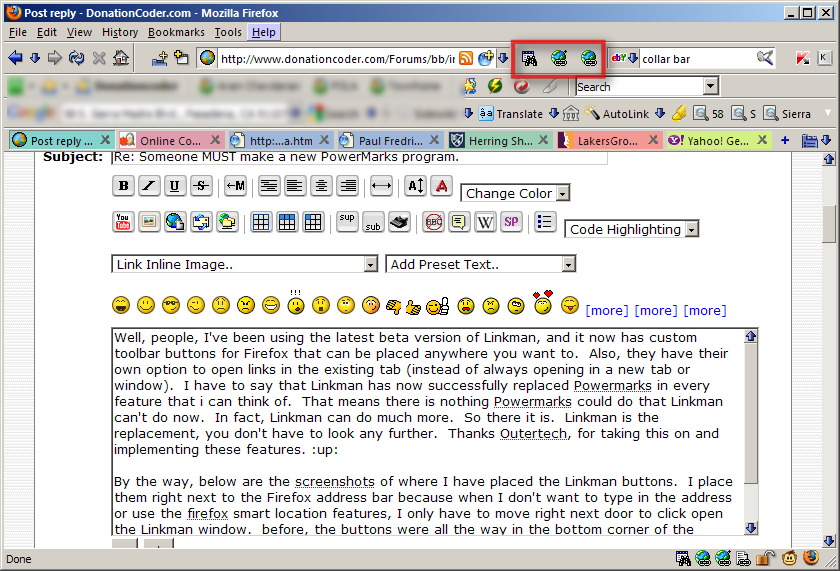
--being able to place the toolbar buttons on the upper toolbar of Firefox.
--Opening the bookmark in the existing tab of Firefox. This was good because I could repeatedly use Powermarks without opening a new tab everytime I used it, and cluttering up my bar. Powermarks had an option to open in the same tab or a new tab. I really wish Linkman would add this also.
Yes, it's true. Powermarks is one of the best little programs I've ever come across. I'm using Linkman right now, but there are two small features that are still lacking:
--being able to place the toolbar buttons on the upper toolbar of Firefox.
This will be possible in the next version (currently in Beta Test).
Is it possible to get in on the beta testing of the next version of Linkman?
Thanks Outertech, I appreciate the continued development of Linkman. Regarding the opening in tabs issues, why is it that Roboform can do it, but Linkman cannot? I'm not trying to be an ass about it, I'm just wondering why other programs can do it. Yes, you are correct, even PM stopped being able to do it in later versions of Firefox, but then again, development stopped on PM long before that.
It's simple enough to do yourself - everything I launch from Linkman opens in a new tab. Install the TabMix Plus extension and configure tab openings for all possible launches from links, other applications, etc.Thanks, I had no idea about that, and I've been using Tab Mix Plus for a long time!
Jim


I wanted to thank all DonationCoder users which have participated in the Linkman 7.90 beta test.

Original address: https://www.donationcoder.com/forum/index.php?topic=13754.0