DonationCoder.com forum
 
Read-only archive. This is a static copy of the DonationCoder.com forum. Reading and searching work as before; logging in, posting and private messages do not.
Archive of 2026-10-21 · About this archive · Main site

Author Topic: File browsing  (Read 9,997 times)

herojoker

  • Participant
  • Joined in 2008
  • *
  • Posts: 124
File browsing
« on: June 14, 2008, 05:00 PM »
When browsing on my hard disk I always see the current folder as the first entry in the result list. Furthermore it's written in lower capital letters, even if the original name has upper capital letters (all the other entries are capitalized correctly).
In my opinion there should be an option to remove the first entry. But on the other hand you could also add a ".." entry (for the sake of completeness, which will navigate one level up).

When pressing "left" in file browsing mode while the focus is in the list, the level above is shown but the focus is completely away! Neither in the result list nor in the input field.

nitrix-ud

  • Charter Member
  • Joined in 2005
  • ***
  • Posts: 560
Re: File browsing
« Reply #1 on: June 14, 2008, 06:20 PM »
Quote
When browsing on my hard disk I always see the current folder as the first entry in the result list. Furthermore it's written in lower capital letters, even if the original name has upper capital letters (all the other entries are capitalized correctly).
In my opinion there should be an option to remove the first entry. But on the other hand you could also add a ".." entry (for the sake of completeness, which will navigate one level up).
+1


Quote
When pressing "left" in file browsing mode while the focus is in the list, the level above is shown but the focus is completely away! Neither in the result list nor in the input field.
true, i also reported that for historys command

s.newave

  • Supporting Member
  • Joined in 2006
  • **
  • Posts: 124
    • Plugin Coding Medal
Re: File browsing
« Reply #2 on: June 14, 2008, 11:35 PM »
When browsing on my hard disk I always see the current folder as the first entry in the result list. Furthermore it's written in lower capital letters, even if the original name has upper capital letters (all the other entries are capitalized correctly).
In my opinion there should be an option to remove the first entry. But on the other hand you could also add a ".." entry (for the sake of completeness, which will navigate one level up).
+1. Definitely think this should be an option.

Quote
When pressing "left" in file browsing mode while the focus is in the list, the level above is shown but the focus is completely away! Neither in the result list nor in the input field.
Also noticed this. I think once you are in the results list the left/right arrows should navigate forwards/backwards through the directories whilst maintaining keyboard focus on the list perhaps focusing on the first entry in the list until you hit enter to trigger a result or esc to return to search box or tab to enter path into search box.

mouser

  • First Author
  • Administrator
  • Joined in 2005
  • *****
  • Posts: 40,931
    • Gathering Badge
    • Plugin Coding Medal
    • Participated in NANY Challenge Seventeen Times
    • Cody Award
    • Coding Snacks
    • Volunteers/Staff
Re: File browsing
« Reply #3 on: June 14, 2008, 11:41 PM »

s.newave

  • Supporting Member
  • Joined in 2006
  • **
  • Posts: 124
    • Plugin Coding Medal
Re: File browsing
« Reply #4 on: June 15, 2008, 12:16 AM »
Hmm, i was actually hoping that the focus would remain in the list after hitting left/right instead of jumping back up to the search box. I think it works better that way imo. You can already navigate fwd/backwards using alt left/right while maintaining focus in the search box.

herojoker

  • Participant
  • Joined in 2008
  • *
  • Posts: 124
Re: File browsing
« Reply #5 on: June 15, 2008, 12:20 AM »
I think so too.

d4ni

  • Supporting Member
  • Joined in 2008
  • **
  • Posts: 129
Re: File browsing
« Reply #6 on: June 15, 2008, 12:57 AM »
Yes I guess s.newave has a very good point - focus is already kept when using alt + left/right. Once you are using the arrow keys (without alt) to navigate, to me it seems clear you do not _want_ to type in any filterstrings, therefore focus should be kept in the list, not in the editbox. Other than that, it's great that you keep fixing these newly discovered issues mouser!

nitrix-ud

  • Charter Member
  • Joined in 2005
  • ***
  • Posts: 560
Re: File browsing
« Reply #7 on: June 15, 2008, 09:38 AM »
my prefered behavior would be :
left arrow goes back to search box and that's it, no deletion of last keyword/folder

so idealy maybe mouser can make it an option

already suggested :
i think some very special options, power-users oriented
could be changed in FindAndRunRobot.ini
that would be sufficient for me, no need to be in the gui
or that could be done through a "registry like table" within the options
where mouser could put other settings
there is such a table in directory opus options (once again pretty amazing options gui)

herojoker

  • Participant
  • Joined in 2008
  • *
  • Posts: 124
Re: File browsing
« Reply #8 on: June 15, 2008, 07:07 PM »
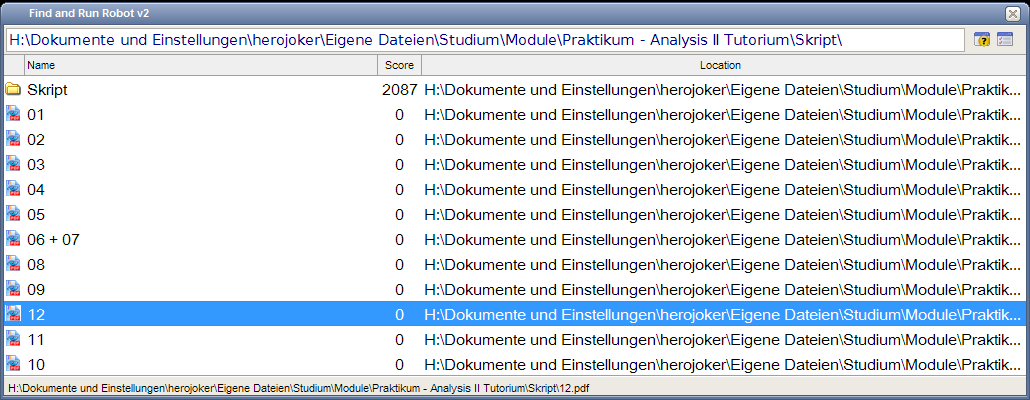
I noticed another weird behaviour: It seems that the sorting is not correct, see screenshot!
It should be 01,...,09,10,11,12 instead of 01,...,09,12,11,10.

Original address: https://www.donationcoder.com/forum/index.php?topic=13681.0