DonationCoder.com forum
 
Read-only archive. This is a static copy of the DonationCoder.com forum. Reading and searching work as before; logging in, posting and private messages do not.
Archive of 2026-10-21 · About this archive · Main site

Author Topic: MakeUsOf Blog Entry: Cool Tips to Put your Mouse Scroll Button to Work  (Read 29,418 times)

mouser

  • First Author
  • Administrator
  • Joined in 2005
  • *****
  • Posts: 40,931
    • Gathering Badge
    • Plugin Coding Medal
    • Participated in NANY Challenge Seventeen Times
    • Cody Award
    • Coding Snacks
    • Volunteers/Staff
Personally I hate the feel of pushing the mouse scroll wheel "button" -- to me it just seems wrong that this is a button, and i refuse to use it as such.  But I recognize some of you might not be quite so obstinate..

Quote
Anyone who is spending a considerable amount of time on the web will probably agree that mastering keyboard shortcuts can make a person a lot more productive. The same can be said about the mouse. The more you master it the better it gets. So here are some cool tools and tips to add to your mouse scroll button.


http://www.makeuseof.com/tag/cool-tips-to-put-your-mouse-scroll-button-to-work/


Screenshot - 6_1_2008 , 2_02_23 PM_thumb.png

Deozaan

  • Charter Member
  • Joined in 2006
  • ***
  • Posts: 9,827
    • Participated in NANY Challenge Eight Times
    • Cody Award
Personally I hate the feel of pushing the mouse scroll wheel "button" -- to me it just seems wrong that this is a button, and i refuse to use it as such.  But I recognize some of you might not be quite so obstinate..

I feel the same way! I hate clicking the wheel button!

So imagine my displeasure when I started messing around with a 3D editor that predominately used the wheel button for manipulating the viewpoint. :-(

lanux128

  • Global Moderator
  • Joined in 2005
  • *****
  • Posts: 6,277
    • Coding Snacks
    • Volunteers/Staff
    • Gathering Badge
    • Participated in NANY Challenge Once
    • Linux User
hehe.. i didn't know there are people even bothered by the mouse-wheel scroll button thingy.. ;)

P.S. i use it to autoscroll in Firefox.

sri

  • Honorary Member
  • Joined in 2006
  • **
  • Posts: 689
Yes, it feels wrong to 'push' the mouse scroll wheel for me too.

yotta

  • Supporting Member
  • Joined in 2008
  • **
  • Posts: 50
it does feel wrong, but it is SO useful, i use it mainly for open-in-a-new-tab in firefox, but have also found other uses for it.

mouser

  • First Author
  • Administrator
  • Joined in 2005
  • *****
  • Posts: 40,931
    • Gathering Badge
    • Plugin Coding Medal
    • Participated in NANY Challenge Seventeen Times
    • Cody Award
    • Coding Snacks
    • Volunteers/Staff
they should put more buttons on the other side of the mouse.

cmpm

  • Charter Member
  • Joined in 2006
  • ***
  • Posts: 2,026
I use Tab Wheel Scroll.
It only works with the mouse in the tab area.
Otherwise it's disabled as I had it, and still have it disabled.

It works much like TaskSwitchXP Pro, except it works with web pages that are up.

So I kind of like it if I have a lot of tabs up, just to scroll through them and see what I'm doing. :)

CWuestefeld

  • Supporting Member
  • Joined in 2006
  • **
  • Posts: 1,009
    • Participated in NANY Challenge Once
they should put more buttons on the other side of the mouse.
You mean, buttons on the side where that little red light comes from?


Curt

  • Supporting Member
  • Joined in 2006
  • **
  • Posts: 7,565
I like to click the wheel  and auto-scroll   in my Internet browsers.

[attachimg=#]

Curt

  • Supporting Member
  • Joined in 2006
  • **
  • Posts: 7,565
they should put more buttons on the other side of the mouse.

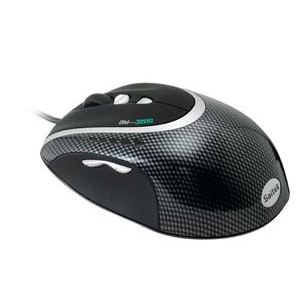
I want to try such a thing, like this $60 one, but the prices in Denmark are double up...

Saitek GM3200 Laser Mouse | USB 2.0 | 6 Programmable Buttons:
[attachimg=#]

Shades

  • Member
  • Joined in 2006
  • **
  • Posts: 2,954
Personally, my Logitech MX500 has more or less the same amount of buttons than the Saitek mouse.

Let's just say that I like the mouse. But not becuase of the buttons  ;D
The easy path is usually downhill...

sri

  • Honorary Member
  • Joined in 2006
  • **
  • Posts: 689
it does feel wrong, but it is SO useful, i use it mainly for open-in-a-new-tab in firefox, but have also found other uses for it.

In my opinion, Ctrl+click for the same purpose is more intuitive.

Deozaan

  • Charter Member
  • Joined in 2006
  • ***
  • Posts: 9,827
    • Participated in NANY Challenge Eight Times
    • Cody Award
it does feel wrong, but it is SO useful, i use it mainly for open-in-a-new-tab in firefox, but have also found other uses for it.

In my opinion, Ctrl+click for the same purpose is more intuitive.

Or using mouse gestures, just right click and drag up to open a blank tab, or perform the rightclick on a link and drag up to open it in a new tab. Now that's easy!

J-Mac

  • Supporting Member
  • Joined in 2007
  • **
  • Posts: 2,918
Logitech MX Revolution Mouse.  Great!  I now have three!  Way too many buttons and TWO scroll wheels!  (Second scroll whell IS pretty worthless.)

Only problem is that to do much with this mouse you must install Logitech's Setpoint software - with which they actually LIMIT some of the mouse's best capabilities.  Idiots!

However there is a guy who has created a wonderful add-on called "UberOptions" that installs over Setpoint and let's you customize this mouse - along with most other Logitech items that use Setpoint - to the point of pure joy.

Jim
"I am getting so tired of slitting the throats of people who say that I am a violent psychopath."

Curt

  • Supporting Member
  • Joined in 2006
  • **
  • Posts: 7,565
- the überOptions' changelog is quite impressive  :up:

http://www.mstar.net/users/rlowens/?n=Main.ChangeLog

4wd

  • Pedantic Old Bastard
  • Supporting Member
  • Joined in 2006
  • **
  • Posts: 5,652
    • Coding Snacks
Let me just say that I wouldn't be alive today without that scroll wheel button....

Honestly, it's so much easier/faster to go prone in Joint Ops rather than having to find a key on the keyboard  :P
"I will not follow where the path may lead, but I will go where there is no path, and I will leave a trail." - Muriel Strode, 1903

Original address: https://www.donationcoder.com/forum/index.php?topic=13516.0