DonationCoder.com forum
 
Read-only archive. This is a static copy of the DonationCoder.com forum. Reading and searching work as before; logging in, posting and private messages do not.
Archive of 2026-10-21 · About this archive · Main site

Author Topic: Please, do me a disservice...  (Read 12,285 times)

Shades

  • Member
  • Joined in 2006
  • **
  • Posts: 2,954
Please, do me a disservice...
« on: May 24, 2008, 06:59 PM »
In Windows it is possible to install/register your own service that in turn are added to the (already extensive) list of Windows services
(something like: blahblahserver /install,  NET START blahblahserver).

Reversing these steps also lets you unregister/uninstall services (something like: NET STOP blahblahserver, blahblahserver /uninstall)

Normally I use batch script for both steps.

Over time the batch scripts do their work without reporting an error. Taking a look with Sysinternal's Process Explorer also shows that the services are available when they need to be an not. But when I take a look at the Windows service list, the service(s) are still there. 

My question is this: does anybody here know some software to remove those 'orphan' services from the Windows service list?
The easy path is usually downhill...

Grorgy

  • Supporting Member
  • Joined in 2007
  • **
  • Posts: 821
Re: Please, do me a disservice...
« Reply #1 on: May 24, 2008, 08:40 PM »
I got rid of one doing
Start, Run and type cmd and hit ok.
then type:
sc delete "<service name>"

And its gone on my xp home system.  I'd already disabled it.

Shades

  • Member
  • Joined in 2006
  • **
  • Posts: 2,954
Re: Please, do me a disservice...
« Reply #2 on: May 24, 2008, 09:06 PM »
Unfortunately the sc command I tried already, it's error says:
"The specified service does not exist as an installed service."

I should have told that my system runs on Windows XP Professional (SP1).

Removing them manually with regedit does not work either.  :(
The easy path is usually downhill...
« Last Edit: May 24, 2008, 09:27 PM by Shades »

Carol Haynes

  • Waffles for England (patent pending)
  • Global Moderator
  • Joined in 2005
  • *****
  • Posts: 8,073
    • Cody Award
    • Furry Fandom Badge - Furry Fandom
Re: Please, do me a disservice...
« Reply #3 on: May 24, 2008, 11:52 PM »
Just do

SC STOP servicename
SC DELETE servicename

you don't need the uninstall step

Shades

  • Member
  • Joined in 2006
  • **
  • Posts: 2,954
Re: Please, do me a disservice...
« Reply #4 on: May 25, 2008, 03:49 AM »
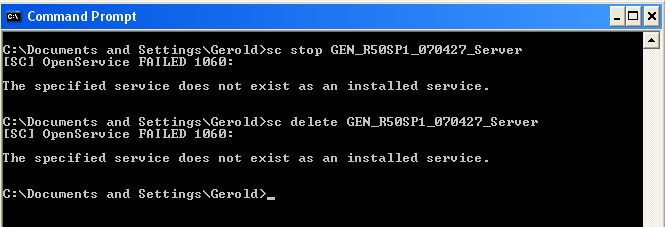
Sorry Carol, that doesn't do the trick either. However, it now showed a reference code so I'll guess Googling will do me some good.

[attach]
The easy path is usually downhill...

PhilB66

  • Supporting Member
  • Joined in 2007
  • **
  • Posts: 1,522
Re: Please, do me a disservice...
« Reply #5 on: May 25, 2008, 04:22 AM »
Look @ HKLM\SYSTEM\CurrentControlSet\Services is the service listed there?

Shades

  • Member
  • Joined in 2006
  • **
  • Posts: 2,954
Re: Please, do me a disservice...
« Reply #6 on: May 25, 2008, 05:28 AM »
The service is located in the following locations:
HKLM\SYSTEM\ControlSet002\Services
HKLM\SYSTEM\ControlSet003\Enum\Root\LEGACY_(blahblahservice)
HKLM\SYSTEM\ControlSet003\Services
HKLM\SYSTEM\ControlSet004\Enum\Root\LEGACY_(blahblahservice)
HKLM\SYSTEM\ControlSet004\Services
HKLM\SYSTEM\CurrentControlSet\Enum\Root\LEGACY_(blahblahservice)
HKLM\SYSTEM\CurrentControlSet\Services

Even after granting myself the correct permissions to remove every registry entry from the list above...the "orphans" do not want to leave my "castle".  Even mr. Restart cannot drive them away :(
The easy path is usually downhill...

PhilB66

  • Supporting Member
  • Joined in 2007
  • **
  • Posts: 1,522
Re: Please, do me a disservice...
« Reply #7 on: May 25, 2008, 05:39 AM »
How about removing the driver from system32 folder and then deleting the registry keys?

iphigenie

  • curiosity FTW!
  • Supporting Member
  • Joined in 2006
  • **
  • Posts: 1,170
Re: Please, do me a disservice...
« Reply #8 on: May 25, 2008, 08:58 AM »
I have often been unable to remove #_LEGACY keys when I tried, so it might need the right registry editor or to be done while booted off a CD.

I usually have given up and just made sure they were disabled but left them in, so I would be curious as to what the solution is

Carol Haynes

  • Waffles for England (patent pending)
  • Global Moderator
  • Joined in 2005
  • *****
  • Posts: 8,073
    • Cody Award
    • Furry Fandom Badge - Furry Fandom
Re: Please, do me a disservice...
« Reply #9 on: May 25, 2008, 02:42 PM »
If it won't delete try setting the permissions on the key in RegEdit to give you full access.

Shades

  • Member
  • Joined in 2006
  • **
  • Posts: 2,954
Re: Please, do me a disservice...
« Reply #10 on: May 25, 2008, 09:48 PM »
Thanks Carol, but that was tried as well...I'm really on the brink of joining iphigenie and handing in the towel on this one :(
The easy path is usually downhill...

Shades

  • Member
  • Joined in 2006
  • **
  • Posts: 2,954
Re: Please, do me a disservice...
« Reply #11 on: May 27, 2008, 12:25 AM »
Ha!


Good news (for me that is)...doing the manual deleting from registry does work when logged in with the default Administrator account and the help of mr. Restart.

First I tried with a user account that had administrator rights assigned, but it seems there is still a (small) difference between those types of users.

Kinda silly from me to not to try this before, but I was under the impression that with Administrator rights assigned there are no differences.

Ah well, live and learn...

Many thanks to everybody who pointed me in the right direction  :Thmbsup:
The easy path is usually downhill...

PhilB66

  • Supporting Member
  • Joined in 2007
  • **
  • Posts: 1,522
Re: Please, do me a disservice...
« Reply #12 on: May 27, 2008, 02:11 AM »
Good to hear and thanks for reporting back.  :Thmbsup:

Original address: https://www.donationcoder.com/forum/index.php?topic=13453.0