DonationCoder.com forum
 
Read-only archive. This is a static copy of the DonationCoder.com forum. Reading and searching work as before; logging in, posting and private messages do not.
Archive of 2026-10-21 · About this archive · Main site

Author Topic: Quick plugin question  (Read 11,340 times)

s.newave

  • Supporting Member
  • Joined in 2006
  • **
  • Posts: 124
    • Plugin Coding Medal
Quick plugin question
« on: May 13, 2008, 03:37 AM »
Im really loving the Locate plugin which i have setup to activate by simply typing "l <search term>". What im wondering is how i can create another command such as "ld" that would act as if i had typed "l -ld" to search only for dirs. This way if i wanted to search for files i would type "l <file search>" and would type "ld <folder search>" if looking for a dir. Is there a way to do this without duplicating the plugin and renaming it which seems a bit ugly  :tellme:

lanux128

  • Global Moderator
  • Joined in 2005
  • *****
  • Posts: 6,277
    • Coding Snacks
    • Volunteers/Staff
    • Gathering Badge
    • Participated in NANY Challenge Once
    • Linux User
Re: Quick plugin question
« Reply #1 on: May 13, 2008, 04:04 AM »
check this post by Armando. it's quite similar to what you want.

mouser

  • First Author
  • Administrator
  • Joined in 2005
  • *****
  • Posts: 40,931
    • Gathering Badge
    • Plugin Coding Medal
    • Participated in NANY Challenge Seventeen Times
    • Cody Award
    • Coding Snacks
    • Volunteers/Staff
Re: Quick plugin question
« Reply #2 on: May 13, 2008, 04:13 AM »
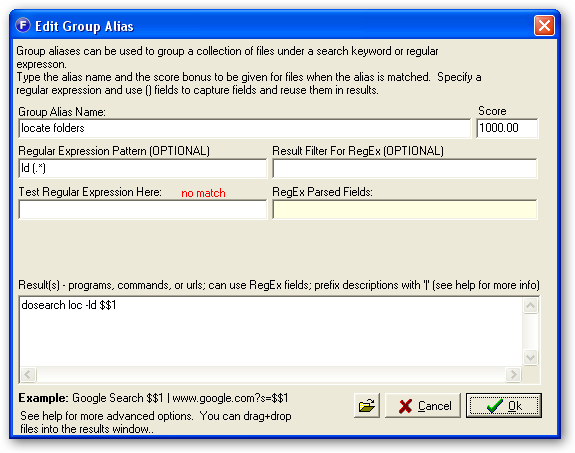
What you want to do is pretty easy using the special alias command called "dosearch"

basically, you can create a new alias with a regex pattern like:
ld (.*)

and for results put
dosearch l -ld $$1

that basically says that whenever you type "ld SOMETHING" it will be treated as if you had typed "l -ld SOMETHING"

lanux128

  • Global Moderator
  • Joined in 2005
  • *****
  • Posts: 6,277
    • Coding Snacks
    • Volunteers/Staff
    • Gathering Badge
    • Participated in NANY Challenge Once
    • Linux User
Re: Quick plugin question
« Reply #3 on: May 13, 2008, 04:45 AM »
What you want to do is pretty easy using the special alias command called "dosearch"

basically, you can create a new alias with a regex pattern like:
ld (.*)

and for results put
dosearch l -ld $$1

that basically says that whenever you type "ld SOMETHING" it will be treated as if you had typed "l -ld SOMETHING"

good call, mouser! :Thmbsup:i keep forgetting about the dosearch/restartsearch command.

ws-farr-dosearch-1.png

s.newave

  • Supporting Member
  • Joined in 2006
  • **
  • Posts: 124
    • Plugin Coding Medal
Re: Quick plugin question
« Reply #4 on: May 13, 2008, 05:11 AM »
Wow thanks for the quick reponse!

Told you it was a quick question  :D

s.newave

  • Supporting Member
  • Joined in 2006
  • **
  • Posts: 124
    • Plugin Coding Medal
Re: Quick plugin question
« Reply #5 on: May 18, 2008, 08:22 PM »
On a related note i am having trouble getting another alias to work. I am trying to create an alias to emulate typing C:\ and then being able to filter results as i continue to type. For example my alias name is  "Browse" with the result being "Browse C Drive | dosearch C:\".

My aim is to be able to start typing Brow.. then hit <tab> and than it should show all folders in my C: drive at which point i could start typing Progr... and it would filter to Program Files and i could hit enter to open that folder. However after i hit tab to autocomplete the alias and it returns all the folders but when i continue typing to filter the results it doesnt work.

Any ideas?

mouser

  • First Author
  • Administrator
  • Joined in 2005
  • *****
  • Posts: 40,931
    • Gathering Badge
    • Plugin Coding Medal
    • Participated in NANY Challenge Seventeen Times
    • Cody Award
    • Coding Snacks
    • Volunteers/Staff
Re: Quick plugin question
« Reply #6 on: May 18, 2008, 09:42 PM »
you need to use a regular expression just as the ld example above, so the regular expression would be
Browse (.*)
and the result would be
Browse C Drive | dosearch C:\ $$1

s.newave

  • Supporting Member
  • Joined in 2006
  • **
  • Posts: 124
    • Plugin Coding Medal
Re: Quick plugin question
« Reply #7 on: May 18, 2008, 10:07 PM »
Thx i knew i was 8) close

kartal

  • Supporting Member
  • Joined in 2008
  • **
  • Posts: 1,529
Re: Quick plugin question
« Reply #8 on: May 19, 2008, 12:02 AM »
loc -ld -Rn -p

These parameters will let you successfully browse any drive you want, jst add the drive as in c:\. I just created special alias for this and works beautifully, you can even browse folders inside farr by using arrow keys
« Last Edit: May 19, 2008, 12:23 AM by kartal »

Original address: https://www.donationcoder.com/forum/index.php?topic=13334.0