DonationCoder.com forum
 
Read-only archive. This is a static copy of the DonationCoder.com forum. Reading and searching work as before; logging in, posting and private messages do not.
Archive of 2026-10-21 · About this archive · Main site

Last post Author Topic: Winamp 5.53 Release  (Read 28,382 times)

Josh

  • Charter Honorary Member
  • Joined in 2005
  • ***
  • Posts: 3,411
    • Gathering Badge
    • Official Forum Clown
    • Coding Snacks
    • Plugin Coding Medal
    • Volunteers/Staff
    • Military Service Badge - US Army
    • Furry Fandom Badge - Furry Fandom
    • Linux User
Re: Winamp 5.53 Release
« Reply #25 on: May 10, 2008, 02:09 PM »
Winamp Preferences - Plug-ins - Output - Click on DirectSound Output then click configure. Click the fading tab
Strength in Knowledge

urlwolf

  • Charter Member
  • Joined in 2006
  • ***
  • Posts: 1,837
    • Gathering Badge
    • Linux User
Re: Winamp 5.53 Release
« Reply #26 on: May 11, 2008, 10:05 AM »
One thing that I don't understand is why most music programs do tagging in the same thread. That is, if you change the genre of a CD, your player is blocked (you cannot press any other keys, change music, etc) till the progress bar finishes.

The only programs that do the right thing (multiple threads) are Mediamonkey, foobar (if a bit cumbersome), and Jriver.

Winamp lets you enjoy the full progress bar.

Another thing that bothers me is that folder monitoring (i.e., auto-add files to library when I move them to my music folder) plain sucks. Winamp doesn't refresh immediately. Same for ratings: and there's no easy way to do a manual refresh.

mahesh2k

  • Supporting Member
  • Joined in 2007
  • **
  • Posts: 1,426
    • Participated in NANY Challenge Twice
Re: Winamp 5.53 Release
« Reply #27 on: May 12, 2008, 09:46 AM »
josh that Directsoud preference setting isn't working for me... :(
Let metry if i can get my hands on any plugin...

mahesh2k

  • Supporting Member
  • Joined in 2007
  • **
  • Posts: 1,426
    • Participated in NANY Challenge Twice
Re: Winamp 5.53 Release
« Reply #28 on: May 14, 2008, 12:57 PM »
Quote
Winamp Preferences - Plug-ins - Output - Click on DirectSound Output then click configure. Click the fading tab
josh thnx :-[ ..It worked after tireless editing of 8000ms settings..it works.... :Thmbsup:

Josh

  • Charter Honorary Member
  • Joined in 2005
  • ***
  • Posts: 3,411
    • Gathering Badge
    • Official Forum Clown
    • Coding Snacks
    • Plugin Coding Medal
    • Volunteers/Staff
    • Military Service Badge - US Army
    • Furry Fandom Badge - Furry Fandom
    • Linux User
Re: Winamp 5.53 Release
« Reply #29 on: May 16, 2008, 03:52 PM »
Always happy to help!
Strength in Knowledge

Deozaan

  • Charter Member
  • Joined in 2006
  • ***
  • Posts: 9,827
    • Participated in NANY Challenge Eight Times
    • Cody Award
Re: Winamp 5.53 Release
« Reply #30 on: May 17, 2008, 02:52 AM »
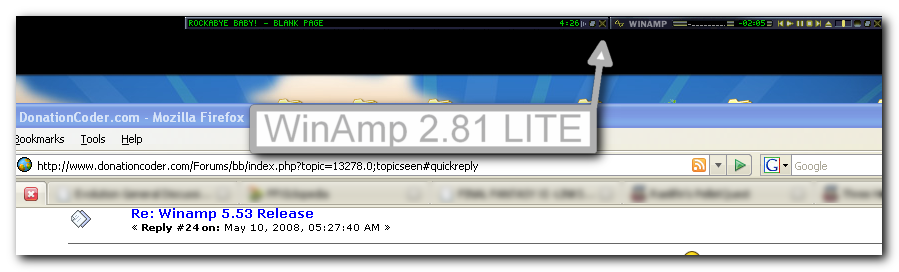
I think I have a copy of WinAmp 2.81 LITE that I've held on to for all these years for many of the same reasons as mentioned earlier.

It's installed and in use right now.  :)

Josh

  • Charter Honorary Member
  • Joined in 2005
  • ***
  • Posts: 3,411
    • Gathering Badge
    • Official Forum Clown
    • Coding Snacks
    • Plugin Coding Medal
    • Volunteers/Staff
    • Military Service Badge - US Army
    • Furry Fandom Badge - Furry Fandom
    • Linux User
Re: Winamp 5.53 Release
« Reply #31 on: May 17, 2008, 06:13 AM »
Deozaan: You should try v5. You can install only the parts you want and it runs just as fast as 2.x
Strength in Knowledge

Deozaan

  • Charter Member
  • Joined in 2006
  • ***
  • Posts: 9,827
    • Participated in NANY Challenge Eight Times
    • Cody Award
Re: Winamp 5.53 Release
« Reply #32 on: May 17, 2008, 10:07 AM »
Deozaan: You should try v5. You can install only the parts you want and it runs just as fast as 2.x

I'm pretty sure I have tried a few of the v5 editions. Too much stuff for my basic needs, even with minimal install.

I used MM3 and think it's probably the most feature-complete player, but then I realized that I was allocating ~250MB of memory to play music... not nice.

Now I use a super-simple winamp 5.53 with nothing but the basics. It uses ~40Mb when minimized on tray.

Like I said, I have WinAmp 2.81 LITE installed and running and it's currently playing music, displayed on my desktop, taking up less than 4MB -- Probably about the same size as the song that's currently playing.
« Last Edit: May 17, 2008, 10:12 AM by Deozaan »

Original address: https://www.donationcoder.com/forum/index.php?topic=13278.0