


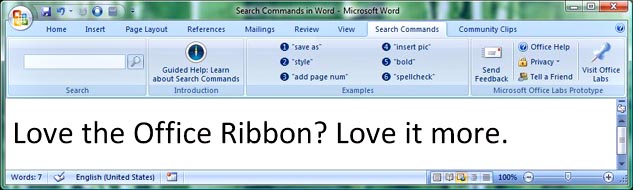
Having trouble finding where a command is in the new Office Ribbon? Microsoft Labs has just released a ribbon add-in that lets you type text from a command, and it gives you a list of matching commands.
Update: I probably should have given credit to Lifehacker for this link. http://lifehacker.com/384668/search-as-you-type-in-the-office-2007-ribbon
Quote
Search Commands helps you find commands, options, wizards, and galleries in Microsoft Office 2007 Word, Excel and PowerPoint. Just type what you’re looking for in your own words and click the command you need. Search Commands also includes Guided Help, which acts as a tour guide for specific tasks.
http://www.officelabs.com/projects/searchcommands/Pages/default.aspx
Update: I probably should have given credit to Lifehacker for this link. http://lifehacker.com/384668/search-as-you-type-in-the-office-2007-ribbon


 )
)


 VanDragt.com




 . You're right about the auto-completion/listing commands as you type. It's mostly technical reasons why I haven't added this capability yet (I had tried, but it didn't work well so I never released it). Unfortunately, it will involve a non-trivial amount of effort to make it work right, so it will be a few versions before it comes into a release.