


Here's something that I had the occasion to use recently, and found quite handy & useful.
It's basically a live Linux distro, that can be burnt onto a CD or run from an USB thumb drive.
It have various data recovery tools, and multiple antivirus scanners. It also support a wide variety of hardware out of the box. It's also very easy to use, with some useful features ready with a 1 key press.
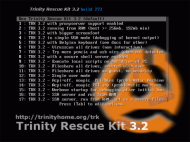
For example, simply booting from it and choosing 10 or 11 will make all partitions files available trough Samba, and so network accessible from any PC, in a matter of seconds.
Option 6 instead will download all the latest updates for the free antivirus ClamAV and run a totally automated cleaning process on all partitions (this is very handy especially when guiding persons that aren't too PC savy "Just download this file, burn, boot from the CD and hit 6").
Off course is possible to boot to a normal prompt and do even more sophisticated things, or simply mount a NTFS partition and run a couple of other differents AV (ClamAV, AVG, F-Prot, BitDefender and Vexira: all the engines apart ClamAV are downloaded on the fly, installed in RAM and updated before starting).
For example, to do a scan with AVG:
Boot with option 2 (TRK running from RAM)
At the prompt, mount all partitions with corresponding File Systems:
A partition list is shown. Just check to see what's the one you are interested in, to be sure:
Run the AV:
Contrary to similar Win based tools (usually derived from BartPE), this don't need any additional software (for example an XP installation CD).
Bye!
It's basically a live Linux distro, that can be burnt onto a CD or run from an USB thumb drive.
It have various data recovery tools, and multiple antivirus scanners. It also support a wide variety of hardware out of the box. It's also very easy to use, with some useful features ready with a 1 key press.
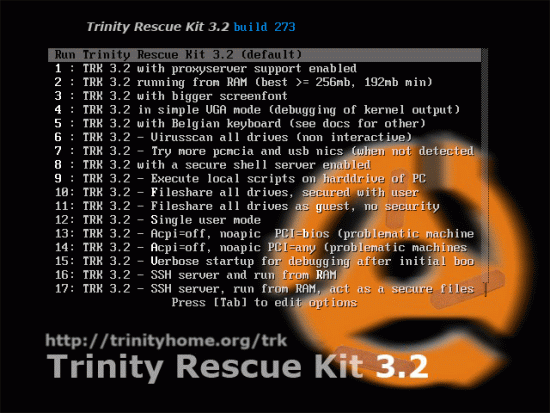
For example, simply booting from it and choosing 10 or 11 will make all partitions files available trough Samba, and so network accessible from any PC, in a matter of seconds.
Option 6 instead will download all the latest updates for the free antivirus ClamAV and run a totally automated cleaning process on all partitions (this is very handy especially when guiding persons that aren't too PC savy "Just download this file, burn, boot from the CD and hit 6").
Off course is possible to boot to a normal prompt and do even more sophisticated things, or simply mount a NTFS partition and run a couple of other differents AV (ClamAV, AVG, F-Prot, BitDefender and Vexira: all the engines apart ClamAV are downloaded on the fly, installed in RAM and updated before starting).
For example, to do a scan with AVG:
Boot with option 2 (TRK running from RAM)
At the prompt, mount all partitions with corresponding File Systems:
Code
mountallfs -gA partition list is shown. Just check to see what's the one you are interested in, to be sure:
Code
ls /sda1Run the AV:
Code
virusscan -a avg -d /sda1Contrary to similar Win based tools (usually derived from BartPE), this don't need any additional software (for example an XP installation CD).
Bye!
 Online TrID file identifier
 SeqBox


