DonationCoder.com forum
 
Read-only archive. This is a static copy of the DonationCoder.com forum. Reading and searching work as before; logging in, posting and private messages do not.
Archive of 2026-10-21 · About this archive · Main site

Author Topic: My foxes are not on fire. Any HELP?  (Read 6,262 times)

Curt

  • Supporting Member
  • Joined in 2006
  • **
  • Posts: 7,565
My foxes are not on fire. Any HELP?
« on: April 18, 2008, 10:12 AM »
Both my Firefox 2 and 3 are sick; they won't leave home. Because they are from the IT world they both speak another language than me, so I really can't understand what they saying - making it hard for me to help them out. Firefox 2 won't start at all. The file firefox.exe starts and tries, and then stops doing anything. Firefox 3 can open and work all right, but still won't leave home. It just says "stopped". I asked it what was wrong, but again, I don't understand the language it is speaking. Maybe you do? Can you read this nonsense and make sense out of it:

1) Error console popup:
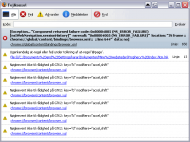
foxerrorconsole.gif

Edited: The text was too long, so now I have attached it in a text file: TextFromErrorConsole.txt (34.6 KB)


-and maybe even tell me what to do to help these poor patients of mine, please?

I already have removed every addon, and added both foxes to Trusted - but so far to no avail.
« Last Edit: April 18, 2008, 10:23 AM by Curt »

justice

  • Solve issues simply.
  • Supporting Member
  • Joined in 2006
  • **
  • Posts: 1,898
    • Participated in NANY Challenge Four Times
    • Cody Award
    • Coding Snacks
    • DJ Badge - DJ
Re: My foxes are not on fire. Any HELP?
« Reply #1 on: April 18, 2008, 10:53 AM »
From the first line it seems the "session history" has a problem, I take it this is the "history" of browsed websites? If so, Firefox is not the problem but your profile you use with it is.

Did you use the same profile for both Firefox 2 and 3 (if you're not sure the answer is probably yes). Start Firefox with the -ProfileManager parameter, follow the instructions to create a new profile and start firefox then choose the new profile and see if everything is ok. If that works you should look at migrating your settings over to the new profile or look for a profile-fixer program (if there is any)

There bottom errors seem to be firefox saying it's unable to setup your hotkeys in the interface. This contradicts my theory that it is a profile problem. When you uninstall firefox you keep all your settings so if you haven't tried that removing all firefoxes and reinstalling one of them might help you out too.

Might not be that though but hopefully gave you some idea about what's going on.

wraith808

  • Supporting Member
  • Joined in 2006
  • **
  • Posts: 11,205
    • Participated in NANY Challenge Fourteen Times
    • Coding Snacks
    • Writer
    • Hardware Hacker
Re: My foxes are not on fire. Any HELP?
« Reply #2 on: April 18, 2008, 04:57 PM »
Can you uninstall both and reinstall?  Or is this not an option?  You might also want to check on the firefox forums... the gurus there would most likely be able to help...

Curt

  • Supporting Member
  • Joined in 2006
  • **
  • Posts: 7,565
Re: My foxes are not on fire. Any HELP?
« Reply #3 on: April 18, 2008, 10:42 PM »
How (not) to spend an evening: Remove your Firefox browser(s), and make a fresh install and add twenty extensions (yes, a much more slim version than I used to have)! To make a terrible long story short; i am typing this post in Firefox 2 - and I won't update to version 3 until the fat Elvis is final&stable.

Thanks for your help, guys!  :up:

sri

  • Honorary Member
  • Joined in 2006
  • **
  • Posts: 689
Re: My foxes are not on fire. Any HELP?
« Reply #4 on: April 19, 2008, 03:17 PM »
You could have also tried to create a new profile using the profile manager.

Original address: https://www.donationcoder.com/forum/index.php?topic=13088.0