DonationCoder.com forum
 
Read-only archive. This is a static copy of the DonationCoder.com forum. Reading and searching work as before; logging in, posting and private messages do not.
Archive of 2026-10-21 · About this archive · Main site

Author Topic: IDEA: Hide windows with keypress (Boss Key)  (Read 8,066 times)

ExNomenDei

  • Participant
  • Joined in 2008
  • *
  • Posts: 1
IDEA: Hide windows with keypress (Boss Key)
« on: April 12, 2008, 09:51 AM »
I have a request/idea that may get a little more complicated than you'd think at first. You see, I'm imagining a program that has a GUI that allows you to select any open window and enter a keypress that will hide and restore it later, as well as allowing groups of windows to be hidden.

Hidden means simply that the window disappears from the tray, window selector, and from the screen.

lanux128

  • Global Moderator
  • Joined in 2005
  • *****
  • Posts: 6,277
    • Coding Snacks
    • Volunteers/Staff
    • Gathering Badge
    • Participated in NANY Challenge Once
    • Linux User
Re: IDEA: Hide windows with keypress (Boss Key)
« Reply #1 on: April 12, 2008, 01:26 PM »
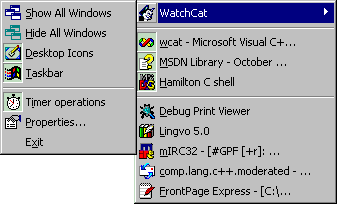
this app turned up at gHacks.net: Watchcat. maybe you can give it a try.

Quote from: "website"
WatchCat 2.0 (last freeware version) uses a menu to keep track of programs you are running, letting you hide any running application from view. Application windows that are hidden by WatchCat not only disappear from your Windows desktop but also disappear from the Taskbar and from the list of running tasks displayed by ALT-TAB. To hide or unhide any application, simply right-click on WatchCat's System Tray icon and select an application from the menu that appears; applications that appear on the bottom of the menu are ones that are currently hidden.

[attach=#]

via gHacks.net

Original address: https://www.donationcoder.com/forum/index.php?topic=13046.0