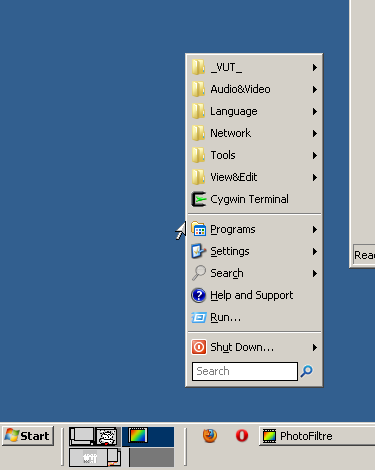
#SingleInstance force
DetectHiddenWindows, on
Process, Priority, , AboveNormal

;--------------------------------------------------------
; Classic shell desktop - use right button click on desktop and
; you get ClassicShell menu.
;    If you need right click on desktop, use CTRL + right
; click instead.

; This script works for Classic shell start menu replacement
; http://classicshell.sourceforge.net/

RButton::
  CoordMode, Mouse, Screen			; Absolute position
  MouseGetPos, Xpos, Ypos, id, control
  WinGetClass, class, ahk_id %id%
  if (class == "Progman")			; Mouse is above desktop
  {
		; Set desired initial menu position
		;    "Top" - mouse pointer is going to be on top left corner menu, default value
		;    "Bottom" - mouse pointer is going to be on bottom left corner menu
		;    "Middle" - mouse pointer is going to be in the middle of menu left side
		InitialMenuPosition := "Middle"
		StateProgman := 1   	; For right click down + move

		Send {RWin}				; Open StartMenu
        WinWaitActive, ahk_class ClassicShell.CMenuContainer
        #IfWinActive ahk_class ClassicShell.CMenuContainer
        WinGetPos, , , Xsize, Ysize, ahk_class ClassicShell.CMenuContainer
        SysGet, MonitorCount, 80 				; Number of monitors
        Sysget, MonitorPrimary, MonitorPrimary 	; Primary monitor number
        Loop %MonitorCount%
        {
	        ; Primary working area, could be changed for primary monitor with taskbar
	        SysGet, Monitor, Monitor, %A_Index% 					; Maximal monitor area
	        if ( Xpos >=MonitorLeft and Xpos <= MonitorRight
	             and Ypos >=MonitorTop and Ypos <= MonitorBottom ) 	; Mouse pointer is inside this monitor
	        {
		        SysGet, MonitorWorkArea, MonitorWorkArea, %A_Index%	; Working area without not hiding taksbar
		        WorkLeft := MonitorWorkAreaLeft
				WorkTop := MonitorWorkAreaTop
				WorkRight := MonitorWorkAreaRight
				WorkBottom := MonitorWorkAreaBottom
				; Test smaller work area - for auto-hide taskbar
				if ( A_Index ==  MonitorPrimary and MonitorLeft == MonitorWorkAreaLeft
				     and MonitorTop == MonitorWorkAreaTop and MonitorRight == MonitorWorkAreaRight
				     and MonitorBottom == MonitorWorkAreaBottom )		; Primary monitor with auto-hide taskbar
		        {
			        WinGetPos,TaskX,TaskY,TaskW,TaskH,ahk_class Shell_TrayWnd,,,	; Where is taskbar?
			        if (TaskW >= A_ScreenWidth) { 							; Vertical Taskbar
					    if (TaskY <= 0) {
					      WorkTop := MonitorWorkAreaTop + TaskH
					    } else {
					      WorkBottom := MonitorWorkAreaBottom - TaskH
					    }
					} else { 											; Horizontal Taskbar
					    if (TaskX <= 0) {
					      WorkLeft := MonitorWorkAreaLeft + TaskW
					    } else {
					      WorkRight := MonitorWorkAreaRight - TaskW
					    }
					}
				}
	        }
    	}
    	; Window position
    	Xwin := Xpos							; Initial X value for window position
        if ( InitialMenuPosition == "Bottom" )
			Ywin := Ypos - Ysize
		else if ( InitialMenuPosition == "Middle" )
			Ywin := Ypos - Ceil( Ysize/2 )
		else 									; Default = "Top"
    		Ywin := Ypos 						; Initial Y value for window position
    	; Whole window on visible part of selected monitor
    	if ( Xwin < WorkLeft )
			Xwin := WorkLeft
		if ( Xwin > WorkRight - Xsize )
			Xwin := WorkRight - Xsize
    	if ( Ywin < WorkTop )
			Ywin := WorkTop
		if ( Ywin > WorkBottom - Ysize )
			Ywin := WorkBottom - Ysize
        WinMove, ahk_class ClassicShell.CMenuContainer, , Xwin, Ywin	; Move opened window
		#IfWinActive
	    Return
    }
  else ; (class != "Progman")		Right click for another programs intact
    {
		; Right click + move http://www.autohotkey.com/forum/topic19826.html
		; Many thanks to original autor YMP
		CoordMode, Mouse, Screen
		MouseGetPos, mX0, mY0
		Loop
		{
		    Sleep, 20
		    If not GetKeyState("RButton", "P")
		      Break
		    MouseGetPos, mX, mY
		    dX:=Abs(mX-mX0), dY:=Abs(mY-mY0)
		    If (dX>3 or dY>3)
		    {
		        Move:=1
		        Click Down Right
		        KeyWait, RButton
		        Click Up Right
		        Break
		    }
		  }
    }
  Return


RButton Up::
  If not Move		; For right click without move
  {
	  If not StateProgman
	  		Click Right
	  else
	  		StateProgman := 0
  }

  Else
    Move:=0
Return


;--------------------------------------------------------
; CTRL-right click on desktop = right click
^RButton::
  MouseGetPos, , , id, control
  WinGetClass, class, ahk_id %id%
  if (class == "Progman")		; Click on desktop: CTRL-RightClick -> RightClick
    {
	    ; Right click + move http://www.autohotkey.com/forum/topic19826.html
		; Many thanks to original autor YMP
		CoordMode, Mouse, Screen
		MouseGetPos, mX0, mY0
		Loop
		{
		    Sleep, 20
		    If not GetKeyState("RButton", "P")
		      Break
		    MouseGetPos, mX, mY
		    dX:=Abs(mX-mX0), dY:=Abs(mY-mY0)
		    If (dX>3 or dY>3)
		    {
		        Move:=1
		        Click Down Right
		        KeyWait, RButton
		        Click Up Right
		        Break
		    }
		  }
    	Return
    }
 else
   {
	 Send ^{Click right}  ; CTRL+RightClick
     return
   }
Return



 ToolTipMenu.zip