DonationCoder.com forum
 
Read-only archive. This is a static copy of the DonationCoder.com forum. Reading and searching work as before; logging in, posting and private messages do not.
Archive of 2026-10-21 · About this archive · Main site

Author Topic: Another shortcut problem  (Read 7,432 times)

herojoker

  • Participant
  • Joined in 2008
  • *
  • Posts: 124
Another shortcut problem
« on: March 31, 2008, 11:45 PM »
Hello,

unfortunately I have a problem with all my start menu shortcuts: Not a single one is working when having "Always launch shortcuts directly instead of resolving links" activated.

Example: entering "Minesweeper" without the quot. marks into the search field, I get the start menu entry as result.
Neither pressing Enter nor double clicking the entry nor choosing "Launch and stay open" in its context menu will run it.
Running it directly from the startmenu is ok.
The same applies for all other shortcuts in the startmenu (not only executables).

I attached an example shortcut, perhaps this will help you.

mouser

  • First Author
  • Administrator
  • Joined in 2005
  • *****
  • Posts: 40,931
    • Gathering Badge
    • Plugin Coding Medal
    • Participated in NANY Challenge Seventeen Times
    • Cody Award
    • Coding Snacks
    • Volunteers/Staff
Re: Another shortcut problem
« Reply #1 on: March 31, 2008, 11:54 PM »
well done for finding the option that makes it work for you.. it's not entirely clear to me why this happens to some people.

d4ni

  • Supporting Member
  • Joined in 2008
  • **
  • Posts: 129
Re: Another shortcut problem
« Reply #2 on: April 03, 2008, 06:59 PM »
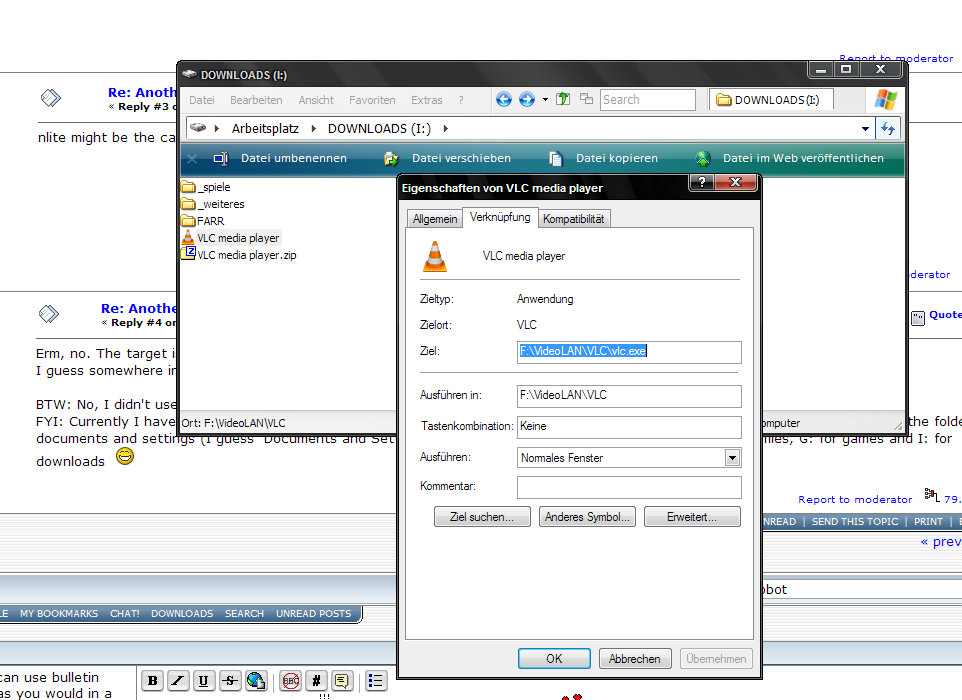
In your example shortcut the problem seems clear; the Target is set to C:\Programs\VideoLAN\VLC\vlc.exe (nLite? I renamed Program Files to Programs as well ;)), while the Start in points to
F:\VideoLAN\VLC

mouser

  • First Author
  • Administrator
  • Joined in 2005
  • *****
  • Posts: 40,931
    • Gathering Badge
    • Plugin Coding Medal
    • Participated in NANY Challenge Seventeen Times
    • Cody Award
    • Coding Snacks
    • Volunteers/Staff
Re: Another shortcut problem
« Reply #3 on: April 04, 2008, 12:08 AM »
nlite might be the cause.

herojoker

  • Participant
  • Joined in 2008
  • *
  • Posts: 124
Re: Another shortcut problem
« Reply #4 on: April 04, 2008, 10:35 AM »
Erm, no. The target is F:\VideoLAN\VLC\vlc.exe here (I downloaded the .zip, extracted the .lnk and looked at the properties).
I guess somewhere in the link %PROGRAMFILES% is used.

BTW: No, I didn't use nLite but created my own winnt.sif.
FYI: Currently I have C:\Windows as Windows directory, D: as swap drive, F: for applications, H:\Dokumente und Einstellungen as the folder for documents and settings (I guess "Documents and Settings" is the english version). E: for installation (setup) files, G: for games and I: for downloads  :D

FYI2: No, it's not Vista but Vista Inspirat with QTTabBar and QTAdressBar.
« Last Edit: April 04, 2008, 10:41 AM by herojoker »

d4ni

  • Supporting Member
  • Joined in 2008
  • **
  • Posts: 129
Re: Another shortcut problem
« Reply #5 on: April 04, 2008, 12:44 PM »
Hm I see. I guess %ProgramFiles% is used in the target then, cause it really says C:\Programs over here. Anyway, I don't know what's going on then ;)

Original address: https://www.donationcoder.com/forum/index.php?topic=12875.0