DonationCoder.com forum
 
Read-only archive. This is a static copy of the DonationCoder.com forum. Reading and searching work as before; logging in, posting and private messages do not.
Archive of 2026-10-21 · About this archive · Main site

Author Topic: Is there a way to get Screenshot Captor (2.37.0.3) to ALWAYS open in FULL mode?  (Read 11,629 times)

jakobkraft

  • Supporting Member
  • Joined in 2008
  • **
  • Posts: 7

I thought that if I just unchecked 'Start Minimized' in General Preferences then it would always open in full mode. But if I close the program while minimized, then the next time I launch it, it opens minimized - though I did leave that option UNCHECKED for a reason...

Any way to force Screenshot Captor to ALWAYS open in full, main window mode? Thanks in advance:)

lanux128

  • Global Moderator
  • Joined in 2005
  • *****
  • Posts: 6,277
    • Coding Snacks
    • Volunteers/Staff
    • Gathering Badge
    • Participated in NANY Challenge Once
    • Linux User
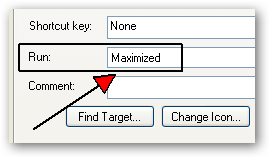
how do you launch Screenshot Captor? if by a shortcut, then go to its properties and change to "Run Maximized" (see pic).

ws-runmax-1.png

jakobkraft

  • Supporting Member
  • Joined in 2008
  • **
  • Posts: 7
Thanks for the suggestion...didn't work though.
Winamp actually behaves similarly - if you have it minimized, and then right-click on the taskbar tab and select Close, then when you open it next time, it opens minimized. But they have a fix - just make the .ini file 'Read Only' and that's that.

I tried that with Screenshot Captor's .ini, which DID work, but also gave me an error every time as it loaded: Cannot Save, or something like that.

Oh well...I'll learn to live with it, it's a good app overall...

lanux128

  • Global Moderator
  • Joined in 2005
  • *****
  • Posts: 6,277
    • Coding Snacks
    • Volunteers/Staff
    • Gathering Badge
    • Participated in NANY Challenge Once
    • Linux User
it shows an underlying problem. whenever apps exit they save last window position in the ini file and making them read-only means this position is not saved along with other data that a programmer may have included. that's why SC gives you an error. by any chance, do you have multiple monitors or use a virtual desktop app? also need to know what OS are you running on?

jakobkraft

  • Supporting Member
  • Joined in 2008
  • **
  • Posts: 7
No virtual desktop or multiple monitors, nothing fancy at all...am running WinXP Pro.
If you can think of something else, I'll be happy to try it; otherwise it's cool. I still prefer this over SnagIt and will stick with it for some time:)

lanux128

  • Global Moderator
  • Joined in 2005
  • *****
  • Posts: 6,277
    • Coding Snacks
    • Volunteers/Staff
    • Gathering Badge
    • Participated in NANY Challenge Once
    • Linux User
sure, i'll let you know if i find out anything.. :)

mouser

  • First Author
  • Administrator
  • Joined in 2005
  • *****
  • Posts: 40,931
    • Gathering Badge
    • Plugin Coding Medal
    • Participated in NANY Challenge Seventeen Times
    • Cody Award
    • Coding Snacks
    • Volunteers/Staff
SC normally remembers how it was last closed -- so if you close it will minimized it will remember, if you close it maximized, it will remember.

jgpaiva

  • Artificial Idiocy
  • Global Moderator
  • Joined in 2006
  • *****
  • Posts: 4,727
    • Cody Award
    • Participated in NANY Challenge Once
    • Coding Snacks
    • Portugal Inhabitant
    • Linux User
This is the normal way of operating for most programs that minimize to tray, they open in the same state they were closed.
Now, finding a way to not have SC do this without mouser having to add (yet) another option in the options menu sounds a bit hard.

jakob: why exactly do you want SC to open maximized?

jakobkraft

  • Supporting Member
  • Joined in 2008
  • **
  • Posts: 7
I actually don't want to open SC MAXIMIZED every time, only want to see main window, resized, when the program opens.
But most of the time when I close SC it's minimized (I close from the system tray.) So basically I was looking for a way to make SC open showing the main window every time, regardless of whether it was minimized or not upon closing.... That's it.

jgpaiva

  • Artificial Idiocy
  • Global Moderator
  • Joined in 2006
  • *****
  • Posts: 4,727
    • Cody Award
    • Participated in NANY Challenge Once
    • Coding Snacks
    • Portugal Inhabitant
    • Linux User
I see, jakob.

Mouser: how about a command line switch to solve this problem?

mouser

  • First Author
  • Administrator
  • Joined in 2005
  • *****
  • Posts: 40,931
    • Gathering Badge
    • Plugin Coding Medal
    • Participated in NANY Challenge Seventeen Times
    • Cody Award
    • Coding Snacks
    • Volunteers/Staff
Quote
Mouser: how about a command line switch to solve this problem?

that's a good compromise since i wouldnt have to add yet another option in options dialog.
ok adding it to todo list.

jakobkraft

  • Supporting Member
  • Joined in 2008
  • **
  • Posts: 7
Thanks a lot :)
Like I said before, it's not a deal breaker, I enjoy using SC very much - but as I've begun to use it more, I just found wishing that it would open showing the main window each time, so I could get right down to business :D

lanux128

  • Global Moderator
  • Joined in 2005
  • *****
  • Posts: 6,277
    • Coding Snacks
    • Volunteers/Staff
    • Gathering Badge
    • Participated in NANY Challenge Once
    • Linux User
jakob, your mention of Winamp made think that this was a system-wide problem until mouser's reply made me realize that this was about saving the last windows state. incidentally, i too had posted a similar request on this previously.

Original address: https://www.donationcoder.com/forum/index.php?topic=12777.0