DonationCoder.com forum
 
Read-only archive. This is a static copy of the DonationCoder.com forum. Reading and searching work as before; logging in, posting and private messages do not.
Archive of 2026-10-21 · About this archive · Main site

Last post Author Topic: Direct Folders 3.3 Released : Now FREE for HOME use  (Read 34,230 times)

tinjaw

  • I'm so glad breakbeat techno isn't an illegal drug
  • Supporting Member
  • Joined in 2006
  • **
  • Posts: 1,927
    • Participated in NANY Challenge Twice
    • Coding Snacks
    • Military Service Badge - US Army
    • Linux User
Direct Folders 3.3 Released : Now FREE for HOME use
« on: March 21, 2008, 12:29 AM »
Those of us who have purchased Direct Folders are happy to see a well needed update to 3.3. Hopefully it will bring it some greater stability.

The product has been altered slightly with a lighter version offered free for home use. Users, like myself, that have purchased an earlier version of Direct Folders 3.x can email them for a key to the pro version.

[attachthumb=#]

cranioscopical

  • Friend of the Site
  • Supporting Member
  • Joined in 2006
  • **
  • Posts: 4,776
    • Cody Award
    • Official Forum Clown
    • rotten turkey sandwich - Rotten Turkey Sandwich
Re: Direct Folders 3.3 Released : Now FREE for HOME use
« Reply #1 on: March 21, 2008, 02:43 AM »
Thanks for the notification, I wasn't aware of this until you pointed it out!
Chris

sri

  • Honorary Member
  • Joined in 2006
  • **
  • Posts: 689
Re: Direct Folders 3.3 Released : Now FREE for HOME use
« Reply #2 on: March 21, 2008, 04:00 AM »
Does this have any specific advantage over FileBox eXtender?

gogogadgetscott

  • Mechanical engineer who has inexplicable knowledge
  • Supporting Member
  • Joined in 2007
  • **
  • Posts: 23
    • Coding Snacks
Re: Direct Folders 3.3 Released : Now FREE for HOME use
« Reply #3 on: March 21, 2008, 04:41 AM »
Demo shows that Direct Folders replaces the Explorer context menu. Not much of an advantage...

tinjaw

  • I'm so glad breakbeat techno isn't an illegal drug
  • Supporting Member
  • Joined in 2006
  • **
  • Posts: 1,927
    • Participated in NANY Challenge Twice
    • Coding Snacks
    • Military Service Badge - US Army
    • Linux User
Re: Direct Folders 3.3 Released : Now FREE for HOME use
« Reply #4 on: March 21, 2008, 12:57 PM »
Demo shows that Direct Folders replaces the Explorer context menu. Not much of an advantage...

I think you may have misinterpreted the demo (which I am sure the developer would like to know). It doesn't replace the context menu. Your context menu is unaltered by Direct Folders. What it provides, at its core, is a way to get to your most used directories quickly. There are plenty of other benefits as well. I would suggest, especially since it is free for home use, that you try it yourself.

paulobrabo

  • The Brazilian Bomber
  • Supporting Member
  • Joined in 2007
  • **
  • Posts: 88
Re: Direct Folders 3.3 Released : Now FREE for HOME use
« Reply #5 on: March 21, 2008, 01:02 PM »
So neat, thank you for the heads up.

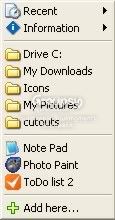
I confirm: no context menu replacing. What you see in the screenshot is Direct Folders' own favorites/recent menu, which appears when you *double-click* on a blank area of an open/save dialog box. It makes for a smooth navigation experience.
English will never be my first language, it doesn't meter how hard I try.

Josh

  • Charter Honorary Member
  • Joined in 2005
  • ***
  • Posts: 3,411
    • Gathering Badge
    • Official Forum Clown
    • Coding Snacks
    • Plugin Coding Medal
    • Volunteers/Staff
    • Military Service Badge - US Army
    • Furry Fandom Badge - Furry Fandom
    • Linux User
Re: Direct Folders 3.3 Released : Now FREE for HOME use
« Reply #6 on: March 21, 2008, 01:13 PM »
I am unable to access their page. What exactly does this program do for you?
Strength in Knowledge

superboyac

  • Is your software in my list?
  • Charter Member
  • Joined in 2005
  • ***
  • Posts: 6,347
Re: Direct Folders 3.3 Released : Now FREE for HOME use
« Reply #7 on: March 21, 2008, 04:20 PM »
I think Direct Folders is the best of the bunch, as I discussed in the thread I started last week.  Very cool to see it getting updated and also made free.  I love the double-clicking in the blank area feature...it is by far the most unique and useful distinguishing feature among all of these dialog resizer software.

masu

  • Member
  • Joined in 2006
  • **
  • Posts: 401
Re: Direct Folders 3.3 Released : Now FREE for HOME use
« Reply #8 on: March 21, 2008, 06:43 PM »
can someone please post a screenshot of direct folder?
thanks
Find+Run Robot 2.90.01
Windows 7

PhilB66

  • Supporting Member
  • Joined in 2007
  • **
  • Posts: 1,522
Re: Direct Folders 3.3 Released : Now FREE for HOME use
« Reply #9 on: March 21, 2008, 06:51 PM »
can someone please post a screenshot of direct folder?
thanks

Info, screenshots and demo

masu

  • Member
  • Joined in 2006
  • **
  • Posts: 401
Re: Direct Folders 3.3 Released : Now FREE for HOME use
« Reply #10 on: March 22, 2008, 09:29 AM »
okay thanks  :Thmbsup:
Find+Run Robot 2.90.01
Windows 7

sauzee

  • Supporting Member
  • Joined in 2006
  • **
  • Posts: 4
Re: Direct Folders 3.3 Released : Now FREE for HOME use
« Reply #11 on: March 27, 2008, 10:28 AM »
cool, thanks for the heads up

surftwo

  • Participant
  • Joined in 2006
  • *
  • Posts: 32
Re: Direct Folders 3.3 Released : Now FREE for HOME use
« Reply #12 on: March 30, 2008, 12:53 PM »
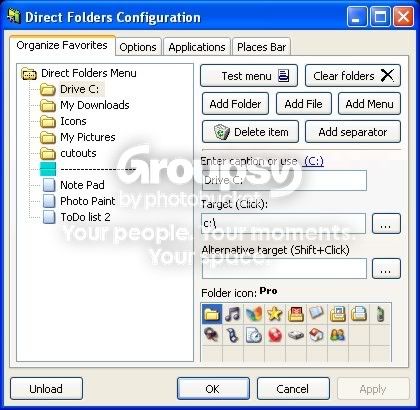
Here's one it's my menu and the Config dialog . by the way it doesn't replace the right shortcut menu.  It adds a left click menu that you can customize with links to folder's and programs or files.  It also contains a history list. Great free program.
My MenuConfig Dialog


« Last Edit: March 30, 2008, 01:05 PM by surftwo »

edbro

  • Charter Member
  • Joined in 2006
  • ***
  • Posts: 426
Re: Direct Folders 3.3 Released : Now FREE for HOME use
« Reply #13 on: March 30, 2008, 01:22 PM »
Does anybody know how to get it to use the default file manager? I have Directory Opus and I use that for everything. But, if I select a folder from the tray icon, Direct Folders will always open in Explorer.

Darwin

  • Charter Member
  • Joined in 2005
  • ***
  • Posts: 6,985
    • Gathering Badge
Re: Direct Folders 3.3 Released : Now FREE for HOME use
« Reply #14 on: March 30, 2008, 01:56 PM »
Thanks for the notification, tinjaw. I missed this one at the time. I haven't used Direct Folders in a long time, but will take a look at it again.
"Some people have a way with words, other people,... oh... have not way" - Steve Martin

ak_

  • Supporting Member
  • Joined in 2007
  • **
  • Posts: 223
Re: Direct Folders 3.3 Released : Now FREE for HOME use
« Reply #15 on: March 30, 2008, 02:54 PM »
It's really too bad that you can't replace double-clicking by middle-clicking, because i use an ahk script to go to parent folder when double-clicking empty area. I was very surprised when i saw that i couldn't change this.

iphigenie

  • curiosity FTW!
  • Supporting Member
  • Joined in 2006
  • **
  • Posts: 1,170
Re: Direct Folders 3.3 Released : Now FREE for HOME use
« Reply #16 on: March 31, 2008, 09:21 AM »
I have direct folders and keep forgetting that I have it - i.e. i dont use it for jumping to folders - of course i have so many different tools that provide that kind of service (I have the stardock tool, the wirekeys plugin -very discrete - and I also have powerdesk pro).

I do like the automatic resize and remember what view and where - that is handy 
The pro version also remembers what file you were on, this is also useful for programs that only allow one file at a time to be picked, or things like file upload via browser etc.

Nod5

  • Supporting Member
  • Joined in 2006
  • **
  • Posts: 1,175
    • Coding Snacks
    • Participated in NANY Challenge Three Times
    • Plugin Coding Medal
Re: Direct Folders 3.3 Released : Now FREE for HOME use
« Reply #17 on: March 31, 2008, 09:53 PM »
ak_, how do you setup AHK to react to clicks in empty explorer areas?

lanux128

  • Global Moderator
  • Joined in 2005
  • *****
  • Posts: 6,277
    • Coding Snacks
    • Volunteers/Staff
    • Gathering Badge
    • Participated in NANY Challenge Once
    • Linux User
Re: Direct Folders 3.3 Released : Now FREE for HOME use
« Reply #18 on: April 16, 2008, 03:51 PM »
ak_, how do you setup AHK to react to clicks in empty explorer areas?

you can view the source here: IDEA: go to parent folder with double-click.

sri

  • Honorary Member
  • Joined in 2006
  • **
  • Posts: 689
Re: Direct Folders 3.3 Released : Now FREE for HOME use
« Reply #19 on: April 19, 2008, 03:59 PM »
I wish this works in XPlorer2.

sri

  • Honorary Member
  • Joined in 2006
  • **
  • Posts: 689
Re: Direct Folders 3.3 Released : Now FREE for HOME use
« Reply #20 on: September 18, 2009, 02:36 AM »
Does anybody know how to get it to use the default file manager? I have Directory Opus and I use that for everything. But, if I select a folder from the tray icon, Direct Folders will always open in Explorer.

I have set Directory Opus to replace windows explorer. When I select any folder from Direct Folders, I jump to it in a new tab in Directory Opus. So it does work.

Additionally I have also set such that double clicking in empty area of a lister brings up Direct Folders menu.

Curt

  • Supporting Member
  • Joined in 2006
  • **
  • Posts: 7,565
Re: Direct Folders 3.3 Released : Now FREE for HOME use
« Reply #21 on: September 18, 2009, 08:04 AM »
I have set Directory Opus to replace windows explorer. When I select any folder from Direct Folders, I jump to it in a new tab in Directory Opus. So it does work.

from their blog:

Quote
Direct Folders 3.6
May 4th, 2009

   * Added: Support for Total Commander 7.5 beta.
   * Added: Support for DirectoryOpus.
   * Added: Few display options.
   * Changed: Separate settings for double click and middle button click.
:up:
« Last Edit: September 18, 2009, 08:06 AM by Curt »

sri

  • Honorary Member
  • Joined in 2006
  • **
  • Posts: 689
Re: Direct Folders 3.3 Released : Now FREE for HOME use
« Reply #22 on: September 18, 2009, 08:08 AM »
A correction to my above post: Clicking on a folder in Direct Folder's menu doesn't switch to it in Directory Opus in a new tab. The existing tab gets used.

The support for Directory Opus that's quoted in the above post is specifically this: When mouse middle button is double clicked in empty space of a lister, Direct Folder's menu appears.

Double clicking in empty space of the lister DOES NOT bring up this menu. However, this can be achieved using AutoHotKey.

sri

  • Honorary Member
  • Joined in 2006
  • **
  • Posts: 689
Re: Direct Folders 3.3 Released : Now FREE for HOME use
« Reply #23 on: September 18, 2009, 08:22 AM »
Just mailed Jeff (the author of DF) the following:

Quote
Hi Jeff,

I use Directory Opus as my file explorer in windows explorer replacement mode.

I am able to mouse button middle click in empty space of a lister to bring up Direct Folder's menu but not when I double click.

Is it possible to add this feature?

Thanks,
Sridhar.

DesertEagle

  • Charter Honorary Member
  • Joined in 2005
  • ***
  • Posts: 16
Re: Direct Folders 3.3 Released : Now FREE for HOME use
« Reply #24 on: September 24, 2009, 01:02 AM »
I'm afraid it's not possible, can't intercept left button double click.

Original address: https://www.donationcoder.com/forum/index.php?topic=12727.0