DonationCoder.com forum
 
Read-only archive. This is a static copy of the DonationCoder.com forum. Reading and searching work as before; logging in, posting and private messages do not.
Archive of 2026-10-21 · About this archive · Main site

Last post Author Topic: My Taskbar Notification Area Competition  (Read 40,587 times)

Curt

  • Supporting Member
  • Joined in 2006
  • **
  • Posts: 7,565
Re: My Taskbar Notification Area Competition
« Reply #25 on: August 27, 2008, 08:36 PM »
So, Carl, did you keep PS Tray Factory? (I see a lot of guys in this thread could make use of it...) - I think it is a little hard on my XP, causing short but max' use of CPU, when it has been used, but I don't know if the reason is Tray Fact' or the fact (some pune intended) that my XP still is unstable.

Here is my notification area:

tray.gif

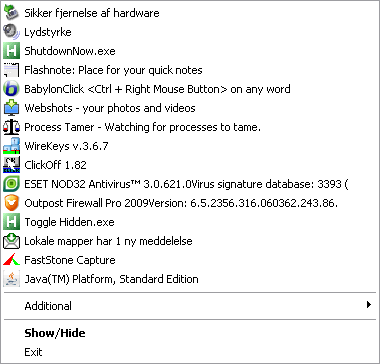
- the cogwheel is PS Tray Factory. Next is Process Explorer, M8 Spartan clipboard, AIMP2, and Beta Clock.

What is hidden inside PS Tray Factory

click thumb:
pstray.gif


Edited:
"1 ny meddelelse" is "one new message" = Thunderbird.
« Last Edit: August 27, 2008, 08:48 PM by Curt »

fenixproductions

  • Honorary Member
  • Joined in 2006
  • **
  • Posts: 1,186
    • Participated in NANY Challenge Four Times
Re: My Taskbar Notification Area Competition
« Reply #26 on: August 27, 2008, 10:14 PM »
I will never understand how is it possible to have so many items in taskbar ;D

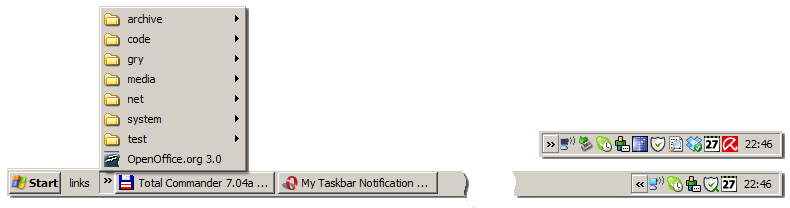
Here's mine:
[attachthumb=#]

"Links" is toolbar created from Desktop's folder which contains all shortcuts given by installers.

Near the clock (from left):
  • Network connection (WinXP, automatic, I cannot switch it off),
  • Safe remove (automatic, USB key for wireless),
  • Skype,
  • Miranda IM (runs together with guy from above),
  • TrueCrypt,
  • COMODO Firewall,
  • Locate32
  • Dropbox
  • Rainlendar,
  • Avira AntiVir

Few other apps which land there too. It is very rare for me to see naked Desktop or focus my eyes on task bar. I am using Total Commander almost all of the time so it handles my most used shortcuts and I became keyboard oriented user.
Надо было учиться, а не камни в школу бросать...
--
f0dder is my personal hero :)

Darwin

  • Charter Member
  • Joined in 2005
  • ***
  • Posts: 6,985
    • Gathering Badge
Re: My Taskbar Notification Area Competition
« Reply #27 on: August 27, 2008, 10:23 PM »
Curt - PS Tray Factory is rock solid on my XP Pro installation (with 2GB RAM) and has never had any noticeable affect on my system resources. Right now it is handling 20 icons (hiding them - there are six more visible, including PS TF's cogwheel icon, but not including the clock. At the moment, it's using 1-3% of my CPU and 4MB of VM. On my Windows 2k machine with 512MB RAM it's using 0% of the CPU and 2MB VM... Of course, it's only hiding 6 icons on that machine with 5 icons visible.

Great... now you've got me wondering why it's using any CPU at all  >:(
"Some people have a way with words, other people,... oh... have not way" - Steve Martin

Curt

  • Supporting Member
  • Joined in 2006
  • **
  • Posts: 7,565
Re: My Taskbar Notification Area Competition
« Reply #28 on: August 28, 2008, 01:20 AM »
- thanks for telling, Darwin.
I guess the CPU usage is because the icons are real-life updated.
PS TF is not causing any speculations when it is 'resting' - only right after I hide or unhide an icon.

Resting:

1.gif
2.gif

Darwin

  • Charter Member
  • Joined in 2005
  • ***
  • Posts: 6,985
    • Gathering Badge
Re: My Taskbar Notification Area Competition
« Reply #29 on: August 28, 2008, 01:31 AM »
Yes, you're right, Curt. I haven't touched my PS Tray Factory icon in hours and just checked it. Also resting:

[attach=#]

EDIT: re-did screenshot...
"Some people have a way with words, other people,... oh... have not way" - Steve Martin
« Last Edit: August 28, 2008, 01:49 AM by Darwin »

allen

  • Charter Member
  • Joined in 2006
  • ***
  • Posts: 1,206
    • Participated in NANY Challenge Once
    • Cody Award
    • Programming School - Deluxe Bonus Medal
    • Military Service Badge - US Navy
    • Linux User
    • Writer
Re: My Taskbar Notification Area Competition
« Reply #30 on: September 15, 2008, 07:51 PM »
taskbar.png
Quicklaunch:
* browser collection
* Boxer
* Windows Live Mail (Dunno why...)
* Zune
* The rest are links to pages launched in chromeless windows in chrome
** Gmail, Google Reader, Timesheet spreadsheet, Urban Dead, Secret Society Wars, Kingdom of Loathing

Running apps:
Chrome, Xyplorer, Evernote

In the tray:
* Microsoft Sync Center
* Dropbox (though I'm considering playing with Microsoft's Mesh if it ever supports mobile)
* Abyss Webserver (Not usually running, but if I'm coding...)
* ArsClip
* Wireless connection doohickey
* Evernote
* Battery dongle
* Network connectivity thingamajig

Original address: https://www.donationcoder.com/forum/index.php?topic=12657.0