DonationCoder.com forum
 
Read-only archive. This is a static copy of the DonationCoder.com forum. Reading and searching work as before; logging in, posting and private messages do not.
Archive of 2026-10-21 · About this archive · Main site

Author Topic: IDEA: Drop to disconnect  (Read 8,697 times)

wreckedcarzz

  • Still lurking. Still an anthro.
  • Charter Member
  • Joined in 2005
  • ***
  • Posts: 1,629
    • Participated in NANY Challenge Twice
    • Coding Snacks
    • Furry Fandom Badge - Furry Fandom
    • Linux User
IDEA: Drop to disconnect
« on: March 09, 2008, 02:33 AM »
Anyone familiar with OS X's drag-and-drop interface should know what I am talking about here right off the bat...

What I am looking for is a small program that tells Windows to Safely Remove Hardware when I drag the drive icon onto the program icon.


Ex:

I plug in a drive. Said drive appears in My Computer.
I copy file ABC.exe on drive
I close drive window
I drag drive icon from My Computer onto DropToDisconnect.exe on my desktop
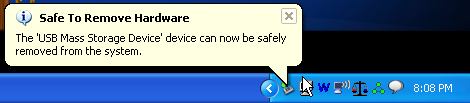
A Windows dialog box appears telling me it is safe to remove the hardware
I remove the drive


Can anyone do this for me? :tellme:


EDIT: And possibly a key-combo that opens a GUI window allowing me to select (multiple, if need be) items to disconnect? That would be really awesome...

jgpaiva

  • Artificial Idiocy
  • Global Moderator
  • Joined in 2006
  • *****
  • Posts: 4,727
    • Cody Award
    • Participated in NANY Challenge Once
    • Coding Snacks
    • Portugal Inhabitant
    • Linux User
Re: IDEA: Drop to disconnect
« Reply #1 on: March 09, 2008, 02:55 AM »
I'm pretty sure there's a solution here on the forum for a VERY similar request.
Unfortunatelly, i couldn't find it.
I did find a related thread, though: IDEA: Useful desktop icon for USB flash drive

Deozaan

  • Charter Member
  • Joined in 2006
  • ***
  • Posts: 9,827
    • Participated in NANY Challenge Eight Times
    • Cody Award
Re: IDEA: Drop to disconnect
« Reply #2 on: March 09, 2008, 03:07 AM »
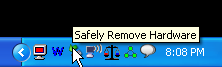
If you can see your desktop, then using Windows default removable drive thingy isn't so bad. Just left click the tray icon once, then select the drive you want to disconnect. Done.

[attachimg=#]

[attachimg=#]

[attachimg=#]
« Last Edit: March 09, 2008, 03:11 AM by Deozaan »

wreckedcarzz

  • Still lurking. Still an anthro.
  • Charter Member
  • Joined in 2005
  • ***
  • Posts: 1,629
    • Participated in NANY Challenge Twice
    • Coding Snacks
    • Furry Fandom Badge - Furry Fandom
    • Linux User
Re: IDEA: Drop to disconnect
« Reply #3 on: March 09, 2008, 03:09 AM »
@Deozaan: I know I can left click, but I prefer to hit the large "object" of an icon, rather than have to position my mouse over this 32x32 tray icon. :-\

@jgpaiva: Reading now...

Deozaan

  • Charter Member
  • Joined in 2006
  • ***
  • Posts: 9,827
    • Participated in NANY Challenge Eight Times
    • Cody Award
Re: IDEA: Drop to disconnect
« Reply #4 on: March 09, 2008, 03:41 AM »
@Deozaan: I know I can left click, but I prefer to hit the large "object" of an icon, rather than have to position my mouse over this 32x32 tray icon. :-\

Oh yeah, I forgot you like the big icons. :)

I wonder if there is a way to get an AHK script to do what I said for you. Then you could make a big shortcut to the AHK script.

ak_

  • Supporting Member
  • Joined in 2007
  • **
  • Posts: 223
Re: IDEA: Drop to disconnect
« Reply #5 on: March 09, 2008, 09:18 AM »
I think USB Disk Ejector could be helpful.

jgpaiva

  • Artificial Idiocy
  • Global Moderator
  • Joined in 2006
  • *****
  • Posts: 4,727
    • Cody Award
    • Participated in NANY Challenge Once
    • Coding Snacks
    • Portugal Inhabitant
    • Linux User
Re: IDEA: Drop to disconnect
« Reply #6 on: March 09, 2008, 10:43 AM »
ak: Usb disk ejector is a perfect solution!!
I've made an ahk script to do what wreckedcarzz initially asked for:

ejectDrive inside
Code
;
; Author:         jgpaiva
; Needs:          USB disk ejector
;
; Script Function:
;	ejects a drive that is dragged into it
;

#notrayicon
#NoEnv ; Recommended for performance and compatibility with future AutoHotkey releases.
SendMode Input ; Recommended for new scripts due to its superior speed and reliability.

numberOfArgs = %0%
arg1 = %1%

StringLeft,arg1,arg1,1

usbEjector = USB_Disk_Eject.exe                                         

if(numberOfArgs = 1)
  run,%usbEjector% /SHOWEJECT /REMOVELETTER %arg1%
else
  run,%usbEjector% /SHOWEJECT 

If you want to not have the usb_disk_ejector.exe on the same folder as ejectDisk, just change its path at the top of the script! ;)

[edit] I forgot to mention: you can disconnect a drive by drag+dropping anything inside the drive onto ejectDrive, it doesn't matter if it's the drive itself or not [/edit]
« Last Edit: March 09, 2008, 10:48 AM by jgpaiva »

wreckedcarzz

  • Still lurking. Still an anthro.
  • Charter Member
  • Joined in 2005
  • ***
  • Posts: 1,629
    • Participated in NANY Challenge Twice
    • Coding Snacks
    • Furry Fandom Badge - Furry Fandom
    • Linux User
Re: IDEA: Drop to disconnect
« Reply #7 on: March 09, 2008, 06:44 PM »
:-* IT WORKS PERFECTLY! :D

Thanks so much jgpaiva, this will be sitting on my desktop permanently now. :Thmbsup:

jgpaiva

  • Artificial Idiocy
  • Global Moderator
  • Joined in 2006
  • *****
  • Posts: 4,727
    • Cody Award
    • Participated in NANY Challenge Once
    • Coding Snacks
    • Portugal Inhabitant
    • Linux User
Re: IDEA: Drop to disconnect
« Reply #8 on: March 09, 2008, 08:01 PM »
Glad to know that, wreckedcarzz!

Original address: https://www.donationcoder.com/forum/index.php?topic=12583.0