DonationCoder.com forum
 
Read-only archive. This is a static copy of the DonationCoder.com forum. Reading and searching work as before; logging in, posting and private messages do not.
Archive of 2026-10-21 · About this archive · Main site

Author Topic: change an existing Windows Explorer's location?  (Read 6,228 times)

ottenm

  • Supporting Member
  • Joined in 2008
  • **
  • Posts: 93
change an existing Windows Explorer's location?
« on: February 22, 2008, 12:21 AM »
When I FARR-browse to a folder, it always opens in a new Windows Explorer.  Is there a way to get it to find an existing Windows Explorer and point to the new folder? 

If not, does that functionality work with any of the replacement explorers?

And regardless, Mouser, is there a Windows Explorer replacement that you endorse?

lanux128

  • Global Moderator
  • Joined in 2005
  • *****
  • Posts: 6,277
    • Coding Snacks
    • Volunteers/Staff
    • Gathering Badge
    • Participated in NANY Challenge Once
    • Linux User
Re: change an existing Windows Explorer's location?
« Reply #1 on: February 22, 2008, 01:49 AM »
if you use a file manager that has option for running in "Single Instance only", then it's possible that the path will be opened in the existing window/pane/tab. as for Windows Explorer, an AutoHotKey script can be used to detect any existing Windows Explorer and point to the new folder. i'll post one if nobody comes forward in a day or two..

about that Explorer replacement, check out this thread: What's your preferred File Manager? ;)

softwarerock

  • Participant
  • Joined in 2008
  • *
  • Posts: 1
Re: change an existing Windows Explorer's location?
« Reply #2 on: May 19, 2008, 11:23 AM »
Hi Lanux128
I am using Ultra Explorer for file management. I want to use Ultra explorer for Custom File manager for FARR. Could u please help me in this.

Thanks in advance.

lanux128

  • Global Moderator
  • Joined in 2005
  • *****
  • Posts: 6,277
    • Coding Snacks
    • Volunteers/Staff
    • Gathering Badge
    • Participated in NANY Challenge Once
    • Linux User
Re: change an existing Windows Explorer's location?
« Reply #3 on: May 19, 2008, 11:46 AM »
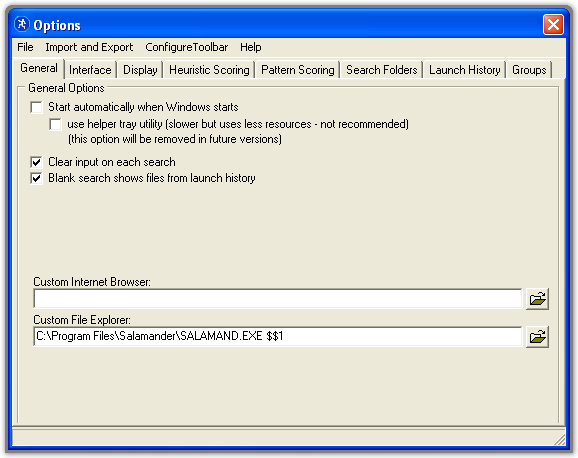
it's actually straight-forward; just go to the options and in the "General" tab browse to or fill-in the path to UE. check out this topic also.

Original address: https://www.donationcoder.com/forum/index.php?topic=12412.0