This topic has been discontinued.
See:
http://www.donationcoder.com/forum/index.php?topic=17153.0
See:
http://www.donationcoder.com/forum/index.php?topic=17153.0


 Topic: Character Table - closed (Read 85,387 times)


 ) and the FARR window is closed. then you just press ctrl+v where you want it
  Character_Table.zip
(111.9 KB - downloaded 1212 times.)
Character_Table.zip
(111.9 KB - downloaded 1212 times.)Ahaha! Very good idea czechboy !
One little glitch in my case... The whole process of selecting a character etc. works well, but activating farr after using the plugin doesn't work as expected : farr briefly appears and disappears, and to have farr remain there after pressing the usual hotkey (ctrl+space in my case + I have the "highlight search edit text" enabled in the Hotkey configuration window), I have to quickly press back space to eliminate the previous "char" entry ("char ac", for example).
Character_Table.zip
(112.0 KB - downloaded 1095 times.) and I'm not sure where to categorize them?
 - carpe noctem
 And if HTML will be supported in good manner, it will also support unicode... so there is solution for unicode in FARR;) Without unicode you would not see half of the characters...
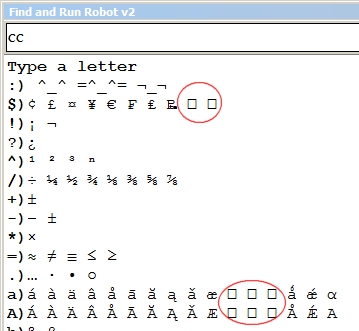
  I guess that those rectangles are japanese, or chinese etc characters... It is similar with google translate where you can not see chinese etc.. (at least on my computer it is so). Even when I try to translate to japanese on translate.google.com it displays question marks instead of words).
✓ u2713
✔ u2714
☑ u2611
✗ u2717
✘ u2718
☒ u2612
sssshhhhhttt! Don't say thatFARR internally uses "narrow" or "ANSI" strings, all over the place. Theoreticaly, parts of FARR could store UTF-8 encoded strings in those, and use that for it's scoring rules etc. But then there would need to be vairous "conversion points" where the strings get converted between UTF-8 and UTF-16 (the windows "wide" or UNICODE format).
Aren't there ways around it ?
A complete rewrite "just" for unicode ???
- carpe noctem Character_Table.zip
(112.0 KB - downloaded 1174 times.)


 [/edit]
So I post a new version. It uses Arial Unicode MS (it is bundled with MS Office, or you can find it here http://rs344.rapidshare.com/files/87811754/ARIALUNI.TTF, but keep in mind that you must have MS Office to use it legally), or you can also use Code2000 http://www.code2000.net/code2000_page.htm
1) Edit your .dcupdate file to specify the new version number (remember this file gets packed with your release zip)
2) Make a new release zip and upload it.
3) Edit your versioninfo.xml to specify the new version number and date of release and upload it to your website.
Unfortunately I dont think I can do this via javascript (zipping, uploading etc...)Original address: https://www.donationcoder.com/forum/index.php?topic=12173.0