DonationCoder.com forum
 
Read-only archive. This is a static copy of the DonationCoder.com forum. Reading and searching work as before; logging in, posting and private messages do not.
Archive of 2026-10-21 · About this archive · Main site

Last post Author Topic: What is your boot time?  (Read 103,864 times)

zridling

  • Friend of the Site
  • Charter Member
  • Joined in 2005
  • ***
  • Posts: 3,299
Re: What is your boot time?
« Reply #25 on: February 01, 2008, 02:42 AM »
Depends on the OS for me, and like so many others, boot-time is not that important to me. It would be if I used a portable (ASUS EEE) or laptop on the go, but it's really not a bragging-rights feature for me. Like mouser and darwin, I'm only rebooting when the machine tells me to.

Vista x64 — 1m,15s
Linux Mint — 55s
FreeBSD — 21s !!
- zaine

Veign

  • Charter Honorary Member
  • Joined in 2005
  • ***
  • Posts: 993
    • Gathering Badge
    • Participated in NANY Challenge Twice
Re: What is your boot time?
« Reply #26 on: February 01, 2008, 03:55 AM »
From when I enter my login password until I have a usable desktop in WinXP is 15s

zridling

  • Friend of the Site
  • Charter Member
  • Joined in 2005
  • ***
  • Posts: 3,299
Re: What is your boot time?
« Reply #27 on: February 01, 2008, 07:11 AM »
You guys don't auto-login?
- zaine

Darwin

  • Charter Member
  • Joined in 2005
  • ***
  • Posts: 6,985
    • Gathering Badge
Re: What is your boot time?
« Reply #28 on: February 01, 2008, 01:18 PM »
In my case, I'm on a notebook and am often on work networks and infrequently on public networks away from home. I feel that I need the additional security of logging in with a password. I also have fast user switching disabled and force log-in to be via ctrl-alt-del...
"Some people have a way with words, other people,... oh... have not way" - Steve Martin

Josh

  • Charter Honorary Member
  • Joined in 2005
  • ***
  • Posts: 3,411
    • Gathering Badge
    • Official Forum Clown
    • Coding Snacks
    • Plugin Coding Medal
    • Volunteers/Staff
    • Military Service Badge - US Army
    • Furry Fandom Badge - Furry Fandom
    • Linux User
Re: What is your boot time?
« Reply #29 on: February 01, 2008, 01:18 PM »
What most people fail to realize is what starts with the OS. On windows, most people have far more items that run on startup.
Strength in Knowledge

nontroppo

  • spinning top
  • Charter Honorary Member
  • Joined in 2005
  • ***
  • Posts: 649
Re: What is your boot time?
« Reply #30 on: February 01, 2008, 01:52 PM »
Just timed (average of two!) on my Macbook with 10.5.1:

To login screen from chime: 22 seconds
From login to ability to run an app: 7 seconds

Startup on OS X is similar to windows, there are system daemons that run before login, and user daemons that run after login. After login, I have 6 processes (outbound firewall UI, Font manager activating some 40 fonts, iCal scheduler, alarm clock, mouse gestures app and Quicksilver) that run. The first mouseover of the dock is a bit jerky for about a second, but it is useable. Annoyingly though, Quicksilver reindexes its catalog on start so it takes an additional 6-10 seconds before I can use it.

Also important for a laptop is *shutdown* speed, and that is fast, about 6-10 seconds.

The thing I love about OS X is there doesn't appear to be any slowdown over time. On my XP partition on the same machine, XP used to boot fast, but over time it takes longer to boot. This is after cleaning consistently, managing startup items with autoruns, defragging etc. And shutdown with XP is infuriatingly inconsistent, sometimes fast but often it just sits there for way too long...

Veign

  • Charter Honorary Member
  • Joined in 2005
  • ***
  • Posts: 993
    • Gathering Badge
    • Participated in NANY Challenge Twice
Re: What is your boot time?
« Reply #31 on: February 01, 2008, 02:43 PM »
You guys don't auto-login?

Nope.  Laptop that I carry with me on the road.  Login and screensaver password.

jgpaiva

  • Artificial Idiocy
  • Global Moderator
  • Joined in 2006
  • *****
  • Posts: 4,727
    • Cody Award
    • Participated in NANY Challenge Once
    • Coding Snacks
    • Portugal Inhabitant
    • Linux User
Re: What is your boot time?
« Reply #32 on: February 01, 2008, 02:45 PM »
You guys don't auto-login?
Yeah, no autologin. I live with friends and don't like people snooping around on my laptop :P

Darwin

  • Charter Member
  • Joined in 2005
  • ***
  • Posts: 6,985
    • Gathering Badge
Re: What is your boot time?
« Reply #33 on: February 01, 2008, 02:48 PM »
Laptop that I carry with me on the road.  Login and screensaver password.

Yes! Screensaver password is a must on the road as well, though whenever I am leaving my workstation/desk I always hit windows-l to make sure that my notebook is locked.
"Some people have a way with words, other people,... oh... have not way" - Steve Martin

Veign

  • Charter Honorary Member
  • Joined in 2005
  • ***
  • Posts: 993
    • Gathering Badge
    • Participated in NANY Challenge Twice
Re: What is your boot time?
« Reply #34 on: February 01, 2008, 02:56 PM »
whenever I am leaving my workstation/desk I always hit windows-l to make sure that my notebook is locked.

Funny thing is I could never remember that windows-l key command.  Thanx for that.

Lashiec

  • Member
  • Joined in 2006
  • **
  • Posts: 2,374
Re: What is your boot time?
« Reply #35 on: February 01, 2008, 07:10 PM »
You guys don't auto-login?

Yup, I'm the lone user of this machine, and it's highly unlikely someone could use it without me being aware of such pretension :D

nosh

  • Supporting Member
  • Joined in 2007
  • **
  • Posts: 1,441
Re: What is your boot time?
« Reply #36 on: February 01, 2008, 09:21 PM »
People enabling login screens only for security purposes would do well to lock their PCs with a 3rd party utility sitting in startup. It'll let everything load & processing/downloads (if any) to commence without having to enter the password first.
I've remapped Win+L to such a utility.

Renegade

  • Tell me something you don't know...
  • Charter Member
  • Joined in 2005
  • ***
  • Posts: 13,291
    • Participated in NANY Challenge Three Times
    • Furry Fandom Badge - Furry Fandom
    • Linux User
Re: What is your boot time?
« Reply #37 on: February 01, 2008, 11:06 PM »
since i only reboot once every couple of weeks these days, i must admit i don't really care about boot time.
...

Good point. Similarly, I rarely reboot.

Another consideration is all the software that you need to load after the startup programs are done, and then getting them into a usable state.

As soon as my computer is loaded, I run:

* Editplus (my text editor) -- There are a few text documents that I load every time and keep them open always
* ALSong (Got to have music!)
* Windows Explorer (Still haven't switched back to using a replacement since I stopped using PowerDesk 4)
* Email client (Varies by computer)
* SQL client (when needed)
* Visual Studio
* Other things as required

That all takes time as well.

So there's another related question -- How long does it take to reboot and get your computer into a state that you can "start"?

Depending on what I'm doing, that takes me up to 20 minutes to get done. Rarely less than 5 minutes though. Usually around 10 minutes or so.

Coming full circle in this post... As such, I rarely reboot. :D

Slow Down Music - Where I commit thought crimes...

Freedom is the right to be wrong, not the right to do wrong. - John Diefenbaker

PhilB66

  • Supporting Member
  • Joined in 2007
  • **
  • Posts: 1,522
Re: What is your boot time?
« Reply #38 on: February 02, 2008, 12:36 AM »
Under 2 minutes from powerup to a workable state.

Mark0

  • Charter Honorary Member
  • Joined in 2005
  • ***
  • Posts: 654
Re: What is your boot time?
« Reply #39 on: February 02, 2008, 02:02 AM »
About 20-25 sec. to be finished / ready to run.
On the eee PC with the default Xandros!  :)

Darwin

  • Charter Member
  • Joined in 2005
  • ***
  • Posts: 6,985
    • Gathering Badge
Re: What is your boot time?
« Reply #40 on: February 02, 2008, 05:13 AM »
People enabling login screens only for security purposes would do well to lock their PCs with a 3rd party utility sitting in startup. It'll let everything load & processing/downloads (if any) to commence without having to enter the password first.
I've remapped Win+L to such a utility.

Nosh, I am intrigued. What 3rd party utility do you use? I ask because I'm in the dark about this category of software and would like to research it. Your app of choice will provide me with a starting point!

Ta,

Mike
"Some people have a way with words, other people,... oh... have not way" - Steve Martin

nosh

  • Supporting Member
  • Joined in 2007
  • **
  • Posts: 1,441
Re: What is your boot time?
« Reply #41 on: February 02, 2008, 06:14 AM »
I'm using a tiny freeware thingie called Syslock
The screenshot on their page doesn't seem accurate, all I see when it's locked is my wallpaper & a Windows login box.
It also comes in  handy whenever I need to clean the keyboard/mouse.  :)

Darwin

  • Charter Member
  • Joined in 2005
  • ***
  • Posts: 6,985
    • Gathering Badge
Re: What is your boot time?
« Reply #42 on: February 02, 2008, 01:32 PM »
Cheers, nosh! I'll check it out.
"Some people have a way with words, other people,... oh... have not way" - Steve Martin

Curt

  • Supporting Member
  • Joined in 2006
  • **
  • Posts: 7,565
Re: What is your boot time?
« Reply #43 on: February 02, 2008, 02:40 PM »
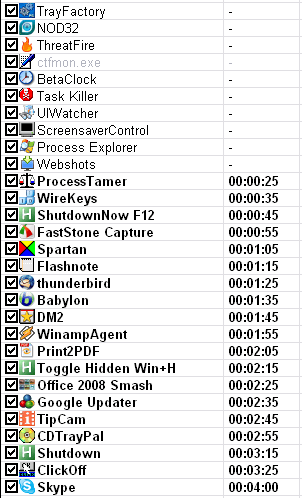
I usually light up a cig and hit the start button, then I most likely leave my appartment, not closing the door, and stand on the gallery, watching the city, until I can hear Skype is logging on to my account. By then I will have finished my cigarette, so the hole of the procedure must have taken about 8 minutes. Other than that I am using Statup Delayer with extreme headroom, 10 seconds for each program, so my startup procedure is: 30 seconds for initial boot and side-page defrag, 90 seconds for XP, 30 seconds for programs starting before Startup Delayer, making it 2½ minute before I can use the machine..--..but then 4 more minutes plus a lot of launching time for the rest of the company, making it a total of some 7 or 8 min. 


I launch my XP several times a day, so I do smoke a lot...  :-[

[attachthumb=#]
« Last Edit: February 02, 2008, 03:22 PM by Curt »

Darwin

  • Charter Member
  • Joined in 2005
  • ***
  • Posts: 6,985
    • Gathering Badge
Re: What is your boot time?
« Reply #44 on: February 03, 2008, 12:43 AM »
Awesome bit of descriptive prose, Curt  :Thmbsup: Thank you for that, I felt like I was "there" :)
"Some people have a way with words, other people,... oh... have not way" - Steve Martin

CleverCat

  • Cat's Are Fun!
  • Supporting Member
  • Joined in 2006
  • **
  • Posts: 1,164
Re: What is your boot time?
« Reply #45 on: February 03, 2008, 07:11 AM »
From Switch on to ready-to-use = +-1-2 mins.

Got a lot of startup progs.  ;D
If you need help - JUST ASK!

app103

  • That scary taskbar girl
  • Global Moderator
  • Joined in 2006
  • *****
  • Posts: 5,888
    • Participated in NANY Challenge Six Times
    • Coding Snacks
    • Gathering Badge
    • Cody Award
    • Volunteers/Staff
Re: What is your boot time?
« Reply #46 on: May 03, 2008, 02:36 AM »
I can't tell you what the current startup time is for my XP machine, since it's not working at the moment, but the old 9x machine...

I have the Class of '99 instrumental cover of Another Brick in the Wall, from the soundtrack of The Faculty (the whole song), as my startup wav and when it's finished the pc is ready to use...5 minutes & 18 seconds.

That song was specially selected because it is the only song I have that is the perfect length and I'll never get sick of hearing it.

Stoic Joker

  • Honorary Member
  • Joined in 2008
  • **
  • Posts: 6,652
    • Cody Award
    • Participated in NANY Challenge Five Times
Re: What is your boot time?
« Reply #47 on: May 04, 2008, 02:43 PM »
Well...
Microsoft Windows [Version 6.0.6001]
Copyright (c) 2006 Microsoft Corporation.  All rights reserved.

C:\Users\Stoic Joker>uptime
\\SPUNKY-V has been up for: 81 day(s), 12 hour(s), 26 minute(s), 21 second(s)


If I remember correctly it took a little over a minute to get going again last time I rebooted. That was an extra "Sanity Check" reboot after installing Vista SP1 RC1 to make sure nothing new & odd showed up in the logs.

nosh

  • Supporting Member
  • Joined in 2007
  • **
  • Posts: 1,441
Re: What is your boot time?
« Reply #48 on: May 05, 2008, 09:49 AM »
Ghacks covered a tiny app today that did a pretty good job showing me my boot time, popping up only after Firefox (the last to load) was ready to go.
[BootTimer]

icekin

  • Supporting Member
  • Joined in 2007
  • **
  • Posts: 264
Re: What is your boot time?
« Reply #49 on: May 30, 2008, 10:03 AM »
I've recently started using WinPatrol, mainly for security reasons, but it does come with a feature called delayed start whereby some programs and services can be set to start later to avoid the computer 'hanging' upon login. I believe that StartRight does something similar.

Original address: https://www.donationcoder.com/forum/index.php?topic=12072.0