DonationCoder.com forum
 
Read-only archive. This is a static copy of the DonationCoder.com forum. Reading and searching work as before; logging in, posting and private messages do not.
Archive of 2026-10-21 · About this archive · Main site

Last post Author Topic: WikidPad - an IDE for your thoughts  (Read 83,362 times)

Perry Mowbray

  • N.A.N.Y. Organizer
  • Charter Member
  • Joined in 2005
  • ***
  • Posts: 1,817
    • Participated in NANY Challenge Three Times
    • Plugin Coding Medal
Re: WikidPad - an IDE for your thoughts
« Reply #25 on: April 03, 2008, 12:03 PM »
Hey guys: what great ideas  :Thmbsup:

I really liked the day page idea:
Second, I do not use scratch pad at all. I have daily record wikipage I use to put random bits

Thanks Kartal: it's a great way to organise stuff that's not necessarily organised so that it can be organised later...

And thanks Justice for your kick start... I've never done anything in AHK before (always used AutoIT myself), but nearly everyone here uses AHK so I'd always thought of getting started (but never really starting  :-[).

So I've combined Kartal's idea of a day page into your script and bingo: wonderful  :Thmbsup:

My Attempt at an AHK Script
Code: (autohotkey)
; WikidJot
SetTitleMatchMode, 2
#NoEnv  ; Recommended for performance and compatibility with future AutoHotkey releases.
SendMode Input  ; Recommended for new scripts due to its superior speed and reliability.
SetWorkingDir %A_ScriptDir%  ; Ensures a consistent starting directory.
#SingleInstance,Force
 
#j::  ; Win+j hotkey
Gui, Add, Text,, Enter note:
Gui, Add, Edit, r9 w400 vClip
Gui, Add, Button,gButtonOK, &Copy to Clipboard  ; The label ButtonOK (if it exists) will be run when the button is pressed.
Gui, Show,, ClipJotter
return  ; End of auto-execute section. The script is idle until the user does something.
return

ButtonOK:
Gui, Submit  ; Save the input from the user to each control's associated variable.

; run wikidpad or switch to it
IfWinNotExist, MyWiki.wiki - WikidPad       ; Look for a specific Wiki ("MyWiki.wiki")
{
  Run, G:\Programmes\WikidPad\Wikidpad.exe  -w G:\Documents\MyWiki\MyWiki.wiki  ; comment this line with correct paths
  WinWait, MyWiki.wiki - WikidPad, , 5
}

; ThisDay is the page where all "today's" notes will go: it's date based and will appear in the ParentLess View
ThisDay := A_DD . "-" . A_MM . "-" . A_YYYY    ' eg: 04-04-2008

WinActivate, MyWiki.wiki - WikidPad         ; Use filename just in case other windows are open

Send, {CTRLDOWN}o{CTRLUP}                   ; Open WikiPage 
WinWait, Open Wiki Word                     ; Wait for the window
IfWinNotActive, Open Wiki Word, WinActivate, Open Wiki Word
WinWaitActive, Open Wiki Word
Send, %ThisDay%                             ; Enter the PageName

WinWaitActive, Open Wiki Word
Send, {ENTER}                               ; Close the Open Wiki Page window

WinWaitActive, Create , , 1                 ; Wait to see if the Create Dialog is displayed
IfWinActive, Create
{
  Send, {ALTDOWN}y{ALTUP}                   ; Of course we want to create a new page!
}

WinWait, MyWiki.wiki - WikidPad
IfWinNotActive, MyWiki.wiki - WikidPad, WinActivate, MyWiki.wiki - WikidPad
WinWaitActive, MyWiki.wiki - WikidPad

ControlFocus, wxWindowClassNR2              ; Set the focus on the editor in case it's not

Loop
{
  ; The 3rd section of the Status Bar displays where the cursor is, use this to show when we've reached the end of the page
  StatusBarGetText, BeforeText , 3 , MyWiki.wiki - WikidPad
  Send, {PgDn}
  StatusBarGetText, AfterText , 3 , MyWiki.wiki - WikidPad
  
  if AfterText = %BeforeText%
    break
}

IfWinNotActive, MyWiki.wiki - WikidPad, WinActivate, MyWiki.wiki - WikidPad
WinWaitActive, MyWiki.wiki - WikidPad

ControlFocus, wxWindowClassNR2              ; Set the focus on the editor in case it's not

Send, {ENTER}{ENTER}                        ; Add a couple of lines
Send, %Clip%                                ; Insert our text

GuiClose:
Gui,Destroy

kartal

  • Supporting Member
  • Joined in 2008
  • **
  • Posts: 1,529
Re: WikidPad - an IDE for your thoughts
« Reply #26 on: April 03, 2008, 03:12 PM »
Perry Mowbray

thansk for the script, I will try it today.

One more method I use is through "launchy" . I made launcy command "todo" which uses my default notepad and sends my path\to\mytodo.wiki as argument to notepad. What I do is press "capslock" to activate launcy and type "todo". This will open "mytodo.wiki" in my default notepad and then I will type the stuff, for example todo:read the book. Since "todo:" is a special keyword in wikipad it will show in special view. In wikipad mytodo wiki page will be activated with the new stuff I just have typed. It works great. And you can use this for any wiki page since all are text based

What I am looking for is actually a way to append text to any file via command line. This way I can just pass any text line to any wiki page without opening any text editor via launcy or farr. Probably there is a way but I have not searched for a solution seriously yet.


justice

  • Solve issues simply.
  • Supporting Member
  • Joined in 2006
  • **
  • Posts: 1,898
    • Participated in NANY Challenge Four Times
    • Cody Award
    • Coding Snacks
    • DJ Badge - DJ
Re: WikidPad - an IDE for your thoughts
« Reply #27 on: April 03, 2008, 06:08 PM »
echo Your text here >> todo.wiki

kartal

  • Supporting Member
  • Joined in 2008
  • **
  • Posts: 1,529
Re: WikidPad - an IDE for your thoughts
« Reply #28 on: April 03, 2008, 07:28 PM »
Justice that adds to bottom of the text, is there a way to add to beginning of the text file?

brotherS

  • Master of Good Ideas
  • Honorary Member
  • Joined in 2005
  • **
  • Posts: 2,261
Re: WikidPad - an IDE for your thoughts
« Reply #29 on: April 03, 2008, 07:58 PM »
Thanks for the review!

I thought about using/trying TiddlyWiki a few times - but didn't yet - and won't use/test WikidPad any time soon, but it's great to know what to expect.

For the time being, I'm using .txt files that I can easily find with Locate (http://www.donationcoder.com/forum/index.php?topic=1385.0) and MindMaps for developing connected thoughts.
Thank you.

Perry Mowbray

  • N.A.N.Y. Organizer
  • Charter Member
  • Joined in 2005
  • ***
  • Posts: 1,817
    • Participated in NANY Challenge Three Times
    • Plugin Coding Medal
Re: WikidPad - an IDE for your thoughts
« Reply #30 on: April 04, 2008, 02:40 AM »
Justice that adds to bottom of the text, is there a way to add to beginning of the text file?

You'd have to (using a batch):
1. write your line of text to a new file
2. write the old file to the new file
3. delete the old file
4. rename the new file to the old file

Or easy enough using a script (VBS,JS,AiT,AHK, etc) to use concatenate the two (in the correct order) and overwrite the original file.

But reading your original question I thought you were wanting to write to a specific Wiki page? If you use the Original Gadfly Database Type then each Page/Word is saved as a different file. Then you'd be able to add text to the end of the file.

kartal

  • Supporting Member
  • Joined in 2008
  • **
  • Posts: 1,529
Re: WikidPad - an IDE for your thoughts
« Reply #31 on: April 04, 2008, 02:48 AM »
Perry I use txt based database so yes I can edit the text files. Also Mouser told me in another topic that he had wrote a text appender for FARR, it can add to beginning or ending of a file. I had tested it works great

justice

  • Solve issues simply.
  • Supporting Member
  • Joined in 2006
  • **
  • Posts: 1,898
    • Participated in NANY Challenge Four Times
    • Cody Award
    • Coding Snacks
    • DJ Badge - DJ
Re: WikidPad - an IDE for your thoughts
« Reply #32 on: April 04, 2008, 08:28 AM »
echo your text here >> temp.txt
type todo.wiki >> temp.txt
move temp.txt todo.wiki /-y

or create a batch file add.bat:
Quote
@echo off
echo %2 >> temp.txt
type %1 >> temp.txt
move temp.txt %1 /-y
and then call it like: add.bat todo.wiki "your text here"

edit: oops it's /-y to confirm overwriting if the destination file exists.
« Last Edit: April 04, 2008, 08:41 AM by justice »

kartal

  • Supporting Member
  • Joined in 2008
  • **
  • Posts: 1,529
Re: WikidPad - an IDE for your thoughts
« Reply #33 on: July 28, 2008, 05:33 AM »
Here is a nice Wikidpad trick.

You can clone wikidpad with current page (view-clone window)
Now one window will be in edit mode and the other one will be in html preview mode.
When you change your content in edit mode, the next preview window(clone) will also update the content.

Ampa

  • I am cute ;)
  • Charter Member
  • Joined in 2005
  • ***
  • Posts: 592
Re: WikidPad - an IDE for your thoughts
« Reply #34 on: July 28, 2008, 11:00 AM »
First new beta since January released last weekend...

Quote from: change log
Jul. 27, 2008 (1.9beta16)

  • Option to set color of editor margin.
    See OptionsDialog#*Margin# color*
  • Option to set color of tree background.
    See OptionsDialog#++++# Tree# options
  • Option to set length of recent wikis list.
    See OptionsDialog#*Recent# wikis# list# length*
  • Option to store relative pathes to recent wikis.
    See OptionsDialog#*Store# relative# pathes# to# wikis*
  • Bug fixed: "Open Wiki Word" dialog was sometimes closed
    when keeping it open makes more sense
  • Bug reduced(?): Linux: Handling of local file URLs to start
    applications works better
  • Support for all uppercase and lowercase letters in the
    Unicode set for creating camel-case wiki words independent of OS language

Wish development was a little faster - I am using Wikidpad a lot, but there are a few shortcomings that I'd like to see resolved.

Perry Mowbray

  • N.A.N.Y. Organizer
  • Charter Member
  • Joined in 2005
  • ***
  • Posts: 1,817
    • Participated in NANY Challenge Three Times
    • Plugin Coding Medal
Re: WikidPad - an IDE for your thoughts
« Reply #35 on: July 28, 2008, 11:24 AM »
First new beta since January released last weekend...

Thanks Ampa! Yes, I'm using WikidPad more and more, and it is somewhat slow, but if it stays slow and steady I'll be happy...

oversky

  • Participant
  • Joined in 2008
  • *
  • Posts: 19
Re: WikidPad - an IDE for your thoughts
« Reply #36 on: October 10, 2008, 09:48 PM »
How can I copy a table from excel into Wikidpad?

Perry Mowbray

  • N.A.N.Y. Organizer
  • Charter Member
  • Joined in 2005
  • ***
  • Posts: 1,817
    • Participated in NANY Challenge Three Times
    • Plugin Coding Medal
Re: WikidPad - an IDE for your thoughts
« Reply #37 on: October 16, 2008, 10:17 AM »
How can I copy a table from excel into Wikidpad?

Of course the table structure is quite different, eh?

In WikidPad I generally do:
Code
<<|
Cell One:One | Cell One:Two
Cell Two:One | Cell Two:Two
>>

So all you'd need to do is to write some VBA to put your Excel cells into that format and put it on the clipboard ready for pasting into WikidPad.

At my last job I wrote a macro to do the same thing but formatted for Confluence, I'll see if I can dig it up...

Perry Mowbray

  • N.A.N.Y. Organizer
  • Charter Member
  • Joined in 2005
  • ***
  • Posts: 1,817
    • Participated in NANY Challenge Three Times
    • Plugin Coding Medal
Re: WikidPad - an IDE for your thoughts
« Reply #38 on: October 16, 2008, 11:04 AM »
OK, found it and made the few changes for WikidPad...

1. Copy the following code into the WorkBook Code.

Code: (vb)
Sub SelectionToWiki()
    Dim specialChars As String
    specialChars = Chr(7) & Chr(10) & Chr(13) & "\"
    
    result = ""
    For i = 1 To Selection.Rows.Count
        'result = result & "| "
        For j = 1 To Selection.Columns.Count
            Dim cell As Range
            Set cell = Selection.Cells(i, j)
            cellStr = cell.Value
            
            ' New Lines don't work in WikidPad Cells so
            cellStr = Replace(cellStr, Chr(10), " / ")
            
            If cell.Font.Bold Then cellStr = "*" & cellStr & "*"
            If cell.Font.Italic Then cellStr = "_" & cellStr & "_"
            result = result & cellStr & " | "
        Next
        ' remove the last pipe
        result = Left(result, Len(result) - 3)
        ' add a line feed
        result = result & Chr(13)
    Next
    ' wrap the table formatting
    result = "<<|" & Chr(13) & result & ">>"
    
    Dim MyDataObj As New DataObject
    MyDataObj.SetText result
    MyDataObj.putinclipboard
    
    MsgBox "WikidPad table copied to clipboard: " & Chr(13) & Chr(13) & result
End Sub

2. Add a table to the WorkSheet:
Screenshot - 16_10_2008 , 9_54_19 PM.png

3. Select the Range to copy

4. Run the Macro: Alt+F8 and select the Macro and click "Run"

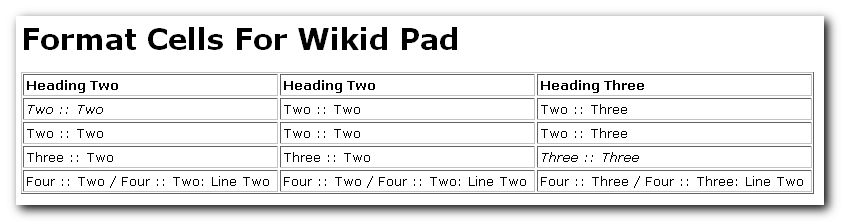
5. Paste the clipboard into a WikidPad Page. It should look like this:
Code: (html4strict)
<<|
*Heading Two* | *Heading Two* | *Heading Three*
_Two :: Two_ | Two :: Two | Two :: Three
Two :: Two | Two :: Two | Two :: Three
Three :: Two | Three :: Two | _Three :: Three_
Four :: Two / Four :: Two: Line Two | Four :: Two / Four :: Two: Line Two | Four :: Three / Four :: Three: Line Two
>>

6. Preview the page. It should look like this:
Screenshot - 16_10_2008 , 9_55_16 PM.png

Original address: https://www.donationcoder.com/forum/index.php?topic=12062.0