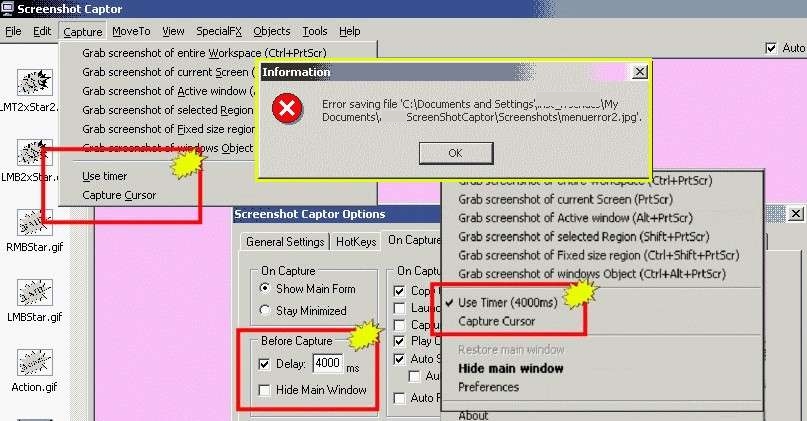
If i select in the settings
or in the tray menu
"Use Timer" or "Captor Cursor"
than this setting is not show in the "Capture menu".
If i check this options in the menu
they are also set in tray and settings.
----
AND FYI
my screenshots are now suddently stored in the C:\ root
(path in the settings are set as in my other post)
---------------
AND FYI
i get an "can not save" error.
*.PNG test saving was a 0 byte file
*.JPG test saving was the same error, but file was saved.
or in the tray menu
"Use Timer" or "Captor Cursor"
than this setting is not show in the "Capture menu".
If i check this options in the menu
they are also set in tray and settings.
----
AND FYI
my screenshots are now suddently stored in the C:\ root
(path in the settings are set as in my other post)
---------------
AND FYI
i get an "can not save" error.
*.PNG test saving was a 0 byte file
*.JPG test saving was the same error, but file was saved.