DonationCoder.com forum
 
Read-only archive. This is a static copy of the DonationCoder.com forum. Reading and searching work as before; logging in, posting and private messages do not.
Archive of 2026-10-21 · About this archive · Main site

Author Topic: IDEA: toolbar with spec character links  (Read 19,269 times)

Curt

  • Supporting Member
  • Joined in 2006
  • **
  • Posts: 7,565
IDEA: toolbar with spec character links
« on: January 20, 2008, 12:19 AM »
This can hardly be a coding "snack", but where do I go to ask for a full meal program?

I would like a (auto-hiding) toolbar / extra taskbar filled with shortcuts to special characters of my own choice. You know, characters like ßИ|ðÞʤξæøåὩ™⅞ or whatever, and shortcuts represented by icons on a toolbar. Click your special character's icon and it is injected to the clipboard. The smallest monitor is appr 800 pixels wide. One small icon is 16 pixels + 1 pixel for space = giving room for at least 45 favourite special characters, one character per icon, on a 800x18 pixels auto-hiding special tool / task -bar. If your screen is any wider you can have more characters. If your screen is high you can have more rows of icons.

Is this doable? Yes, of course, but is it doable at DonationCoder? :tellme:

app103

  • That scary taskbar girl
  • Global Moderator
  • Joined in 2006
  • *****
  • Posts: 5,888
    • Participated in NANY Challenge Six Times
    • Coding Snacks
    • Gathering Badge
    • Cody Award
    • Volunteers/Staff
Re: IDEA: toolbar with spec character links
« Reply #1 on: January 20, 2008, 11:12 AM »
I should be able to do this, believe it or not.

I could use much of the code from my DC Search deskbar project to accomplish this, once that is finished and a few issues it has have been resolved.

I am still working through a few XP theme issues with it. Once I have those straightened out, you will have your special characters toolbar on your taskbar, too.  ;)

Curt

  • Supporting Member
  • Joined in 2006
  • **
  • Posts: 7,565
Re: IDEA: toolbar with spec character links
« Reply #2 on: January 20, 2008, 01:14 PM »
I should be able to do this, believe it or not. I could use much of the code from my DC Search deskbar project to accomplish this, once that is finished and a few issues it has have been resolved. I am still working through a few XP theme issues with it. Once I have those straightened out, you will have your special characters toolbar on your taskbar, too. 

This is the true DC spirit!  :Thmbsup:

What a way to mark post number 1700 (Edit: 1.699), April!  :-*  [attachimg=#]
« Last Edit: January 20, 2008, 01:16 PM by Curt »

app103

  • That scary taskbar girl
  • Global Moderator
  • Joined in 2006
  • *****
  • Posts: 5,888
    • Participated in NANY Challenge Six Times
    • Coding Snacks
    • Gathering Badge
    • Cody Award
    • Volunteers/Staff
Re: IDEA: toolbar with spec character links
« Reply #3 on: January 20, 2008, 01:17 PM »
Keep your eyes open for post #2000 and snag a screenshot when it happens. I am likely to miss it. I never seem to pay attention to such things.

Curt

  • Supporting Member
  • Joined in 2006
  • **
  • Posts: 7,565
Re: IDEA: toolbar with spec character links
« Reply #4 on: January 20, 2008, 01:30 PM »
I will do my best to grab your #2000

My imagination tells me the hard part of the thread's IDEA may be to get special characters to inject AT ALL, and then to create a proper icon for each?
« Last Edit: January 20, 2008, 01:34 PM by Curt »

app103

  • That scary taskbar girl
  • Global Moderator
  • Joined in 2006
  • *****
  • Posts: 5,888
    • Participated in NANY Challenge Six Times
    • Coding Snacks
    • Gathering Badge
    • Cody Award
    • Volunteers/Staff
Re: IDEA: toolbar with spec character links
« Reply #5 on: January 20, 2008, 01:32 PM »
Why does it have to be an icon? Why can't it be the actual character on the button?

Curt

  • Supporting Member
  • Joined in 2006
  • **
  • Posts: 7,565
Re: IDEA: toolbar with spec character links
« Reply #6 on: January 20, 2008, 01:38 PM »
- even smarter! You're right: I should tell what result I need, not how I imagine it may be done, and then I should let the specialists make it happen!  :up:
« Last Edit: January 20, 2008, 05:44 PM by Curt »

skrommel

  • Fastest code in the west
  • Developer
  • Joined in 2005
  • ***
  • Posts: 933
    • Participated in NANY Challenge Twice
    • Coding Snacks
Re: IDEA: toolbar with spec character links
« Reply #7 on: February 10, 2008, 10:02 PM »
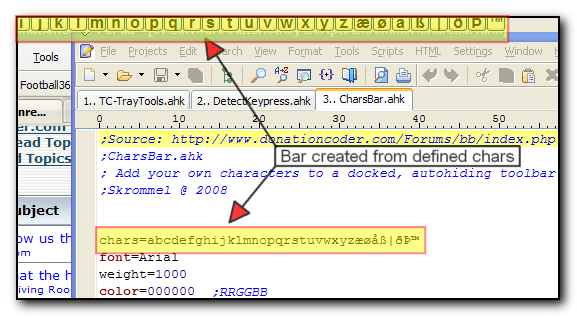
:) Try CharsBar!

Add your own characters to a docked, autohiding toolbar.
Change the settings in the top of the script.

Skrommel

Code
;CharsBar.ahk
; Add your own characters to a docked, autohiding toolbar 
;Skrommel @ 2008


chars=abcdefghijklmnopqrstuvwxyzæøåß|ðÞ™
font=Arial
weight=1000
color=000000  ;RRGGBB
size=12
buttonw=20
buttonh=20
xspace=0
yspace=0
dock=top      ; top left right bottom


#NoEnv
#SingleInstance,Force
SetBatchLines,-1
SetWinDelay,0
SetControlDelay,0
SendMode,Input
SetWorkingDir,%A_ScriptDir%
CoordMode,Mouse,Screen

Gui,+LastFound
guiid:=WinExist()

DllCall( "RegisterShellHookWindow", UInt,guiid ) 
MsgNum := DllCall( "RegisterWindowMessage", Str,"SHELLHOOK" ) 
OnMessage( MsgNum, "ShellMessage" ) 

building=1
Gui,+AlwaysOnTop +ToolWindow -Resize -Border -Caption
Gui,Margin,0,0
Gui,Font,S%size% W%weight% C%color%,%font%
Loop,% StrLen(chars)
{ 
  char:=SubStr(chars,A_Index,1)
  ascii:=Asc(char)
  Gui,Add,Button,% "GCLICK W" buttonw " H" buttonh,% char
}
Gui,Show
building=0
Gosub,BUILD
SetTimer,MOUSE,100
SetTimer,HIDE,3000
Return


ShellMessage( wParam,lParam ) 
{ 
  Global activeid
  Global guiid
  
  If ( wParam = 4 ) ;  HSHELL_WINDOWACTIVATED=4 ;HSHELL_WINDOWCREATED=1 
  {
    If (lParam<>guiid And lParam<>0)
    {
      activeid:=lParam
    }
  }
}


MOUSE:
MouseGetPos,mx,my,mid,mctrl

IfWinExist,ahk_id %guiid%
  WinGetPos,guix,guiy,guiw,guih,ahk_id %guiid%
If (mx>=guix And mx<=guix+guiw And my>=guiy And my<=guiy+guih)
{
  If hiding=1
    SetTimer,HIDE,Off
  hiding=0
}
Else
{
  If hiding=0
    SetTimer,HIDE,1000
  hiding=1
}
If ((my<=monitorTop And dock="top") Or (my>=monitorBottom-1 And dock="bottom") Or (mx<=monitorLeft And dock="left") Or (mx>=monitorRight+1 And dock="right"))
{
  SetTimer,HIDE,Off
  WinShow,ahk_id %guiid%
  hiding=0
}
Return


HIDE:
SetTimer,HIDE,Off
WinHide,ahk_id %guiid%
Return


CLICK:
If A_GuiEvent In Normal,DoubleClick
{
  WinActivate,ahk_id %activeid%
  Send,%A_GuiControl%

;  ControlSendRaw,,%A_GuiControl%,ahk_id %activeid%
}
Return


GuiSize:
If building=1
  Return
If ErrorLevel=1  ;minimized
  Return
Gosub,BUILD
Return


BUILD:
building=1

Sysget,primary,MonitorPrimary
Sysget,monitor,MonitorWorkArea,%primary% 

If dock=top
  WinMove,ahk_id %guiid%,,% monitorLeft,% monitorTop,% monitorRight-monitorLeft,% buttonh+yspace
If dock=bottom
  WinMove,ahk_id %guiid%,,% monitorLeft,% monitorBottom-buttonh-yspace,% monitorRight-monitorLeft,% buttonh+yspace ;% 
If dock=left
  WinMove,ahk_id %guiid%,,% monitorLeft,% monitorTop,% buttonw+xspace,% monitorBottom-monitorTop
If dock=right
  WinMove,ahk_id %guiid%,,% monitorRight-buttonw-xspace,% monitorTop,% buttonw+xspace,% monitorBottom-monitorTop

WinGet,controls,ControlList
x:=xspace
y:=yspace
Loop,Parse,controls,`n
{ 
  GuiControl,MoveDraw,%A_LoopField%,X%x% Y%y% 
  x:=x+buttonw+xspace-1
  If (x>A_GuiWidth-buttonw-xspace)
  {
    x:=xspace
    y:=y+buttonh+yspace-1
  }
}
building=0
Return

Curt

  • Supporting Member
  • Joined in 2006
  • **
  • Posts: 7,565
Re: IDEA: toolbar with spec character links
« Reply #8 on: February 10, 2008, 11:14 PM »
Wow, skrommel. Thanks a lot!


I only have one question: What on earth do I do with such a code?  :tellme:


/an IT-analphabetic  :-[

jgpaiva

  • Artificial Idiocy
  • Global Moderator
  • Joined in 2006
  • *****
  • Posts: 4,727
    • Cody Award
    • Participated in NANY Challenge Once
    • Coding Snacks
    • Portugal Inhabitant
    • Linux User
Re: IDEA: toolbar with spec character links
« Reply #9 on: February 10, 2008, 11:28 PM »
Just go to Autohotkey.com, download and install autohotkey. Then, open notepad, copy-paste that code there and save it as "CharsBar.ahk".
Then just double-click charsbar.ahk :)

Curt

  • Supporting Member
  • Joined in 2006
  • **
  • Posts: 7,565
Re: IDEA: toolbar with spec character links
« Reply #10 on: February 11, 2008, 01:38 PM »
Thanks, jgpaiva.

Why does it have to be an icon? Why can't it be the actual character on the button?

Suddenly I remember why I asked for icons in the first place. I sometimes have to quote in ancient Greek, but too often I cannot remember the difference between eta, theta and zeta (I don't "know" Greek), and others. This is where an icon is ideal because of the tooltip telling me the proper name.

Can skrommels version show tooltips?   :tellme:

lanux128

  • Global Moderator
  • Joined in 2005
  • *****
  • Posts: 6,277
    • Coding Snacks
    • Volunteers/Staff
    • Gathering Badge
    • Participated in NANY Challenge Once
    • Linux User
Re: IDEA: toolbar with spec character links
« Reply #11 on: August 30, 2008, 12:12 PM »
Curt, what was the error message you received?

anyway, after you mentioned this problem, i had tried the script and it displays the chars but doesn't inserts them when i click/double-click on it.

SC_2008-08-30_003.png

PhilB66

  • Supporting Member
  • Joined in 2007
  • **
  • Posts: 1,522
Re: IDEA: toolbar with spec character links
« Reply #12 on: August 30, 2008, 12:44 PM »
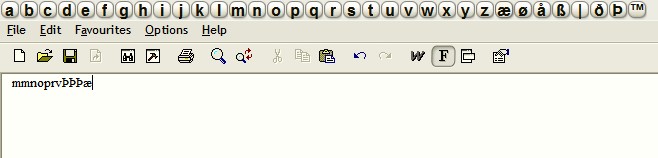
Odd... works fine on my machine.

[attach]

Curt

  • Supporting Member
  • Joined in 2006
  • **
  • Posts: 7,565
Re: IDEA: toolbar with spec character links
« Reply #13 on: August 30, 2008, 05:14 PM »
I am very pleased to see that it is working for you, Phil, and to some degree also to you, lanux. On my setup there is no toolbar at all, so I never get to test the pasting in the first place.

I have other AHK scripts, and they're are working fine.

Edited:
No error messages, or anything else for that matter.
« Last Edit: August 30, 2008, 05:16 PM by Curt »

Original address: https://www.donationcoder.com/forum/index.php?topic=11926.0