DonationCoder.com forum
 
Read-only archive. This is a static copy of the DonationCoder.com forum. Reading and searching work as before; logging in, posting and private messages do not.
Archive of 2026-10-21 · About this archive · Main site

Author Topic: New feature "Copy File to Clipboard"  (Read 10,337 times)

ioSIS

  • Participant
  • Joined in 2007
  • *
  • Posts: 8
New feature "Copy File to Clipboard"
« on: January 15, 2008, 10:05 PM »
Hello!

May you add feature "Copy File to Clipboard" at "On Capture" list?
It will be very useful fo me. (and not only for me, I hope )

jgpaiva

  • Artificial Idiocy
  • Global Moderator
  • Joined in 2006
  • *****
  • Posts: 4,727
    • Cody Award
    • Participated in NANY Challenge Once
    • Coding Snacks
    • Portugal Inhabitant
    • Linux User
Re: New feature "Copy File to Clipboard"
« Reply #1 on: January 15, 2008, 10:10 PM »
You mean so that you can paste it in windows explorer in some other folder, right?

mouser

  • First Author
  • Administrator
  • Joined in 2005
  • *****
  • Posts: 40,931
    • Gathering Badge
    • Plugin Coding Medal
    • Participated in NANY Challenge Seventeen Times
    • Cody Award
    • Coding Snacks
    • Volunteers/Staff
Re: New feature "Copy File to Clipboard"
« Reply #2 on: January 16, 2008, 12:31 AM »
SC already has options for either copying new screenshot file path to clipboard, or copying the bitmap file data itself..
ah i see maybe you want a third option, to save the file, and then copy the file data.  hmm interesting idea..
« Last Edit: January 16, 2008, 12:34 AM by mouser »

ioSIS

  • Participant
  • Joined in 2007
  • *
  • Posts: 8
Re: New feature "Copy File to Clipboard"
« Reply #3 on: January 16, 2008, 01:12 AM »
You mean so that you can paste it in windows explorer in some other folder, right?

Exactly!  :)

mouser

  • First Author
  • Administrator
  • Joined in 2005
  • *****
  • Posts: 40,931
    • Gathering Badge
    • Plugin Coding Medal
    • Participated in NANY Challenge Seventeen Times
    • Cody Award
    • Coding Snacks
    • Volunteers/Staff
Re: New feature "Copy File to Clipboard"
« Reply #4 on: January 16, 2008, 01:24 AM »
ok, putting it on todo list, seems reasonable.

lanux128

  • Global Moderator
  • Joined in 2005
  • *****
  • Posts: 6,277
    • Coding Snacks
    • Volunteers/Staff
    • Gathering Badge
    • Participated in NANY Challenge Once
    • Linux User
Re: New feature "Copy File to Clipboard"
« Reply #5 on: January 16, 2008, 01:31 AM »
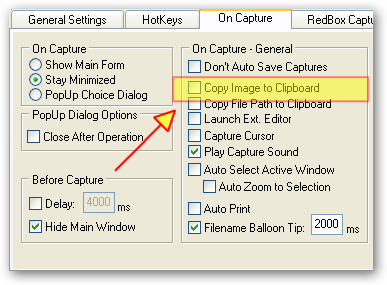
doesn't this do what you want?

[attach=#]

jgpaiva

  • Artificial Idiocy
  • Global Moderator
  • Joined in 2006
  • *****
  • Posts: 4,727
    • Cody Award
    • Participated in NANY Challenge Once
    • Coding Snacks
    • Portugal Inhabitant
    • Linux User
Re: New feature "Copy File to Clipboard"
« Reply #6 on: January 16, 2008, 01:33 AM »
lanux: apparently, everyone is misreading the request. (i also did the first few times i read it).

What he wants is to copy the file itself to the clipboard, not the image. Copying the file would allow you to paste it at the desktop, for example. (this refers to exactly the same thing as hitting ctrl-c on a file on windows explorer)

It's just about the only option possibly missing on that "on capture" dialog ;)

jgpaiva

  • Artificial Idiocy
  • Global Moderator
  • Joined in 2006
  • *****
  • Posts: 4,727
    • Cody Award
    • Participated in NANY Challenge Once
    • Coding Snacks
    • Portugal Inhabitant
    • Linux User
Re: New feature "Copy File to Clipboard"
« Reply #7 on: January 16, 2008, 01:35 AM »
If there was a program that'd copy a file to the clipboard, mouser could easily add a "launch program X with file as argument" option that would solve this request (and probably a bunch of future requests)..

lanux128

  • Global Moderator
  • Joined in 2005
  • *****
  • Posts: 6,277
    • Coding Snacks
    • Volunteers/Staff
    • Gathering Badge
    • Participated in NANY Challenge Once
    • Linux User
Re: New feature "Copy File to Clipboard"
« Reply #8 on: January 16, 2008, 01:55 AM »
...copy the file itself to the clipboard...

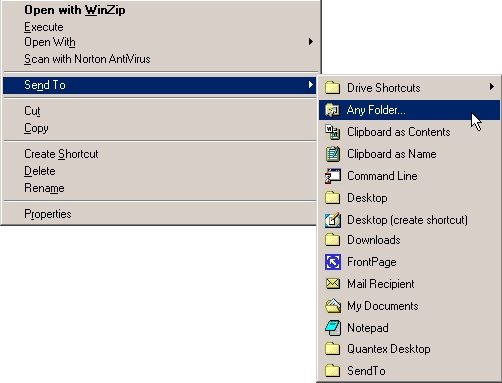
i see he meant the file contents itself. i remember the old TweakUI had this feature..

[attach=#]

ccondrup

  • Supporting Member
  • Joined in 2006
  • **
  • Posts: 15
Re: New feature "Copy File to Clipboard"
« Reply #9 on: January 19, 2008, 03:35 PM »
second this request... OR have a "copy to.." menu, not only a "move to.." ;)

lanux128

  • Global Moderator
  • Joined in 2005
  • *****
  • Posts: 6,277
    • Coding Snacks
    • Volunteers/Staff
    • Gathering Badge
    • Participated in NANY Challenge Once
    • Linux User
Re: New feature "Copy File to Clipboard"
« Reply #10 on: January 19, 2008, 05:31 PM »
second this request... OR have a "copy to.." menu, not only a "move to.." ;)
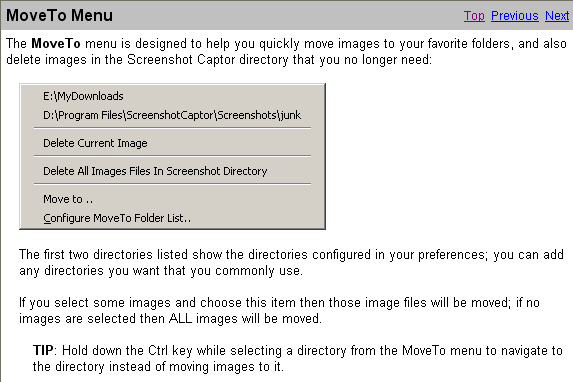
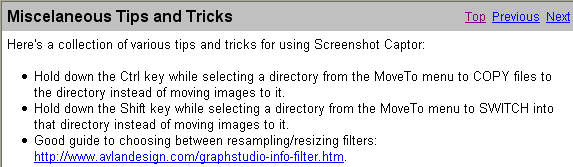
SC already has this function, albeit needs some prodding to find it. check out the following screenshots from the help file.. :)

Here is the MoveTo Menu
[attach=#]

And here are the different keyboard combinations available
[attach=#]

Original address: https://www.donationcoder.com/forum/index.php?topic=11848.0