DonationCoder.com forum
 
Read-only archive. This is a static copy of the DonationCoder.com forum. Reading and searching work as before; logging in, posting and private messages do not.
Archive of 2026-10-21 · About this archive · Main site

Author Topic: H E L P !!! I lost a spreadsheet!  (Read 13,921 times)

CodeTRUCKER

  • Bush Flying... where I'd rather be.
  • Supporting Member
  • Joined in 2006
  • **
  • Posts: 1,086
    • Participated in NANY Challenge Once
    • Military Service Badge - US Navy
H E L P !!! I lost a spreadsheet!
« on: January 12, 2008, 07:42 AM »
I closed my spreadsheet and never saved it and for some unknown reason when the dialog came I chose close without saving. 

Is there a way to get that file back?  Is there a temporary hiding somewhere?

TIA!
DISCLAIMER - I have made and make many threads for questions and even project posts across the Internet. Unfortunately, many are in limbo because I cannot remember where they are at. If anyone knows of an open thread or an unanswered inquiry, please PM me. Thank you.
   
Notice: Unless stated otherwise, I receive no compensation for anything I post here.
« Last Edit: May 13, 2009, 01:02 AM by CodeTRUCKER »

PhilB66

  • Supporting Member
  • Joined in 2007
  • **
  • Posts: 1,522
Re: H E L P !!! I lost a spreadsheet!
« Reply #1 on: January 12, 2008, 09:57 AM »
Try in Documents and Settings\User Name\Application Data\Microsoft\Excel\

Oh, wait... just found this...

"Excel automatically saves every 10 minutes to the default location of "C:\ Documents and Settings\<username>\Local Settings\Temp" The files are identifiable as they are saved as a number .tmp e.g. "28.tmp". This means that they look different from word or any other temporary files that are being saved there by other applications."

(Source Recovery of MS Office Files from Temp Files)
« Last Edit: January 12, 2008, 10:03 AM by PhilB66 »

CodeTRUCKER

  • Bush Flying... where I'd rather be.
  • Supporting Member
  • Joined in 2006
  • **
  • Posts: 1,086
    • Participated in NANY Challenge Once
    • Military Service Badge - US Navy
Re: H E L P !!! I lost a spreadsheet!
« Reply #2 on: January 12, 2008, 05:16 PM »
No dice.  There is nothing there that I can find.  Thanks for trying.
DISCLAIMER - I have made and make many threads for questions and even project posts across the Internet. Unfortunately, many are in limbo because I cannot remember where they are at. If anyone knows of an open thread or an unanswered inquiry, please PM me. Thank you.
   
Notice: Unless stated otherwise, I receive no compensation for anything I post here.
« Last Edit: May 13, 2009, 01:04 AM by CodeTRUCKER »

PPLandry

  • Supporting Member
  • Joined in 2007
  • **
  • Posts: 702
Re: H E L P !!! I lost a spreadsheet!
« Reply #3 on: January 13, 2008, 03:59 AM »
I closed my spreadsheet and never saved it and for some unknown reason when the dialog came I chose close without saving. 

Is there a way to get that file back?  Is there a temporary hiding somewhere?

TIA!
If the file was opened from an email client, it is saved in a temp folder. It should stay there quite some time.

If you created it, and true backups are not enabled (file>save as>tools>general options: for 2002 at least), you can't use the backup referenced earlier. That one in only in case of crash. It is deleted on file>close.

After all these years of pseudo word and excel integration, the two behave so differently  :down: backup management is just one example of this.  >:( :down:
Real generosity toward the future lies in giving all to the present -- Albert Camus -- www.InfoQube.biz
« Last Edit: January 13, 2008, 04:03 AM by PPLandry »

lanux128

  • Global Moderator
  • Joined in 2005
  • *****
  • Posts: 6,277
    • Coding Snacks
    • Volunteers/Staff
    • Gathering Badge
    • Participated in NANY Challenge Once
    • Linux User
Re: H E L P !!! I lost a spreadsheet!
« Reply #4 on: January 13, 2008, 10:14 AM »
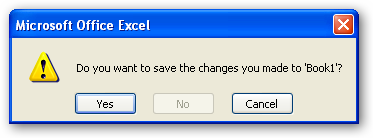
i once made an AHK script for a friend as he kept running into situations like this. assuming you use Microsoft Excel, maybe you'll find it useful too.. :) this script monitors and disables the "No" button in the dialog box that prompts up when trying to close an unsaved file. (see pic).
[attach=#]

P.S. in case you really need to close a file without saving, there is a hotkey (Win+p) that will turn off the monitoring for 10 seconds.

[attachurl=#]

jgpaiva

  • Artificial Idiocy
  • Global Moderator
  • Joined in 2006
  • *****
  • Posts: 4,727
    • Cody Award
    • Participated in NANY Challenge Once
    • Coding Snacks
    • Portugal Inhabitant
    • Linux User
Re: H E L P !!! I lost a spreadsheet!
« Reply #5 on: January 13, 2008, 02:19 PM »
LOL lanux!

Now that's something i'd never think, but it sure looks useful.

[edit] typo :) [/edit]
« Last Edit: February 12, 2008, 09:08 AM by jgpaiva »

lanux128

  • Global Moderator
  • Joined in 2005
  • *****
  • Posts: 6,277
    • Coding Snacks
    • Volunteers/Staff
    • Gathering Badge
    • Participated in NANY Challenge Once
    • Linux User
Re: H E L P !!! I lost a spreadsheet!
« Reply #6 on: January 14, 2008, 12:10 AM »
Now that's something i'd never thing, but it sure looks useful.

jgpaiva: you'll be surprised how many people find that confusing, "save the changes" is like more like making the changes permanent.. imo, it should be "do you want to close <document_name> without saving?". :)

mouser

  • First Author
  • Administrator
  • Joined in 2005
  • *****
  • Posts: 40,931
    • Gathering Badge
    • Plugin Coding Medal
    • Participated in NANY Challenge Seventeen Times
    • Cody Award
    • Coding Snacks
    • Volunteers/Staff
Re: H E L P !!! I lost a spreadsheet!
« Reply #7 on: February 12, 2008, 08:38 AM »
nice idea!!

Original address: https://www.donationcoder.com/forum/index.php?topic=11799.0
