Read-only archive. This is a static copy of the DonationCoder.com forum. Reading and searching work as before; logging in, posting and private messages do not.
I can't add plugins by merely copying the folder to C:\Program Files\Findandrunrobot\plugins. I can only add them via dcupdater. Any thoughts on why this is?
as lanux says its probably just a matter of exiting and restarting farr, or type: rplugins from farr to have it rescan them. the updater does nothing but copy the plugin files there and trigger farr to rescan for them.
Thanks for your quick replies. I've tried both suggestions: I rescanned for plugins using the rplugins command, and I exited FARR, and recopied a plugin folder to the plugins directory. Neither worked. I've got fourteen plugin folders in the plugins directory, but only the one I updated via dcupdater shows up when I type aplugins, or in options, plugin manager.
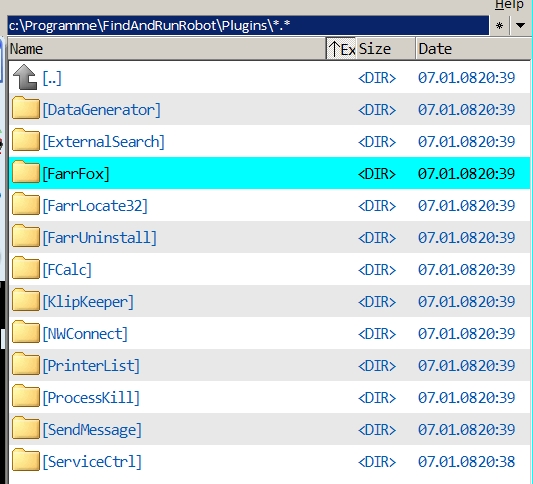
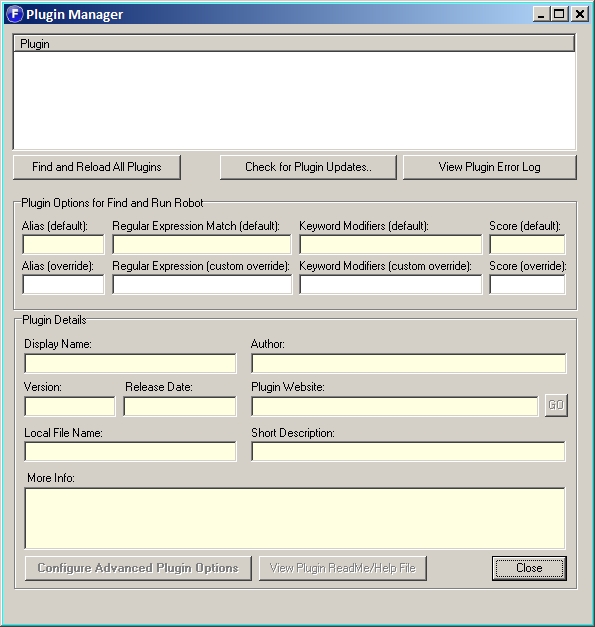
I have the same problem. On my computer, FARR never found any of the plugins that were installed to its plugin folder, i.e. the Plugin Manager comes up completely blank and does not do anything. Since I am not too keen on installing the updater, I am currently unable to use any plugins whatsoever. I have included two screenshots to prove the plugins are there and show the empty manager window.
PS: I am running the German version of WinXP, in case that has any bearing.
dave12n & Mr Ploppy: this is just guess work but worth a try.. both of you can re-install Farr into the same folder and see if that fixes the problem..
That is really strange, BUT: if the updater works to install plugins, try this: see if the updater is really installing them in the same place as you are.. or if maybe the updater and farr are putting them and looking for them somewhere else?
i suggest this because there is really nothing that the updater does except copy the files into the plugin directory, there is no additional magic.
Well, I installed the updater after all and have now discovered that I was mistaken in believing that the subfolders of the FARR plugin folder that were present after installation contained the actual plugins they were named after, when in fact they only contained updater links to download those plugins.
It was simply a case of the files of the ACTUAL plugins (.dlls etc.) still missing. Manual installation of a downloaded plugin is quite possible.
Sorry about the misunderstanding and wasting forum space, but maybe this should be made clear in the forum for those who have had no experience with the DCUpdater and its .dcupdate extension...
I've narrowed down the problem I'm having. I was trying to install FARRGoogleSuggest manually, without success. I finally thought of trying to manually add another one (FARRUninstall), and it works. So the problem apparently is with FARRGoogleSuggest. Strangely, the identical version of FARRGoogleSuggest works with the identical version of FARR on my other computer.