DonationCoder.com forum
 
Read-only archive. This is a static copy of the DonationCoder.com forum. Reading and searching work as before; logging in, posting and private messages do not.
Archive of 2026-10-21 · About this archive · Main site

Author Topic: How to remove ALL of Firefox?  (Read 7,522 times)

Curt

  • Supporting Member
  • Joined in 2006
  • **
  • Posts: 7,565
How to remove ALL of Firefox?
« on: January 07, 2008, 12:48 AM »
My Firefox 2.0.0.11 was showing signs of being a little sick, so I removed it and installed a fresh copy. But it was excatly the same - meaning it doesn't clean up when leaving. The thing that annoys me the most is that I wasn't asked if I wanted to keep this or that - it just "uninstalled" and left everything behind! I am truly disappointed!! So my question is of course: HOW to clean up after this fox - how to remove ALL of Firefox?  :tellme:

nite_monkey

  • Member
  • Joined in 2006
  • **
  • Posts: 753
Re: How to remove ALL of Firefox?
« Reply #1 on: January 07, 2008, 12:54 AM »
you mean the profile (in xp located in c:/documents and settings/<user name>/aplication data<hidden folder>/mozilla)if you delete that folder then all your add-ons, bookmarks, and settings should be gone
[Insert really cool signature here]

lanux128

  • Global Moderator
  • Joined in 2005
  • *****
  • Posts: 6,277
    • Coding Snacks
    • Volunteers/Staff
    • Gathering Badge
    • Participated in NANY Challenge Once
    • Linux User
Re: How to remove ALL of Firefox?
« Reply #2 on: January 07, 2008, 01:22 AM »
what was left behind? if you mean the user profile, check out this article from the KB: Uninstalling Firefox, where detailed instructions are available..

also, if you start firefox with the following command-line "-p" or "-profilemanager", you can create/delete the profiles in the Profile Manager..

Deozaan

  • Charter Member
  • Joined in 2006
  • ***
  • Posts: 9,827
    • Participated in NANY Challenge Eight Times
    • Cody Award
Re: How to remove ALL of Firefox?
« Reply #3 on: January 07, 2008, 01:36 AM »
You could always format your hard drive...  :P

Lashiec

  • Member
  • Joined in 2006
  • **
  • Posts: 2,374
Re: How to remove ALL of Firefox?
« Reply #4 on: January 07, 2008, 02:36 AM »
The four folders set up by a Firefox installation are:

  • %programfiles%\Mozilla Firefox (binaries and other files)
  • %userprofile%\<insert your language equivalent for "Local Settings">\<insert your language equivalent for "Application Data">\Mozilla (update logs and cache)
  • %appdata%\Mozilla (extensions, bookmarks, cookies, etc.)
  • %appdata%\Talkback (if you installed it)

Input all those strings with the '%' like that, those are environment variables.

Curt

  • Supporting Member
  • Joined in 2006
  • **
  • Posts: 7,565
Re: How to remove ALL of Firefox?
« Reply #5 on: January 07, 2008, 01:16 PM »
Thanks a lot for such detailed directions!  :up:

You could always format your hard drive... 

I most certainly will!! ... as soon as XP SP3 in Danish is available on disc!  ;)

Curt

  • Supporting Member
  • Joined in 2006
  • **
  • Posts: 7,565
Re: How to remove ALL of Firefox?
« Reply #6 on: January 07, 2008, 03:29 PM »
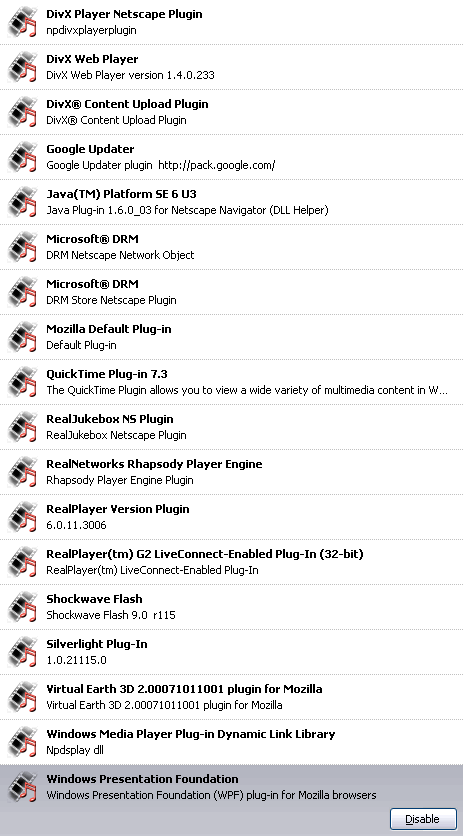
I am impressed with the numbers of pre-installed plugins in Firefox 3 BETA 2:


[attachthumb=#]

:Thmbsup:
« Last Edit: January 07, 2008, 03:31 PM by Curt »

Lashiec

  • Member
  • Joined in 2006
  • **
  • Posts: 2,374
Re: How to remove ALL of Firefox?
« Reply #7 on: January 07, 2008, 05:46 PM »
*cough* Those plugins were already installed in your computer, the installation routines of Firefox simply detected them.

Curt

  • Supporting Member
  • Joined in 2006
  • **
  • Posts: 7,565
Re: How to remove ALL of Firefox?
« Reply #8 on: January 07, 2008, 06:53 PM »
Okay. But then I am impressed with that!  ;D


Edit: Sadly the Real video downloader toolbar does not work with FF 3
« Last Edit: January 07, 2008, 06:56 PM by Curt »

Original address: https://www.donationcoder.com/forum/index.php?topic=11706.0