


This plugin lets you easily access your environment variables. For example, Firefox keeps all its settings in your application data folder (%appdata%). In explorer you could simply write %appdata% to access it, however, in FARR it isn't possible. Until now  .
.
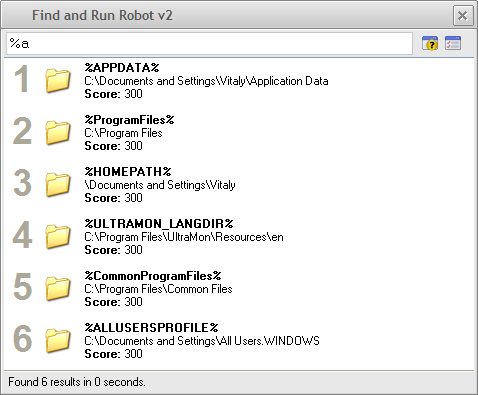
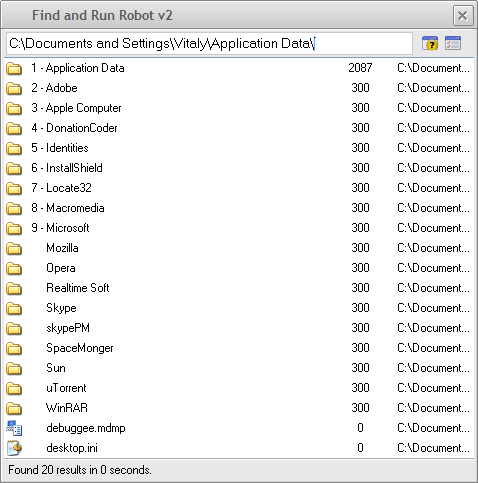
Install the plugin and press % to see the list of your environment variables, select one to automatically expand it on the search path or simply continue writing. Once you add the \ it would automatically expand. E.g, writing %appdata%\ would automatically become C:\Documents and Settings\Vitaly\Application Data\.
Notice: Only the variables that actually represent a folder, %PATH% and other variables won't be visible.
Download
http://vitalyb.dcmembers.com/FARREnviormentVariables/FARREnviormentVariables.zip
Screenshots
[attach]
.Install the plugin and press % to see the list of your environment variables, select one to automatically expand it on the search path or simply continue writing. Once you add the \ it would automatically expand. E.g, writing %appdata%\ would automatically become C:\Documents and Settings\Vitaly\Application Data\.
Notice: Only the variables that actually represent a folder, %PATH% and other variables won't be visible.
Download
http://vitalyb.dcmembers.com/FARREnviormentVariables/FARREnviormentVariables.zip
Screenshots
[attach]


 But that's it, I stop for now.
![Find&Run Robot [FindAndRunRobot.exe] Screenshot - 30.12.2007 , 10_11_55.png](/forum/attachments/25566/Find_Run_Robot_[FindAndRunRobot.exe]_Screenshot_-_30.12.2007_,_10_11_55.png)
![Find&Run Robot [FindAndRunRobot.exe] Screenshot - 30.12.2007 , 10_12_10.png](/forum/attachments/25568/Find_Run_Robot_[FindAndRunRobot.exe]_Screenshot_-_30.12.2007_,_10_12_10.png)
![Find&Run Robot [FindAndRunRobot.exe] Screenshot - 30.12.2007 , 10_12_24.png](/forum/attachments/25570/Find_Run_Robot_[FindAndRunRobot.exe]_Screenshot_-_30.12.2007_,_10_12_24.png)
![Find&Run Robot [FindAndRunRobot.exe] Screenshot - 30.12.2007 , 11_05_05.png](/forum/attachments/25571/Find_Run_Robot_[FindAndRunRobot.exe]_Screenshot_-_30.12.2007_,_11_05_05.png)

 )
)


