DonationCoder.com forum
 
Read-only archive. This is a static copy of the DonationCoder.com forum. Reading and searching work as before; logging in, posting and private messages do not.
Archive of 2026-10-21 · About this archive · Main site

Last post Author Topic: S.O.S.....Having troubles "upgrading" from Vista to XP SP2  (Read 31,070 times)

CodeTRUCKER

  • Bush Flying... where I'd rather be.
  • Supporting Member
  • Joined in 2006
  • **
  • Posts: 1,086
    • Participated in NANY Challenge Once
    • Military Service Badge - US Navy
S.O.S.....Having troubles "upgrading" from Vista to XP SP2
« on: December 14, 2007, 09:31 PM »
I have been trying to upgrade my Toshiba laptop from Vista to XP without a lot of success, so I am needing some help.
DISCLAIMER - I have made and make many threads for questions and even project posts across the Internet. Unfortunately, many are in limbo because I cannot remember where they are at. If anyone knows of an open thread or an unanswered inquiry, please PM me. Thank you.
   
Notice: Unless stated otherwise, I receive no compensation for anything I post here.
« Last Edit: May 13, 2009, 04:34 AM by CodeTRUCKER »

mouser

  • First Author
  • Administrator
  • Joined in 2005
  • *****
  • Posts: 40,931
    • Gathering Badge
    • Plugin Coding Medal
    • Participated in NANY Challenge Seventeen Times
    • Cody Award
    • Coding Snacks
    • Volunteers/Staff
Re: S.O.S.....Having troubles "upgrading" from Vista to XP SP2
« Reply #1 on: December 14, 2007, 10:05 PM »
The general approach with such stuff that i recommend is:

1) backup current hard drive image so you can always go back to you current setup (i.e. use a drive imager like Acronis, etc.)
2) backup any of your data files in an easy-to-access way.
3) visit the website of the computer manufacturer and find and download all drivers for your computer (important if you have a laptop since there are commonly special drivers for the network, touchpad, etc.)
4) do a clean install of the new operating system, wiping out the previous one (i.e. never try to do a formal "upgrade")
5) install the drivers
6) do a driver image of the new clean install.

Toshiba is a good laptop maker and their drivers are easily available on the web -- you should have no problem with xp on that machine.

CodeTRUCKER

  • Bush Flying... where I'd rather be.
  • Supporting Member
  • Joined in 2006
  • **
  • Posts: 1,086
    • Participated in NANY Challenge Once
    • Military Service Badge - US Navy
Re: S.O.S.....Having troubles "upgrading" from Vista to XP SP2
« Reply #2 on: December 14, 2007, 10:19 PM »
Oops!  I already blew it on the first bullet.  :-[  Lesson learned for next time.
DISCLAIMER - I have made and make many threads for questions and even project posts across the Internet. Unfortunately, many are in limbo because I cannot remember where they are at. If anyone knows of an open thread or an unanswered inquiry, please PM me. Thank you.
   
Notice: Unless stated otherwise, I receive no compensation for anything I post here.
« Last Edit: May 13, 2009, 04:35 AM by CodeTRUCKER »

mouser

  • First Author
  • Administrator
  • Joined in 2005
  • *****
  • Posts: 40,931
    • Gathering Badge
    • Plugin Coding Medal
    • Participated in NANY Challenge Seventeen Times
    • Cody Award
    • Coding Snacks
    • Volunteers/Staff
Re: S.O.S.....Having troubles "upgrading" from Vista to XP SP2
« Reply #3 on: December 14, 2007, 10:29 PM »
Here is your page of drivers from the toshiba site:
http://www.csd.toshiba.com/cgi-bin/tais/su/su_sc_modItemList.jsp?moid=1757701&rpn=PSAEGU&ct=DL

You want to download the most recent of each different driver.
Check your bios version as well and upgrade your bios if it is older (MAYBE -- only if you feel like an adventure).

Any pc that can run vista can run xp well.

CodeTRUCKER

  • Bush Flying... where I'd rather be.
  • Supporting Member
  • Joined in 2006
  • **
  • Posts: 1,086
    • Participated in NANY Challenge Once
    • Military Service Badge - US Navy
Re: S.O.S.....Having troubles "upgrading" from Vista to XP SP2
« Reply #4 on: December 14, 2007, 10:53 PM »
No question about that.  The trick is to get the Vista machine to "run" XP.  ;)
DISCLAIMER - I have made and make many threads for questions and even project posts across the Internet. Unfortunately, many are in limbo because I cannot remember where they are at. If anyone knows of an open thread or an unanswered inquiry, please PM me. Thank you.
   
Notice: Unless stated otherwise, I receive no compensation for anything I post here.
« Last Edit: May 13, 2009, 04:31 AM by CodeTRUCKER »

CodeTRUCKER

  • Bush Flying... where I'd rather be.
  • Supporting Member
  • Joined in 2006
  • **
  • Posts: 1,086
    • Participated in NANY Challenge Once
    • Military Service Badge - US Navy
Re: S.O.S.....Having troubles "upgrading" from Vista to XP SP2
« Reply #5 on: December 14, 2007, 11:04 PM »
Success (sort of)!  I have the audio working.
DISCLAIMER - I have made and make many threads for questions and even project posts across the Internet. Unfortunately, many are in limbo because I cannot remember where they are at. If anyone knows of an open thread or an unanswered inquiry, please PM me. Thank you.
   
Notice: Unless stated otherwise, I receive no compensation for anything I post here.
« Last Edit: May 13, 2009, 04:39 AM by CodeTRUCKER »

Dormouse

  • Supporting Member
  • Joined in 2007
  • **
  • Posts: 1,992
Re: S.O.S.....Having troubles "upgrading" from Vista to XP SP2
« Reply #6 on: December 14, 2007, 11:20 PM »
Since there are lots of threads on the net from frustrated Tosh owners trying to get to XP, including for your model, I suspect that they never made XP drivers.

CodeTRUCKER

  • Bush Flying... where I'd rather be.
  • Supporting Member
  • Joined in 2006
  • **
  • Posts: 1,086
    • Participated in NANY Challenge Once
    • Military Service Badge - US Navy
Re: S.O.S.....Having troubles "upgrading" from Vista to XP SP2
« Reply #7 on: December 14, 2007, 11:29 PM »
Since there are lots of threads on the net from frustrated Tosh owners trying to get to XP, including for your model, I suspect that they never made XP drivers.

Please tell me it is not true.  :(
DISCLAIMER - I have made and make many threads for questions and even project posts across the Internet. Unfortunately, many are in limbo because I cannot remember where they are at. If anyone knows of an open thread or an unanswered inquiry, please PM me. Thank you.
   
Notice: Unless stated otherwise, I receive no compensation for anything I post here.
« Last Edit: May 13, 2009, 04:42 AM by CodeTRUCKER »

CodeTRUCKER

  • Bush Flying... where I'd rather be.
  • Supporting Member
  • Joined in 2006
  • **
  • Posts: 1,086
    • Participated in NANY Challenge Once
    • Military Service Badge - US Navy
Re: S.O.S.....Having troubles "upgrading" from Vista to XP SP2
« Reply #8 on: December 14, 2007, 11:49 PM »
I have the audio working but the video is not working properly.  Could this have anything to do with "hardware authentication?"
DISCLAIMER - I have made and make many threads for questions and even project posts across the Internet. Unfortunately, many are in limbo because I cannot remember where they are at. If anyone knows of an open thread or an unanswered inquiry, please PM me. Thank you.
   
Notice: Unless stated otherwise, I receive no compensation for anything I post here.
« Last Edit: May 13, 2009, 04:41 AM by CodeTRUCKER »

mouser

  • First Author
  • Administrator
  • Joined in 2005
  • *****
  • Posts: 40,931
    • Gathering Badge
    • Plugin Coding Medal
    • Participated in NANY Challenge Seventeen Times
    • Cody Award
    • Coding Snacks
    • Volunteers/Staff
Re: S.O.S.....Having troubles "upgrading" from Vista to XP SP2
« Reply #9 on: December 14, 2007, 11:54 PM »
ok so you got the audio working.. what's wrong with your video now?

with regard to:
Quote
Could this have anything to do with "hardware authentication?"
no.

CodeTRUCKER

  • Bush Flying... where I'd rather be.
  • Supporting Member
  • Joined in 2006
  • **
  • Posts: 1,086
    • Participated in NANY Challenge Once
    • Military Service Badge - US Navy
Re: S.O.S.....Having troubles "upgrading" from Vista to XP SP2
« Reply #10 on: December 15, 2007, 12:07 AM »
The video looks like a whole lot of overlapping columns of mini-desktops.
DISCLAIMER - I have made and make many threads for questions and even project posts across the Internet. Unfortunately, many are in limbo because I cannot remember where they are at. If anyone knows of an open thread or an unanswered inquiry, please PM me. Thank you.
   
Notice: Unless stated otherwise, I receive no compensation for anything I post here.
« Last Edit: May 13, 2009, 04:43 AM by CodeTRUCKER »

tinjaw

  • I'm so glad breakbeat techno isn't an illegal drug
  • Supporting Member
  • Joined in 2006
  • **
  • Posts: 1,927
    • Participated in NANY Challenge Twice
    • Coding Snacks
    • Military Service Badge - US Army
    • Linux User
Re: S.O.S.....Having troubles "upgrading" from Vista to XP SP2
« Reply #11 on: December 15, 2007, 11:20 PM »
I took a look at the page mouser suggested. The problem is that many of those drivers are for Vista only. Please provide a list of the stuff that isn't working.

Find msinfo32.exe on your computer and run it. Then export the info to a text file (File|Export...) and attach it to your reply.

CodeTRUCKER

  • Bush Flying... where I'd rather be.
  • Supporting Member
  • Joined in 2006
  • **
  • Posts: 1,086
    • Participated in NANY Challenge Once
    • Military Service Badge - US Navy
Re: S.O.S.....Having troubles "upgrading" from Vista to XP SP2
« Reply #12 on: December 16, 2007, 12:39 AM »
I took a look at the page mouser suggested. The problem is that many of those drivers are for Vista only. Please provide a list of the stuff that isn't working.

The whole video thing is not working.
DISCLAIMER - I have made and make many threads for questions and even project posts across the Internet. Unfortunately, many are in limbo because I cannot remember where they are at. If anyone knows of an open thread or an unanswered inquiry, please PM me. Thank you.
   
Notice: Unless stated otherwise, I receive no compensation for anything I post here.
« Last Edit: May 13, 2009, 04:44 AM by CodeTRUCKER »

Carol Haynes

  • Waffles for England (patent pending)
  • Global Moderator
  • Joined in 2005
  • *****
  • Posts: 8,073
    • Cody Award
    • Furry Fandom Badge - Furry Fandom
Re: S.O.S.....Having troubles "upgrading" from Vista to XP SP2
« Reply #13 on: December 16, 2007, 01:12 AM »
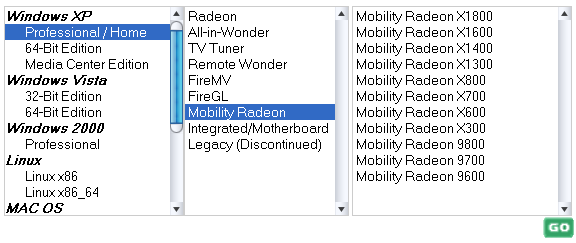
Can't you just download the appropriate Catalyst Driver from the ATI website ?

http://ati.amd.com/support/driver.html

Having said that ATI don't seem to do a Mobility x1200 card (even for Vista) - are you sure that is the right model?

sc.png

there are Radeon x1200 and Radeon XPress x1200 models in the integrated/motherboard section.
« Last Edit: December 16, 2007, 01:15 AM by Carol Haynes »

Ralf Maximus

  • Supporting Member
  • Joined in 2007
  • **
  • Posts: 927
    • Coding Snacks
Re: S.O.S.....Having troubles "upgrading" from Vista to XP SP2
« Reply #14 on: December 16, 2007, 02:36 AM »
Catalyst should work, even if you don't know what model you have.  The installer figures it out automagically.

CodeTRUCKER

  • Bush Flying... where I'd rather be.
  • Supporting Member
  • Joined in 2006
  • **
  • Posts: 1,086
    • Participated in NANY Challenge Once
    • Military Service Badge - US Navy
Re: S.O.S.....Having troubles "upgrading" from Vista to XP SP2
« Reply #15 on: December 16, 2007, 02:54 AM »
I have tried Catalyst in the past, but I had trouble.  I had to work it out myself, but I will be dipped, I can not remember how in the world I made work. 
DISCLAIMER - I have made and make many threads for questions and even project posts across the Internet. Unfortunately, many are in limbo because I cannot remember where they are at. If anyone knows of an open thread or an unanswered inquiry, please PM me. Thank you.
   
Notice: Unless stated otherwise, I receive no compensation for anything I post here.
« Last Edit: May 13, 2009, 04:46 AM by CodeTRUCKER »

CodeTRUCKER

  • Bush Flying... where I'd rather be.
  • Supporting Member
  • Joined in 2006
  • **
  • Posts: 1,086
    • Participated in NANY Challenge Once
    • Military Service Badge - US Navy
Re: S.O.S.....Having troubles "upgrading" from Vista to XP SP2
« Reply #16 on: December 16, 2007, 02:57 AM »
Something else is out of kilter.  I can not get Catalyst to download.  I will try again later.
DISCLAIMER - I have made and make many threads for questions and even project posts across the Internet. Unfortunately, many are in limbo because I cannot remember where they are at. If anyone knows of an open thread or an unanswered inquiry, please PM me. Thank you.
   
Notice: Unless stated otherwise, I receive no compensation for anything I post here.
« Last Edit: May 13, 2009, 04:47 AM by CodeTRUCKER »

Ralf Maximus

  • Supporting Member
  • Joined in 2007
  • **
  • Posts: 927
    • Coding Snacks
Re: S.O.S.....Having troubles "upgrading" from Vista to XP SP2
« Reply #17 on: December 16, 2007, 02:59 AM »
Check out this link:

http://www.nodans.com/index.cfm/2007/11/9/XP-Drivers-for-Toshiba-A215--S7428

Guy has the same Toshiba as you, retrograded from Vista to XP, became disgusted with Toshiba's website and tracked down all the XP drivers.  Maybe this will work for you?

mouser

  • First Author
  • Administrator
  • Joined in 2005
  • *****
  • Posts: 40,931
    • Gathering Badge
    • Plugin Coding Medal
    • Participated in NANY Challenge Seventeen Times
    • Cody Award
    • Coding Snacks
    • Volunteers/Staff
Re: S.O.S.....Having troubles "upgrading" from Vista to XP SP2
« Reply #18 on: December 16, 2007, 03:03 AM »
Wow, looks like Ralf hit the jackpot for you CodeTrucker, as that guy says what you have been saying:
Quote
To get this to work, you have to pretty much forget the Toshiba site. It is mostly unhelpful and will send you over the edge. Instead, one must dig down deep into the operating system. One must manually edit driver inf files. One must deal with trying to find a driver for "Unknown System Device". Fortunately, some unnamed kind soul has done all the hard work for you.

CodeTRUCKER

  • Bush Flying... where I'd rather be.
  • Supporting Member
  • Joined in 2006
  • **
  • Posts: 1,086
    • Participated in NANY Challenge Once
    • Military Service Badge - US Navy
Re: S.O.S.....Having troubles "upgrading" from Vista to XP SP2
« Reply #19 on: December 16, 2007, 03:12 AM »
Thank you, I am going to check it out now.  Incidentally, things are in an uproar, so I hope what I have been typing makes sense.  :-[
DISCLAIMER - I have made and make many threads for questions and even project posts across the Internet. Unfortunately, many are in limbo because I cannot remember where they are at. If anyone knows of an open thread or an unanswered inquiry, please PM me. Thank you.
   
Notice: Unless stated otherwise, I receive no compensation for anything I post here.
« Last Edit: May 13, 2009, 04:29 AM by CodeTRUCKER »

mouser

  • First Author
  • Administrator
  • Joined in 2005
  • *****
  • Posts: 40,931
    • Gathering Badge
    • Plugin Coding Medal
    • Participated in NANY Challenge Seventeen Times
    • Cody Award
    • Coding Snacks
    • Volunteers/Staff
Re: S.O.S.....Having troubles "upgrading" from Vista to XP SP2
« Reply #20 on: December 16, 2007, 03:13 AM »
make sure you read the comments -- people with dif models are posting their experiences too i think.

CodeTRUCKER

  • Bush Flying... where I'd rather be.
  • Supporting Member
  • Joined in 2006
  • **
  • Posts: 1,086
    • Participated in NANY Challenge Once
    • Military Service Badge - US Navy
Re: S.O.S.....Having troubles "upgrading" from Vista to XP SP2
« Reply #21 on: December 16, 2007, 03:16 AM »
Yes, I will be sure and do that.  Maybe, just maybe I might find a complete road map on some of those offerings.  Thanks.
DISCLAIMER - I have made and make many threads for questions and even project posts across the Internet. Unfortunately, many are in limbo because I cannot remember where they are at. If anyone knows of an open thread or an unanswered inquiry, please PM me. Thank you.
   
Notice: Unless stated otherwise, I receive no compensation for anything I post here.
« Last Edit: May 13, 2009, 04:25 AM by CodeTRUCKER »

Carol Haynes

  • Waffles for England (patent pending)
  • Global Moderator
  • Joined in 2005
  • *****
  • Posts: 8,073
    • Cody Award
    • Furry Fandom Badge - Furry Fandom
Re: S.O.S.....Having troubles "upgrading" from Vista to XP SP2
« Reply #22 on: December 16, 2007, 10:07 AM »
Good luck - let us know how it goes and how fried your brain is when its all done  :D

Sounds like Toshiba are a company to avoid in future!

Interestingly on that list he specifies Radeon X1200 - not "Mobility Radeon".

CodeTRUCKER

  • Bush Flying... where I'd rather be.
  • Supporting Member
  • Joined in 2006
  • **
  • Posts: 1,086
    • Participated in NANY Challenge Once
    • Military Service Badge - US Navy
Re: S.O.S.....Having troubles "upgrading" from Vista to XP SP2
« Reply #23 on: December 16, 2007, 12:20 PM »
That is what caught my eye too.
DISCLAIMER - I have made and make many threads for questions and even project posts across the Internet. Unfortunately, many are in limbo because I cannot remember where they are at. If anyone knows of an open thread or an unanswered inquiry, please PM me. Thank you.
   
Notice: Unless stated otherwise, I receive no compensation for anything I post here.
« Last Edit: May 13, 2009, 04:30 AM by CodeTRUCKER »

tinjaw

  • I'm so glad breakbeat techno isn't an illegal drug
  • Supporting Member
  • Joined in 2006
  • **
  • Posts: 1,927
    • Participated in NANY Challenge Twice
    • Coding Snacks
    • Military Service Badge - US Army
    • Linux User
Re: S.O.S.....Having troubles "upgrading" from Vista to XP SP2
« Reply #24 on: December 16, 2007, 01:44 PM »
CodeTRUCKER,

You overlooked part of my reply.

Find msinfo32.exe on your computer and run it. Then export the info to a text file (File|Export...) and attach it to your reply.

This will provide you with a great deal of technical information about what you have and what drivers are loaded. This is worth having, even if everything is working, so you have a record of it in working order for when problem arise.

Original address: https://www.donationcoder.com/forum/index.php?topic=11337.0