DonationCoder.com forum
 
Read-only archive. This is a static copy of the DonationCoder.com forum. Reading and searching work as before; logging in, posting and private messages do not.
Archive of 2026-10-21 · About this archive · Main site

Author Topic: Realtime Disk Access monitoring?  (Read 14,547 times)

Josh

  • Charter Honorary Member
  • Joined in 2005
  • ***
  • Posts: 3,411
    • Gathering Badge
    • Official Forum Clown
    • Coding Snacks
    • Plugin Coding Medal
    • Volunteers/Staff
    • Military Service Badge - US Army
    • Furry Fandom Badge - Furry Fandom
    • Linux User
Realtime Disk Access monitoring?
« on: December 10, 2007, 12:53 AM »
Is there a program which will tell you what program is accessing a hard disk at any given time and what the program is accessing? I am trying to troubleshoot the constant churn of my hard drives and want to find out what is causing this.
Strength in Knowledge

justice

  • Solve issues simply.
  • Supporting Member
  • Joined in 2006
  • **
  • Posts: 1,898
    • Participated in NANY Challenge Four Times
    • Cody Award
    • Coding Snacks
    • DJ Badge - DJ
Re: Realtime Disk Access monitoring?
« Reply #1 on: December 10, 2007, 01:02 AM »
yep process explorer from sysinternals. On the top right graph on the main screen in my configuration it tells you the process that's causing the disk activity.

Josh

  • Charter Honorary Member
  • Joined in 2005
  • ***
  • Posts: 3,411
    • Gathering Badge
    • Official Forum Clown
    • Coding Snacks
    • Plugin Coding Medal
    • Volunteers/Staff
    • Military Service Badge - US Army
    • Furry Fandom Badge - Furry Fandom
    • Linux User
Re: Realtime Disk Access monitoring?
« Reply #2 on: December 10, 2007, 01:15 AM »
Is there anything with more detail? The windows performance snap-in is far too complex for my needs.
Strength in Knowledge

PhilB66

  • Supporting Member
  • Joined in 2007
  • **
  • Posts: 1,522
Re: Realtime Disk Access monitoring?
« Reply #3 on: December 10, 2007, 01:25 AM »
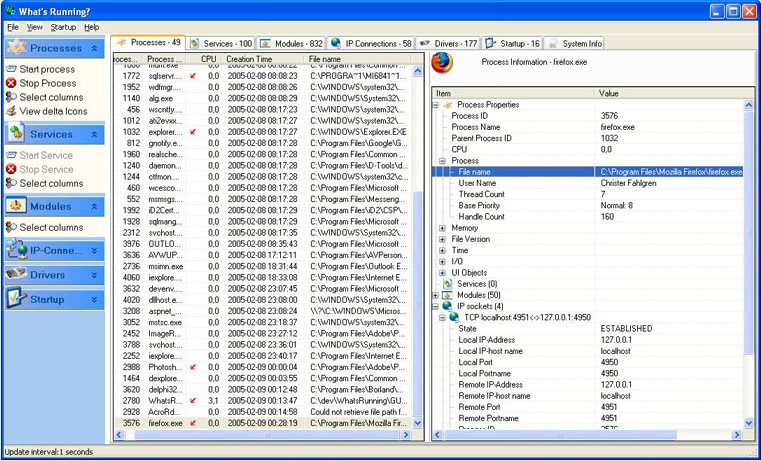
"What's Running is a product that gives you an inside look into your Windows 2000/XP/2003 system.

Explore processes, services, modules, IP-connections, drivers and much more through a simple to use application. Find out important information such as what modules are involved in a specific process.

Control your system by starting and stopping services and processes. Configure your startup programs easily."

[attach]
« Last Edit: December 10, 2007, 01:36 AM by PhilB66 »

PhilB66

  • Supporting Member
  • Joined in 2007
  • **
  • Posts: 1,522
Re: Realtime Disk Access monitoring?
« Reply #4 on: December 10, 2007, 01:34 AM »
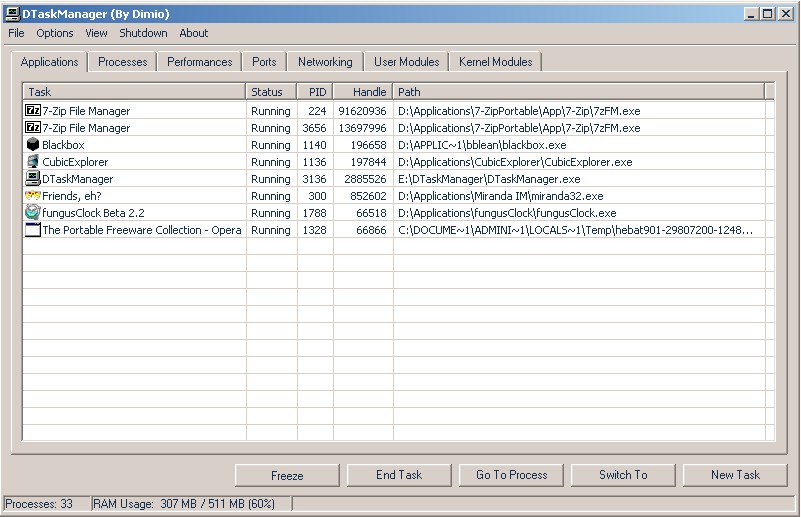
DTaskManager (scroll down the page to find out about the program) - Small and Portable, works on Windows 2000/XP/VISTA.

[attach]

nosh

  • Supporting Member
  • Joined in 2007
  • **
  • Posts: 1,441
Re: Realtime Disk Access monitoring?
« Reply #5 on: December 10, 2007, 04:39 AM »
As justice mentioned, Process Explorer is excellent if you want to see the total reads/writes of an app in one place (I/O Read Bytes & I/O Write Bytes columns)... ideal for identifying _what's_ chugging your disks.

If you need a more detailed breakup Filemon would be the obvious choice. Lastly, if you find Filemon's output too detailed/overwhelming (you can filter items to make things sane, of course) you may want to look at FileTracer's "Monitor File Activity" window.

nontroppo

  • spinning top
  • Charter Honorary Member
  • Joined in 2005
  • ***
  • Posts: 649
Re: Realtime Disk Access monitoring?
« Reply #6 on: December 10, 2007, 02:04 PM »
Process Monitor is the update of Filemon, and it is *much* better. Most importantly, it has great post-capture analysis. You can filter by application then sort by file and access type; this is great for beta testing apps...

f0dder

  • [Well, THAT escalated quickly!]
  • Charter Honorary Member
  • Joined in 2005
  • ***
  • Posts: 9,153
    • Participated in NANY Challenge Once
Re: Realtime Disk Access monitoring?
« Reply #7 on: December 10, 2007, 02:07 PM »
Process Monitor is nice, yes, but the way filters are added is a bit tedious; they need to update the dialog+controls a bit to make it friendlier :)
- carpe noctem

Ralf Maximus

  • Supporting Member
  • Joined in 2007
  • **
  • Posts: 927
    • Coding Snacks
Re: Realtime Disk Access monitoring?
« Reply #8 on: December 10, 2007, 02:25 PM »
Agreed, PM is da bom, but sometimes all you want to do is capture file accesses or registry activity, so I still fire up FileMon and RegMon occasionally.

PM provides too much information sometimes.  And you're right, as nice as the filtering is the interface is awkward.

nontroppo

  • spinning top
  • Charter Honorary Member
  • Joined in 2005
  • ***
  • Posts: 649
Re: Realtime Disk Access monitoring?
« Reply #9 on: December 11, 2007, 12:40 PM »
Although the initial filter dialog *is* quite daunting ;-) it is as fast to use as filemon's. I then use the toolbar file/reg/process toggle buttons and everything is faster from there on. PM has a much better logging engine than FM; when tracking down a huge performance regression in Opera startup using filemon, FM would simply choke to death, so someone had to binary patch it to temporarily fix it. PM easily handled the same situation without breaking into a sweat (reliability wins over simplicity)...

Original address: https://www.donationcoder.com/forum/index.php?topic=11258.0