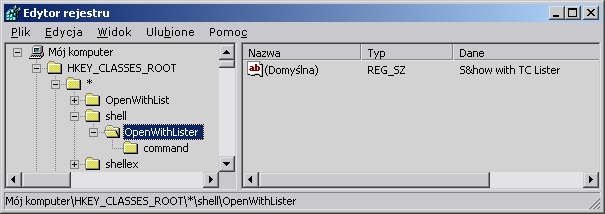
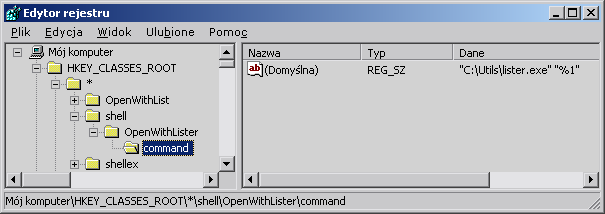
Okay, I really should know this, but there it is, I don't  I need to add a single command to Explorer's context menu for all files (not folders), manually. I hardly ever use Explorer, since Total Commander is my thing, but there's an increasing number of apps that embed explorer's shell nenu in their file listings (Nero, Acronis True Image, etc). Often I want to view the contents of files in these contexts, but there is no viewer in XP and "Open with" doesn't qute cut it for effiiciency. So I want to add a command, for every file type, that will open the file in Total Commander's lister.exe.
I know there are tools to remove junk from the shell menu (e.g. Shell menu view by Nirsoft), but now I want to do the reverse, hopefully for free. I've no problems with editing the registry, and I think the entry should go under HKEY_CLASSES_ROOT\*\shellex\ContextMenuHandlers, but that's about what I can figure out. In Explorer -> Tools -> Folder options -> File types you can only add a new action for a specific file type; specifying no extension or "*" doesn't work. (The former produces an error, the latter is ignored.)
I should really know this by now. I was sick with fever when they taught shell menus, I was.
.marek
I need to add a single command to Explorer's context menu for all files (not folders), manually. I hardly ever use Explorer, since Total Commander is my thing, but there's an increasing number of apps that embed explorer's shell nenu in their file listings (Nero, Acronis True Image, etc). Often I want to view the contents of files in these contexts, but there is no viewer in XP and "Open with" doesn't qute cut it for effiiciency. So I want to add a command, for every file type, that will open the file in Total Commander's lister.exe. I know there are tools to remove junk from the shell menu (e.g. Shell menu view by Nirsoft), but now I want to do the reverse, hopefully for free. I've no problems with editing the registry, and I think the entry should go under HKEY_CLASSES_ROOT\*\shellex\ContextMenuHandlers, but that's about what I can figure out. In Explorer -> Tools -> Folder options -> File types you can only add a new action for a specific file type; specifying no extension or "*" doesn't work. (The former produces an error, the latter is ignored.)
I should really know this by now. I was sick with fever when they taught shell menus, I was.
.marek