DonationCoder.com forum
 
Read-only archive. This is a static copy of the DonationCoder.com forum. Reading and searching work as before; logging in, posting and private messages do not.
Archive of 2026-10-21 · About this archive · Main site

Author Topic: Registry Key Help, please?  (Read 11,721 times)

BigJim

  • I have seen the light!
  • Supporting Member
  • Joined in 2007
  • **
  • Posts: 178
Registry Key Help, please?
« on: November 17, 2007, 05:55 PM »
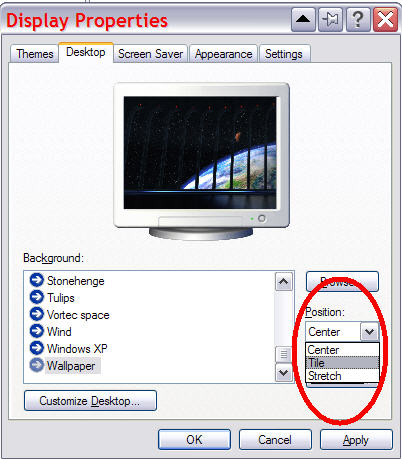
Experimentation is great fun ... until you really screw something up! With a view toward averting that, can someone tell me how/where to make a registry edit (?) so that the default wallpaper setting is "Tile" instead of "Center"?

[attach]
TruckerJim says "You can go down a hill too slow a thousand times. But too fast only once."

Veign

  • Charter Honorary Member
  • Joined in 2005
  • ***
  • Posts: 993
    • Gathering Badge
    • Participated in NANY Challenge Twice
Re: Registry Key Help, please?
« Reply #1 on: November 17, 2007, 06:35 PM »
Here's something:
http://www.pctools.com/guides/registry/detail/290/

(not exact but it lets you control the postion)

For what you want its the WallPaperstyle and tileWallPaper settings

Stretch 
TileWallpaper = 0
WallPaperstyle = 2

Tile
TileWallpaper = 1
WallPaperstyle = 0

Center
TileWallpaper = 0
WallPaperstyle = 0

Key is:
HKEY_CURRENT_USER\Control Panel\Desktop
« Last Edit: November 17, 2007, 06:37 PM by Veign »

BigJim

  • I have seen the light!
  • Supporting Member
  • Joined in 2007
  • **
  • Posts: 178
Re: Registry Key Help, please?
« Reply #2 on: November 17, 2007, 08:03 PM »
Thanks so much for your quick reply!

As usual, I've stated my question AND my problem incompletely. I have a set of nifty wallpapers designed to stretch across my dual monitors (www.digitalblasphemy.com) but they must have the "Position" set to "Tile". (I was wrong; the default is "Stretch") I'm using gPhotoShow (www.gphotoshow.com) to use these and others as ScreenSavers, too. One of the features of gPhotoShow is that it can set the last used ScreenSaver as wallpaper when you've finished enjoying the pretty pictures on the screen. But since a change of wallpaper resets the "Position" to "Stretch" it all gets messed up.

I see where you've directed me in [HKEY_CURRENT_USER\Control Panel\Desktop] but that seems to only reflect or change the current setting. Shouldn't I be making the changes in [HKEY_USERS\.DEFAULT\Control Panel\Desktop] to make "Tile" the default?
TruckerJim says "You can go down a hill too slow a thousand times. But too fast only once."

Original address: https://www.donationcoder.com/forum/index.php?topic=10867.0