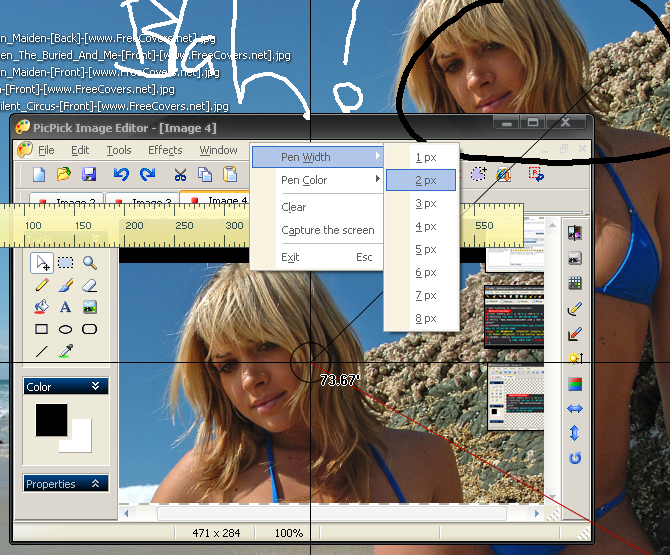
Added today at Freeware World: EasyCapture from XYStudio - XYDownload.com.
Current version: 1.0.0
Release date: 2007.11.10
Support OS: Win2K,XP,Vista
Current version: 1.0.0
Release date: 2007.11.10
Support OS: Win2K,XP,Vista
Quote
EasyCapture Features[attachimg=#]
Capture Anything
Region Capture
Select a specific rectangular region of the screen that you want to capture. Quickly capture an image.
Capture Screen Window / Object
Select any visible windows on the screen that you want to capture, Quickly capture an image.
Full screen capture
One click to capture the full screen to an image.
Active window capture
Select the current active window, Quickly capture an image.
Scrolling window capture
One click to capture scrolling window to an image.
Fix rectangle region capture
Select the fix size rectangle region of the screen that you want to capture, Quickly capture an image.
Edit and Add Effect
Adjust image size and color
If the color or size of your original capture isn't quite right, you can make adjustments easily in Cessna. With features like crop, resize, brightness, contrast, color level, color tone.
Add Professional Effects
EasyCapture lets you add special professional effects with Flip, invert, Hue or saturation and Image processing effects, like blur, emboss, oil paint, halftone, Mosaic and 3D grid.
Enhance Your Captures
Add Text annotation
EasyCapture enhance you capture with add text annotation.
Add Line
EasyCapture enhance you capture with add line.
Add Region
EasyCapture enhance you capture with add Region (Rectangle, Ellipse).
Add Highlight region
EasyCapture enhance you capture with add Highlight rectangle regions.
Add Arrow
EasyCapture enhance you capture with add Arrow.
Add Stamp
EasyCapture enhance you capture with add stamps.
Easily Output
Save to Clipboard
EasyCapture lets you easily output each capture to clipboard.
Save to File
EasyCapture lets you automatically save you capture to image file, including BMP, GIF, JPEG and PNG format.