DonationCoder.com forum
 
Read-only archive. This is a static copy of the DonationCoder.com forum. Reading and searching work as before; logging in, posting and private messages do not.
Archive of 2026-10-21 · About this archive · Main site

Author Topic: YzShadow - Drop shadows for all your windows  (Read 12,885 times)

Ralf Maximus

  • Supporting Member
  • Joined in 2007
  • **
  • Posts: 927
    • Coding Snacks
YzShadow - Drop shadows for all your windows
« on: October 28, 2007, 03:19 AM »
Via Appaholic, Found a neat little freebie, YzShadow:
http://appaholic.wordpress.com/2007/10/26/yz-shadow-drop-shadow-on-every-window-for-windows/

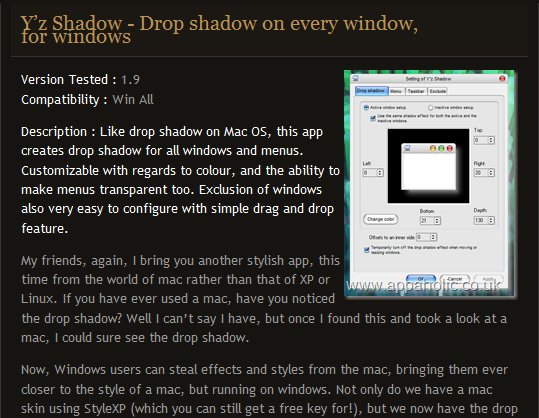
Only takes up 8M RAM, and adds beautiful alpha-blended drop shadows to every window on your desktop.  Performance on low-end video cards can take a hit, but if you're jealous of the OS X desktop this is one step closer for Windows users.

Hint: The readme doesn't say so, but make sure you unzip "with folders" or the Language folder + files can't be found by the app, resulting in an impenetrable japanese error message.
wreckedcarzz

  • Still lurking. Still an anthro.
  • Charter Member
  • Joined in 2005
  • ***
  • Posts: 1,629
    • Participated in NANY Challenge Twice
    • Coding Snacks
    • Furry Fandom Badge - Furry Fandom
    • Linux User
Re: YzShadow - Drop shadows for all your windows
« Reply #1 on: October 28, 2007, 03:27 AM »
I have used YzShadow for a while, but there seems to be a lack of development, and therefore no Vista version. Havn't used it since I found out. Sad, it really is a good program. As long as your on XP it works great (and you can make the shadows look like lighting effects and whatnot :))

jgpaiva

  • Artificial Idiocy
  • Global Moderator
  • Joined in 2006
  • *****
  • Posts: 4,727
    • Cody Award
    • Participated in NANY Challenge Once
    • Coding Snacks
    • Portugal Inhabitant
    • Linux User
Re: YzShadow - Drop shadows for all your windows
« Reply #2 on: October 28, 2007, 10:18 AM »
It's really really funny with a large green shadow :D

nudone

  • Cody's Creator
  • Columnist
  • Joined in 2005
  • ***
  • Posts: 4,119
    • Cody Award
Re: YzShadow - Drop shadows for all your windows
« Reply #3 on: October 28, 2007, 11:21 AM »
i like these things AND i don't like them.

ya know, if it was builit into the operating system i'd probably leave it enabled. when it's a util i just end up removing it as i get that 'resource anxiety' feeling.

i think the green shadow (backlight) is a nice effect - nice against a black or dark wallpaper and windows theme.
« Last Edit: October 28, 2007, 11:42 AM by nudone »

Darwin

  • Charter Member
  • Joined in 2005
  • ***
  • Posts: 6,985
    • Gathering Badge
Re: YzShadow - Drop shadows for all your windows
« Reply #4 on: October 28, 2007, 01:01 PM »
Ha, ha - you've summed my feelings on these types of utils nicely, nudone  :Thmbsup: (well... with the exception that I get resource anxiety about the built in eye candy too, so run XP in classic mode with the themes service disabled. I wound up doing the same with the Vista machine that I had briefly...)!
"Some people have a way with words, other people,... oh... have not way" - Steve Martin

Curt

  • Supporting Member
  • Joined in 2006
  • **
  • Posts: 7,565
Re: YzShadow - Drop shadows for all your windows
« Reply #5 on: October 28, 2007, 01:53 PM »
Quote from the DC thread Y'z Shadow:

From time to time I am a big fan of eye candy; be it a beautiful woman or stuff to make my PC look better. One FREE, small app I have come across is named Y'z Shadow and is the kidbrother of Y's Toolbar - both to be found at WinMatrix. The list of features is limited to making all windows cast a shadow [periode].[/periode] but it really is/are ALL windows, even context menus and drop-down boxes, and the shadow is discrete and tasteful. I like this little app:.....

Y'z Toolbar will not cooperate with Quizo's QT TabBar.
Y'z does not write to registry, but is to be placed in Start.

Original address: https://www.donationcoder.com/forum/index.php?topic=10592.0