DonationCoder.com forum
 
Read-only archive. This is a static copy of the DonationCoder.com forum. Reading and searching work as before; logging in, posting and private messages do not.
Archive of 2026-10-21 · About this archive · Main site

Last post Author Topic: Windows Install Date Thingie: I made it!  (Read 120,868 times)

app103

  • That scary taskbar girl
  • Global Moderator
  • Joined in 2006
  • *****
  • Posts: 5,888
    • Participated in NANY Challenge Six Times
    • Coding Snacks
    • Gathering Badge
    • Cody Award
    • Volunteers/Staff
Re: Windows Install Date Thingie: I made it!
« Reply #50 on: November 07, 2007, 01:11 AM »
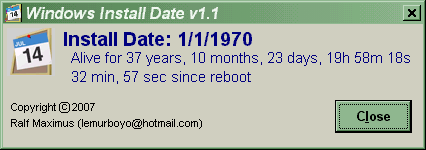
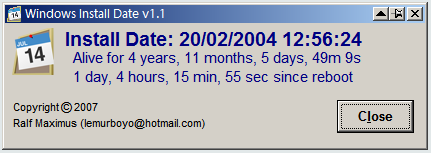
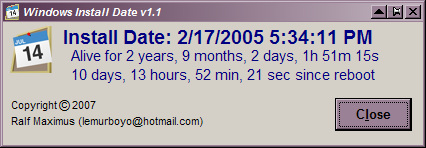
My xp machine:

SNAG-0166.png

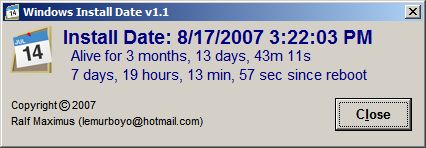
My 9x machine:

installdate9x.png

I guess it isn't 9x compatable.  :(

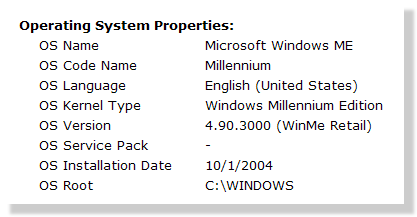
The real original install date is some time back in September 2002 with a repair install done over original on 10/1/2004 which changed the date. (a botched IE 6 update I couldn't roll back screwed up Explorer, needed to revert to original IE 5.5 to repair)
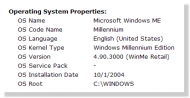
osinfo.png

No drive images involved in obtaining those dates on either machine...all natural.

Ralf:

If you would like to make your little app 9x compatable, on a 9x system I believe the reg key would be:
HKEY_LOCAL_MACHINE\SOFTWARE\Microsoft\Windows\CurrentVersion\FirstInstallDateTime
dlagesse1992

  • someonestolemyname
  • Supporting Member
  • Joined in 2006
  • **
  • Posts: 24
Re: Windows Install Date Thingie: I made it!
« Reply #51 on: November 28, 2007, 09:06 PM »
Do I get the award for newest install?
Also, this is an image - the actual "install" was only like a week ago...

Ralf Maximus

  • Supporting Member
  • Joined in 2007
  • **
  • Posts: 927
    • Coding Snacks
Re: Windows Install Date Thingie: I made it!
« Reply #52 on: November 29, 2007, 07:08 AM »
OOooh, I forgot about this wee beastie.  It's been, after all, more than 24 hours. :-)

I need to break it open again and see where I went wrong with the date conversion.

Mandork

  • Hopeless or hapless?
  • Supporting Member
  • Joined in 2007
  • **
  • Posts: 64
Re: Windows Install Date Thingie: I made it!
« Reply #53 on: January 05, 2008, 12:57 PM »
Just ran across this and thought I'd give it a try.  The horror!  It's been running the same installation ever since it was purchased.  I don't have any disk imaging strategies or anything...one of the many projects that have been put aside while I try to finish my PhD.

Incidentally, all you multiple-install folks, do any of you have any experience with re-activating MS Office?  I am using a technically borrowed computer (belongs to my Dad) which has Office 2003 Pro, acquired through his company for a discount.  I'm not certain if the license is part of their group license, or if it is Dad's own personal one.  Dad doesn't know, either.  Is there any way to find out from the computer itself?  And if I try to reformat and reinstall, can I re-activate Office using a burned copy of the Office CD (Dad has the original on the other side of the Atlantic) and the key information as reported by Belarc advisor, or is there another piece of info that I need?

That's the one thing that has been stopping me from trying any reformat or repair operations.  It's running fine, albeit slowly, and I am afraid to try anything lest I screw up Office.  I'm also familiar with the alternatives (OOo, etc.) and I'm actually using LaTeX to produce the final output, but I have yet to find anything that rivals Word's outline view. 

Unless anyone has a suggestion for the latter....?  ;)

Apologies if this is in the wrong place!
Computers are useless. They can only give you answers.
Pablo Picasso

Stoic Joker

  • Honorary Member
  • Joined in 2008
  • **
  • Posts: 6,652
    • Cody Award
    • Participated in NANY Challenge Five Times
Re: Windows Install Date Thingie: I made it!
« Reply #54 on: January 05, 2008, 01:22 PM »
Not sure if this is OK, but here is the code for a commandline uptime utility I was playing with awhile back.

Crap... I can't find the code tags so this will look terrible...Sorry!

code inside
Code: (cpp)
// UpTime.cpp : Defines the entry point for the console application.
#include "stdafx.h"

/* define some C99 types for windows */
typedef unsigned __int32 uint32_t;
typedef unsigned __int64 uint64_t;
typedef unsigned __int8 uint8_t;
typedef __int64 int64_t;

/*static*/ char msgstr[21];

#define KEY_SYSTEM	L"2"
#define IDX_UPTIME	674

static void get_boottime(ULARGE_INTEGER *boottime, ULARGE_INTEGER *nowtime) {
	BYTE pbuf[4096];
	PPERF_DATA_BLOCK ppdb = (PPERF_DATA_BLOCK) pbuf;
	DWORD psz = sizeof(pbuf);
	PPERF_OBJECT_TYPE ppot;
	PPERF_COUNTER_DEFINITION ppcd;
	PPERF_COUNTER_BLOCK ppcb;
	DWORD i;

	memset(pbuf, 0, psz);
	nowtime->QuadPart = boottime->QuadPart = 0;	/* 0 = error */

	/* get current 64-bit boottime in 100ns units */
	RegQueryValueExW(HKEY_PERFORMANCE_DATA, KEY_SYSTEM, NULL, NULL, pbuf, &psz);
	RegCloseKey(HKEY_PERFORMANCE_DATA);

	if(memcmp(pbuf, L"PERF", 8)) {
		/* PERF_DATA_BLOCK signature not present */
		return;
	}

	/* parse returned performance data */
	ppot = (PPERF_OBJECT_TYPE) &pbuf[ppdb->HeaderLength];
	ppcd = (PPERF_COUNTER_DEFINITION) &pbuf[ppdb->HeaderLength + ppot->HeaderLength];
	ppcb = (PPERF_COUNTER_BLOCK) &(((uint8_t *)ppot)[ppot->DefinitionLength]);
	nowtime->QuadPart = ppdb->PerfTime100nSec.QuadPart;

	/* get uptime and processor queue length */
	for (i = 0; i < ppot->NumCounters; i++) {
		if (ppcd->CounterNameTitleIndex == IDX_UPTIME) {
			boottime->QuadPart = (int64_t) *(uint64_t *) &(((uint8_t *)ppcb)[ppcd->CounterOffset]);
		}
		ppcd++;
	}
}

int main() {
	ULARGE_INTEGER bt, nt, ut;
	uint32_t days;
	SYSTEMTIME ust;

	get_boottime(&bt, &nt);
	ut.QuadPart = nt.QuadPart - bt.QuadPart;
	FileTimeToSystemTime((FILETIME *) &ut, &ust);

	ut.QuadPart /= 864000000000;

	days = (uint32_t) ut.QuadPart;
	if(days > 1) {
		sprintf(msgstr, "\r\n   %d days, %02d:%02d:%02d\r\n", days, ust.wHour, ust.wMinute, ust.wSecond);
	}else if(days == 1) {
		sprintf(msgstr, "\r\n   1 day, %02d:%02d:%02d\r\n", ust.wHour, ust.wMinute, ust.wSecond);
	}else{
		sprintf(msgstr, "\r\n   0 days, %02d:%02d:%02d\r\n", ust.wHour, ust.wMinute, ust.wSecond);
	}
	printf(msgstr);
 return 0;
}


edit by jgpaiva: added code+spoiler tags
« Last Edit: January 05, 2008, 01:36 PM by jgpaiva »

f0dder

  • [Well, THAT escalated quickly!]
  • Charter Honorary Member
  • Joined in 2005
  • ***
  • Posts: 9,153
    • Participated in NANY Challenge Once
Re: Windows Install Date Thingie: I made it!
« Reply #55 on: January 05, 2008, 01:25 PM »
Stoic: use [code]<stuff here>[/code] tags... or use the "reply" button instead of quick reply, and use the code formatting highlighting thingy.
- carpe noctem
« Last Edit: January 05, 2008, 04:53 PM by f0dder »

Stoic Joker

  • Honorary Member
  • Joined in 2008
  • **
  • Posts: 6,652
    • Cody Award
    • Participated in NANY Challenge Five Times
Re: Windows Install Date Thingie: I made it!
« Reply #56 on: January 06, 2008, 04:10 AM »
Stoic: use [code]<stuff here>[/code] tags... or use the "reply" button instead of quick reply, and use the code formatting highlighting thingy.
Oh Yeah, That... (Duh!) I tend to be a bit retarded first thing in the morning.

Thank You.

Digerati

  • Participant
  • Joined in 2008
  • *
  • Posts: 3
Re: Windows Install Date Thingie: I made it!
« Reply #57 on: April 16, 2008, 03:57 PM »
Hi folks, new to here, but not IT. And a HW guy - don't do code - so I don't have much to contribute, but questions and observations.

I joined to comment on this program - I like it, first off and it works great on my XPPSP2 system. Thanks for providing it, Ralf.

But I have my dad's old XPHomeSP2, XP2500+ I built in November 2002 sitting in the dungeon of my basement crunching BOINC units, and it refuses to die - or even stumble. Note the discrepancies between Microsoft's Uptime (which is correct, BTW -  :D) and Windows Install Date "thingie" below:
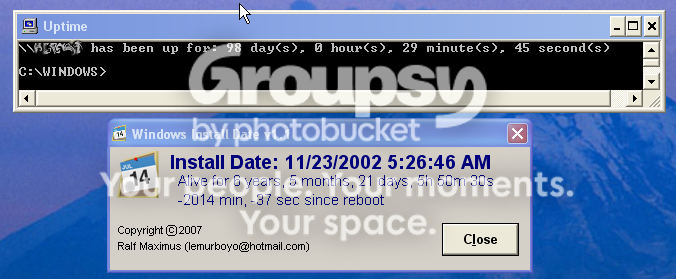


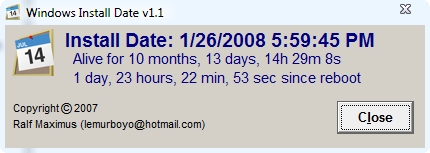
The Install date for that system is correct. However, last I checked, November 2002 plus 6 years 5 months equals May 2009 - I don't think we are there yet.

Also, it will be interesting to see what happens in ~33.6 hours (note the -2014 minutes) - I wonder how it knows I will reboot then? ;)

I look forward to V1.2.

Edit note - updated link to image - Digerati
Bill (AFE7Ret)
Freedom is NOT Free!

« Last Edit: August 13, 2008, 12:42 PM by Digerati »

lanux128

  • Global Moderator
  • Joined in 2005
  • *****
  • Posts: 6,277
    • Coding Snacks
    • Volunteers/Staff
    • Gathering Badge
    • Participated in NANY Challenge Once
    • Linux User
Re: Windows Install Date Thingie: I made it!
« Reply #58 on: April 16, 2008, 04:03 PM »
welcome aboard, Digerati! :) just to let you know that Ralf is on a little break right now and we hope to see him back very soon.

tomos

  • Charter Member
  • Joined in 2006
  • ***
  • Posts: 11,970
    • Gathering Badge
    • Participated in NANY Challenge Once
Re: Windows Install Date Thingie: I made it!
« Reply #59 on: April 16, 2008, 06:12 PM »
hi Digerati* & welcome :)
-
from a page or two back

Yikes!  Something indeed is weird.

The first number (Install Date) comes straight out of the registry; I'm just reading the number and displaying it.  Reasons that number might be wrong for you (just guessing):
- Machine came from a vendor who pre-installed Windows years ago, then imaged it.  They build new PCs by installing the image.

- Some other app twiddled the registry setting in question for some mysterious and unknowable-by-man reason.

- Registry got "fixed" at one time in the past by restoring a backup from a registry cleaning tool, and the backup was from an old version.

The second number (alive time) comes from the WMI (Windows Management Instrumentation) "last reboot" date.  Again, that's the number handed over by Windows when that value is requested.  A logical person might assume Windows is actually resetting that value upon startup, but I'm not certain of anything anymore...

I'll do some research on when WMI resets that value and see what I can learn.  Anyone with more WMI knowledge/experience than I please feel free to chime in.

* btw, do you happen to hang out/help at the castlecops forums?
just tried to go there for a look now but thing's moving incredibly slowly there at the mo
Tom

Digerati

  • Participant
  • Joined in 2008
  • *
  • Posts: 3
Re: Windows Install Date Thingie: I made it!
« Reply #60 on: April 18, 2008, 11:40 AM »
Thanks lanox and tomos.
Quote
* btw, do you happen to hang out/help at the castlecops forums?
just tried to go there for a look now but thing's moving incredibly slowly there at the mo
Yes, that's me - well, Bill_Bright is me. And yes CastleCops is running slow (still/again - in fact, they appear to be down again this morning - :().

As for the alive times being off - what can I say? If Uptime knows when I last rebooted, then it seems the alive times should be right. I just wonder how many folks have encountered a Windows PC that has been running for more than 3 months without a reboot. ;)
Bill (AFE7Ret)
Freedom is NOT Free!

ThArGos

  • Participant
  • Joined in 2008
  • *
  • Posts: 3
Re: Windows Install Date Thingie: I made it!
« Reply #61 on: November 04, 2008, 10:47 AM »
Hello. Congratulations on your client.

I would like to share with you our uptime project.
We have uptime clients for many architectures (windows, mac, linux) and each client sends its uptime to our server.
Thus we can display the uptime of everyone playing the game.

You can reach us at http://www.uptimeprj.com/

Everybody is welcome, you can even help, or create your own client. Yes your own client ! So you can adapt your actual client to participate to this great adventure =)

See you soon !
--
ThArGos
« Last Edit: November 04, 2008, 03:23 PM by ThArGos »

y0himba

  • Yar.
  • Charter Member
  • Joined in 2005
  • ***
  • Posts: 448
    • Military Service Badge - US Army
    • Military Service Badge - US Navy
Re: Windows Install Date Thingie: I made it!
« Reply #62 on: November 04, 2008, 12:32 PM »
It's Vista :P

Davidtheo

  • Participant
  • Joined in 2008
  • *
  • Posts: 119
Re: Windows Install Date Thingie: I made it!
« Reply #63 on: November 05, 2008, 01:26 AM »
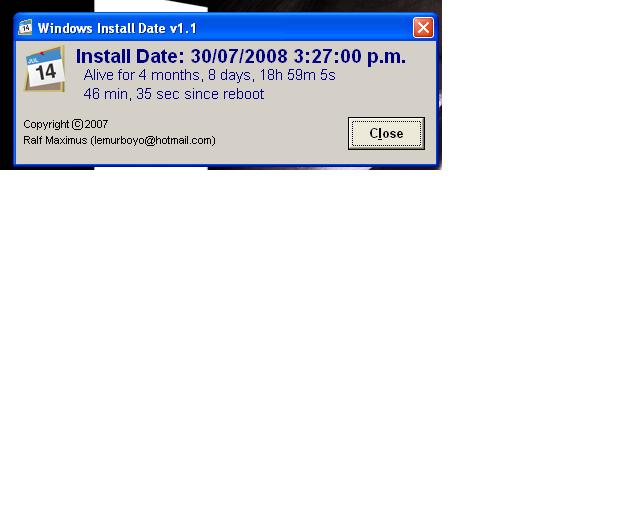
My work Computer.


[attach=#]

lanux128

  • Global Moderator
  • Joined in 2005
  • *****
  • Posts: 6,277
    • Coding Snacks
    • Volunteers/Staff
    • Gathering Badge
    • Participated in NANY Challenge Once
    • Linux User
Re: Windows Install Date Thingie: I made it!
« Reply #64 on: November 05, 2008, 01:59 AM »
has anyone been in touch with Ralf? haven't seen him for a while, still seems to be on his long sabbatical.

mouser

  • First Author
  • Administrator
  • Joined in 2005
  • *****
  • Posts: 40,931
    • Gathering Badge
    • Plugin Coding Medal
    • Participated in NANY Challenge Seventeen Times
    • Cody Award
    • Coding Snacks
    • Volunteers/Staff
Re: Windows Install Date Thingie: I made it!
« Reply #65 on: November 05, 2008, 06:58 AM »
Great question!

We need to start a petition to get Ralf back!!

COME BACK RALF WE MISS YOU!!

ThArGos

  • Participant
  • Joined in 2008
  • *
  • Posts: 3
Re: Windows Install Date Thingie: I made it!
« Reply #66 on: November 05, 2008, 10:20 AM »
Have a look at our rankings : http://www.uptimeprj.com/toplist.php?lang=en

It would be great if Ralf adapts his program to participate to our uptime project.
What do you think of ?

mcvrkovic

  • Participant
  • Joined in 2008
  • *
  • Posts: 1
Re: Windows Install Date Thingie: I made it!
« Reply #67 on: December 05, 2008, 05:35 PM »
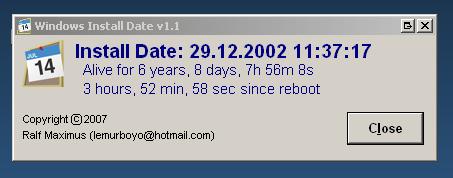
29.12.2002. !!!

I use Northon ghost to refres the system...

Yeah!

:)

Ralf Maximus

  • Supporting Member
  • Joined in 2007
  • **
  • Posts: 927
    • Coding Snacks
Re: Windows Install Date Thingie: I made it!
« Reply #68 on: December 05, 2008, 06:15 PM »
Holy smokes!

I'd kinda forgotten this thread existed.  Thanks, mcvrkovic, for the ping.  :)

ThArGos: I'll check out the link and see what's involved in adapting it.  Also, I'll back-scan thru the thread and collect a list of bugs that need fixin'.

Then, I'll dust off the code and we shall see.

ThArGos

  • Participant
  • Joined in 2008
  • *
  • Posts: 3
Re: Windows Install Date Thingie: I made it!
« Reply #69 on: December 08, 2008, 04:09 PM »
Great !

Our website has just been totally redone. At the moment subscriptions are suspended (for the week I think) in order to verify that the new website is working well.

You can check out the new display of the rankings here http://www.uptimeprj.com/toplist/index/en/0-30/UZD/

Cheers!
--
ThArGos

fritz57

  • Participant
  • Joined in 2009
  • *
  • Posts: 1
Re: Windows Install Date Thingie: I made it!
« Reply #70 on: February 11, 2009, 01:11 PM »
Hi,
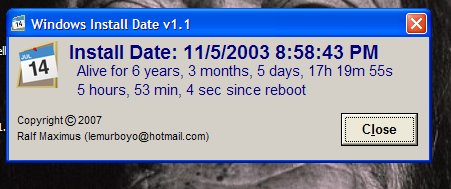
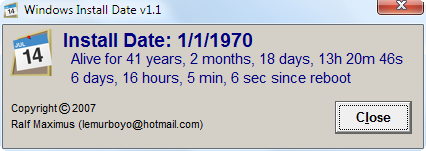
    the exe [ v.1.1 ] is cool but it seem to me there is a two minor errorrs: i.e.
a) The time elapsed from installation date is wrong [ one year too much ] 
b) the  tick of the up time from reboot seem too fast respect the system clock on the tray bar i.e. when by the tray bar system clock the elapsed time is 5h 33 min the Install Date progs state a 6h 37 min elapsed [ quite strage :! ]

Anyway thanks for your code

federico


   P.S.  here the image to show problem a) 

@thehop

  • Participant
  • Joined in 2005
  • *
  • Posts: 19
Re: Windows Install Date Thingie: I made it!
« Reply #71 on: July 16, 2009, 02:29 AM »
thx - fine Tool !  :)

But it differs two hours (Summertime?) from the WHS onboard tool netsh.exe (Network Command Shell)
[Startbutton] -> Run... -> netsh diag gui

Quote
Network Diagnostics
Network Diagnostics scans your system to gather information about your hardware, software, and network connections.

-> Scan your system
-> Set scanning options

... bla-bla ...

InstallDate = 09:44:34 11.07.2009
LargeSystemCache = 0
LastBootUpTime = 15:03:33 15.07.2009
LocalDateTime = 04:00:45 16.07.2009
Locale = 0c07
Manufacturer = Microsoft Corporation
MaxNumberOfProcesses = -1
MaxProcessMemorySize = 2097024
Name = Microsoft Windows Server 2003 for Small Business Server|C:\whs|\Device\Harddisk0\Partition2
NumberOfLicensedUsers = 10


cheerio

Markoul

  • Participant
  • Joined in 2009
  • *
  • Posts: 1
Record Breaker
« Reply #72 on: August 27, 2009, 01:14 PM »
[attach]
« Last Edit: August 27, 2009, 01:18 PM by Markoul »

Digerati

  • Participant
  • Joined in 2008
  • *
  • Posts: 3
Re: Windows Install Date Thingie: I made it!
« Reply #73 on: March 15, 2011, 02:57 PM »
Sorry to dredge this up from the deep but I sure would not mind seeing a Windows Install Date Thingy "gadget" for Windows 7!  :D
Bill (AFE7Ret)
Freedom is NOT Free!

kyrathaba

  • N.A.N.Y. Organizer
  • Honorary Member
  • Joined in 2006
  • **
  • Posts: 3,200
    • Participated in NANY Challenge Eight Times
    • Programming School - Deluxe Bonus Medal
    • Programming School - Stage 1 Medal
    • Coding Snacks
    • Military Service Badge - US Army
    • Writer
Re: Windows Install Date Thingie: I made it!
« Reply #74 on: March 15, 2011, 06:22 PM »
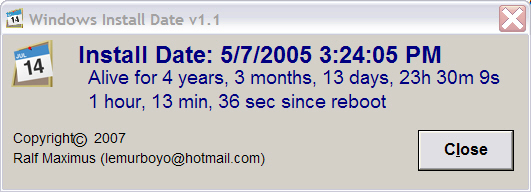
winInstallDate.png

How does the program calculate time since reboot?  The elapsed time shown may be correct for my laptop if we're talking about user-initiated reboot; but Windows OS automatically rebooted my machine sometime in the past two days, after updates were downloaded and installed...
Win 10 Pro running on a 3.2 GHz CPU and 12 Gb RAM
__________________________________________

Proofreading Service: http://williammillerservices.com/proofreading

« Last Edit: March 15, 2011, 06:24 PM by kyrathaba »

Original address: https://www.donationcoder.com/forum/index.php?topic=10571.0