I use it daily too (of course) 
>Is there anything I can do before exiting the program that sort of ensures me that the changes are being saved?
You could click the save button, change item and come back to it
>I still think it's important to have a more sophisticated backup settings
True, but if the content is never saved, a backup will not help you. We must track this down first.
A QuickSearch does not find the missing info? [Edit]I see that it did[/Edit]
>and I don't see some of the items I added yesterday.
Use the journal grid (or a similar one with the DateFilter) to see items added yesterday. I don't recall ever loosing items...
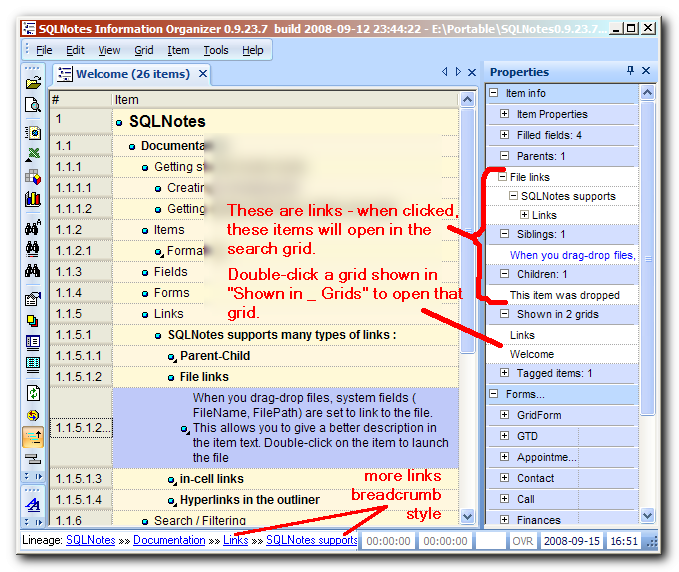
>But in the properties, they appear in no grids, which is weird because I obviously entered them in a grid
You mean that they have no fields filled (other than the Item field)? There is a bug in the current version, where if the grid source field contains a space in the name, it isn't auto-assigned, hence would not show in the grid. This is now fixed. Updated version will be out today.
>Now, how do I add the lost items back into the proper grid? Do I have to move it manually, or can I restore it somehow?
Simply assign fields to those items such that the grid will show it. It could be as simple as checking a yes/no field, or more complex. It all depends on the grid (source, filter, AlphaFilter, DateFilter). Show a screenshot if you're having problems.
>Is there anything I can do before exiting the program that sort of ensures me that the changes are being saved?
You could click the save button, change item and come back to it
>I still think it's important to have a more sophisticated backup settings
True, but if the content is never saved, a backup will not help you. We must track this down first.
A QuickSearch does not find the missing info? [Edit]I see that it did[/Edit]
>and I don't see some of the items I added yesterday.
Use the journal grid (or a similar one with the DateFilter) to see items added yesterday. I don't recall ever loosing items...
>But in the properties, they appear in no grids, which is weird because I obviously entered them in a grid
You mean that they have no fields filled (other than the Item field)? There is a bug in the current version, where if the grid source field contains a space in the name, it isn't auto-assigned, hence would not show in the grid. This is now fixed. Updated version will be out today.
>Now, how do I add the lost items back into the proper grid? Do I have to move it manually, or can I restore it somehow?
Simply assign fields to those items such that the grid will show it. It could be as simple as checking a yes/no field, or more complex. It all depends on the grid (source, filter, AlphaFilter, DateFilter). Show a screenshot if you're having problems.


 ]
]


 Now I just need to figure out how to use this thing, but at least it's working and I can see some of its power.