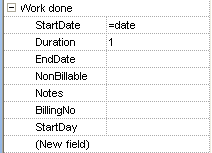
changed the screenshot in last post...
changed "checked" column to "changed" (try saying that fast!)
changed "checked" column to "changed" (try saying that fast!)


 Topic: SQLNotes...what is it exactly? (Read 1,173,506 times)


 (I'd like to discuss things about categories, etc. I posted in Mantis about this and I found a temporary pretty neat and simple solution that works very well -- still not ideal but, who knows, probably similar to what you're already using)
I'll be offline for 2 days.
| Filter The Filter filters the list of items. It can be edited directly, but it also can be set through the Search Form or Quick Search |
| Saving Filters Currently you can't named filters, but you can use the history drop-down box to select old filters. Also, Grid's will remember their filter so you can create a multiple Grids - each with its own Filter. |
Amando, you mentioned error #91 somewhere
did you get any info on it?
I was changing the colours for a grid in options and you have to restart for them to take effect (sometimes anyways) and now it wont start,
well, it starts up but then I get
---------------------------
SQLNotes
---------------------------
Run-time error '91':
Object variable or With block variable not set
---------------------------
OK
---------------------------
and it crashes...
Tom
 But I solved the problem by:
How do I *include* files that have duration i.e. files I have worked on & recorded the time spent:-
Projects and (File and duration>0)
- doesnt work - filters out everything
You say in the wiki page about filters
Filter
The Filter filters the list of items. It can be edited directly, but it also can be set through the Search Form or Quick Search
is there any tips around how to use the Search function to do this?
and, just BTW:-
Saving Filters
Currently you can't named filters, but you can use the history drop-down box to select old filters. Also, Grid's will remember their filter so you can create a multiple Grids - each with its own Filter.
I dont have any drop down box here on the filters?
but if I remove filter text and then click on icon to deactivate filter the text returns (which is fine)

| * that would be a great idea actually a search/filter pane which shows all the fields - like in the properties pane, you fill in what you want and it gets shown in the filter bar So, in this case I'd tick my two fields and fill ">0" in duration field, click "Find" or "Filter" and off |
In filter bar I've tried:
Projects and File and duration>0
Projects and File and (duration>0)
both coming up empty nada nix...
* that would be a great idea actually
a search/filter pane which shows all the fields - like in the properties pane,
you fill in what you want and it gets shown in the filter bar
So, in this case I'd tick my two fields and fill ">0" in duration field,
click "Find" or "Filter" and off
well... If you have 100s of fields (which is very possible), it might be a bit hard to use... But this is already pretty much possible anyways with the "source bar" (alt+s). Just write all the fields and terms you want (with the proper operators, symbols etc.) and bingo.
find this easy - the opposite in fact, well source is okay but filters...Amando, you mentioned error #91 somewhere
did you get any info on it?
I was changing the colours for a grid in options and you have to restart for them to take effect (sometimes anyways) and now it wont start,
well, it starts up but then I get
---------------------------
SQLNotes
---------------------------
Run-time error '91':
Object variable or With block variable not set
---------------------------
OK
---------------------------
and it crashes...
Tom
and, just BTW:-Corrected. This page was written by a SQLNotes user, not by myself. It is great to see others write. It sometimes is much clearer than when I write documentation. Different perspective. All users are welcomed to write, correct, comment the wiki. Consider it a community effort to help expose the (I hope) great features of (the about to be renamed) SQLNotes.
Saving Filters
Currently you can't named filters, but you can use the history drop-down box to select old filters. Also, Grid's will remember their filter so you can create a multiple Grids - each with its own Filter.
I dont have any drop down box here on the filters?
but if I remove filter text and then click on icon to deactivate filter the text returns (which is fine)
the AND operator : the 3 fields must have something in them simultaneously. If that's not what you want, try using the OR operator (place it where you want it... can't help you with that).
Ecco uses a similar kind of filter definition UI.
* that would be a great idea actually
a search/filter pane which shows all the fields - like in the properties pane,
you fill in what you want and it gets shown in the filter bar
So, in this case I'd tick my two fields and fill ">0" in duration field,
click "Find" or "Filter" and off
Ecco uses a similar kind of filter definition UI.
What I envision is something very similar to the forms manager with extra spaces to add AND, OR, etc and ( ).
So one would select the field, the value and operators
or cant figure them out) - if you had,Correct, Imagine a check box to the left of the field name. Check it to include the field in the filtersuper, that way I can learn how to filter-speak at my leisure

> SQLNotes forum not functioning
Seems fine now...
Original address: https://www.donationcoder.com/forum/index.php?topic=10432.0