DonationCoder.com forum
 
Read-only archive. This is a static copy of the DonationCoder.com forum. Reading and searching work as before; logging in, posting and private messages do not.
Archive of 2026-10-21 · About this archive · Main site

Author Topic: Qliner Hotkeys (open source): Hotkey program with visual keyboard  (Read 21,673 times)

mouser

  • First Author
  • Administrator
  • Joined in 2005
  • *****
  • Posts: 40,931
    • Gathering Badge
    • Plugin Coding Medal
    • Participated in NANY Challenge Seventeen Times
    • Cody Award
    • Coding Snacks
    • Volunteers/Staff
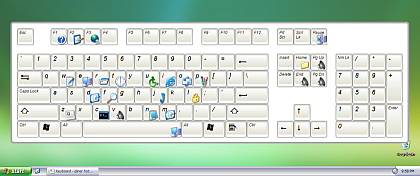
Over at ghacks they've found a cool looking hotkey program with one very nice feature that I know will appeal so some people -- you can get a quick visual representation of which keys you have mapped to each program.


http://www.qliner.com/hotkeys/


qlinerhotkeys2.png


from http://www.ghacks.net/

Ralf Maximus

  • Supporting Member
  • Joined in 2007
  • **
  • Posts: 927
    • Coding Snacks
Re: Qliner Hotkeys (open source): Hotkey program with visual keyboard
« Reply #1 on: October 08, 2007, 05:07 PM »
Looks pretty cool.  Nice concept, clean execution.

But I'm holding out for this:
http://www.artlebedev.com/everything/optimus/

(With a name like Maximus, you KNOW it's got to be... something...)

CleverCat

  • Cat's Are Fun!
  • Supporting Member
  • Joined in 2006
  • **
  • Posts: 1,164
Re: Qliner Hotkeys (open source): Hotkey program with visual keyboard
« Reply #2 on: October 12, 2008, 11:59 AM »
Can't wait to try qliner - been using a boring old MS one!  ;D
If you need help - JUST ASK!

f0dder

  • [Well, THAT escalated quickly!]
  • Charter Honorary Member
  • Joined in 2005
  • ***
  • Posts: 9,153
    • Participated in NANY Challenge Once
Re: Qliner Hotkeys (open source): Hotkey program with visual keyboard
« Reply #3 on: October 12, 2008, 02:17 PM »
Unfortunately doesn't work on 64bit windows - I suspect it's the same type of problem that CircleDock had.
- carpe noctem

VideoInPicture

  • Honorary Member
  • Joined in 2008
  • **
  • Posts: 467
    • Coding Snacks
Re: Qliner Hotkeys (open source): Hotkey program with visual keyboard
« Reply #4 on: October 12, 2008, 02:22 PM »
Want to me to debug it? It's C# so I should be able to get it working or see what's wrong.
Author of Circle Dock: http://circledock.wikidot.com
Author of Video In Picture: http://videoinpicture.wikidot.com
Author of Webcam Signature: http://webcamsignature.wikidot.com
Author of Easy Unicode Paster: http://easyunicodepaster.wikidot.com

f0dder

  • [Well, THAT escalated quickly!]
  • Charter Honorary Member
  • Joined in 2005
  • ***
  • Posts: 9,153
    • Participated in NANY Challenge Once
Re: Qliner Hotkeys (open source): Hotkey program with visual keyboard
« Reply #5 on: October 12, 2008, 02:31 PM »
Want to me to debug it? It's C# so I should be able to get it working or see what's wrong.
Do you have access to a 64bit machine, though? I suspect it'll be as simple as setting the build type to x86 instead of "any", but I can't be arsed to play around with it myself right now :)
- carpe noctem

CleverCat

  • Cat's Are Fun!
  • Supporting Member
  • Joined in 2006
  • **
  • Posts: 1,164
Re: Qliner Hotkeys (open source): Hotkey program with visual keyboard
« Reply #6 on: October 12, 2008, 02:38 PM »
Qliner is terrific!  :D
If you need help - JUST ASK!

VideoInPicture

  • Honorary Member
  • Joined in 2008
  • **
  • Posts: 467
    • Coding Snacks
Re: Qliner Hotkeys (open source): Hotkey program with visual keyboard
« Reply #7 on: October 12, 2008, 02:46 PM »
I don't have 64-bit Windows installed, but I can get it from MSDN. That would take me quite while to get everything up and running.

Also, I can't seem to download the source code from the CVS for qliner for some reason. It keeps saying the repository has been relocated temporarily. However, I took a browse through the online version of the code and it appears to be straightforward C# for the most part coupled with a Win32 C++ hook. Also, the C# .csproj files show that the executables weren't compiled to be 32-bit specific so it is highly like that qliner is having the same problem that Circle Dock has and you simple just have to add in the instruction to build as x86 into the .csproj files.
Author of Circle Dock: http://circledock.wikidot.com
Author of Video In Picture: http://videoinpicture.wikidot.com
Author of Webcam Signature: http://webcamsignature.wikidot.com
Author of Easy Unicode Paster: http://easyunicodepaster.wikidot.com

KenR

  • Super
  • Blogger
  • Joined in 2006
  • ***
  • Posts: 826
Re: Qliner Hotkeys (open source): Hotkey program with visual keyboard
« Reply #8 on: October 12, 2008, 02:52 PM »
Unfortunately doesn't work on 64bit windows - I suspect it's the same type of problem that CircleDock had.

f0dder,
Forgive me for asking, but is that 64 bit XP or Vista.
Ken
Kenneth P. Reeder, Ph.D.
Clinical Psychologist
Jacksonville, North Carolina  28546

KenR

  • Super
  • Blogger
  • Joined in 2006
  • ***
  • Posts: 826
Re: Qliner Hotkeys (open source): Hotkey program with visual keyboard
« Reply #9 on: October 12, 2008, 02:55 PM »
Over at ghacks they've found a cool looking hotkey program with one very nice feature that I know will appeal so some people -- you can get a quick visual representation of which keys you have mapped to each program.


http://www.qliner.com/hotkeys/

(see attachment in previous post)


from http://www.ghacks.net/

Mouser ... Mouser ... A hotkeys app? Does that mean that this program is more powerful than that program you wrote? What was it now ... FARR?

Ken
Kenneth P. Reeder, Ph.D.
Clinical Psychologist
Jacksonville, North Carolina  28546

Darwin

  • Charter Member
  • Joined in 2005
  • ***
  • Posts: 6,985
    • Gathering Badge
Re: Qliner Hotkeys (open source): Hotkey program with visual keyboard
« Reply #10 on: October 12, 2008, 03:09 PM »
Unfortunately doesn't work on 64bit windows - I suspect it's the same type of problem that CircleDock had.

I suspect that the answer will be "either".
f0dder,
Forgive me for asking, but is that 64 bit XP or Vista.
Ken
"Some people have a way with words, other people,... oh... have not way" - Steve Martin

tomos

  • Charter Member
  • Joined in 2006
  • ***
  • Posts: 11,970
    • Gathering Badge
    • Participated in NANY Challenge Once
Re: Qliner Hotkeys (open source): Hotkey program with visual keyboard
« Reply #12 on: October 12, 2008, 03:46 PM »
Qliner Hotkeys is a really sexy looking app but that's where its wow-factor ends. It's weak and inept when compared to AutoHotkey and to add insult to injury, it consumes far more resources. I still have it installed though, it lets me create a nice graphical representation of my shortcuts, I save a jpg screencap of the Qliner keyboard and configure an (Auto)hotkey to load it whenever I need to be reminded of a shortcut. Using the best of both worlds. ;)

also unfortunately didnt work well with european (continental) keyboards a year ago - (may have been updated since?? = No, unfortunately not...)
Tom

f0dder

  • [Well, THAT escalated quickly!]
  • Charter Honorary Member
  • Joined in 2005
  • ***
  • Posts: 9,153
    • Participated in NANY Challenge Once
Re: Qliner Hotkeys (open source): Hotkey program with visual keyboard
« Reply #13 on: October 12, 2008, 03:57 PM »
Unfortunately doesn't work on 64bit windows - I suspect it's the same type of problem that CircleDock had.
f0dder,
Forgive me for asking, but is that 64 bit XP or Vista.
Ken
Both, I bet. The CircleDock issue manifested itself on my XP64 box, and I tried Qliner on my Vista64 laptop. Pretty much exactly the same issue - 32bit hook DLL and dotNET built for "any cpu" instead of targetting x86 (32bit). 64bit apps can't load 32bit DLLs.
- carpe noctem

Curt

  • Supporting Member
  • Joined in 2006
  • **
  • Posts: 7,565
Re: Qliner Hotkeys (open source): Hotkey program with visual keyboard
« Reply #14 on: October 12, 2008, 04:35 PM »
Quote from: Re: My favorite software! What's yours?
« Reply #84 on: 16 January 2007, 19:17:33 »
Quote from: Curt
QLiner Hotkeys makes the fastest way the prettiest way
- QLiner Hotkeys used to be a favourite of mine because the popup keyboard makes it easy to be reminded of which hotkey I am looking for - I tend to have forgotten hotkeys when I have to use them  :-[
  :up:

Original address: https://www.donationcoder.com/forum/index.php?topic=10290.0