To update the list, should we have to open the text file each time? Oh.. that seems tedious if we have several lists.
[attach]


 Topic: Is there a way to directly write notes onto the Windows desktop? (Read 74,328 times)


To update the list, should we have to open the text file each time? Oh.. that seems tedious if we have several lists.


Take a look at this:
http://lifehacker.com/software/plain-text/geek-to-live—incorporate-text-files-onto-your-desktop-213280.php
I think it fits the bill perfectly, and is light on resources.


Yeah, i kind of found out after i posted.Take a look at this:
http://lifehacker.com/software/plain-text/geek-to-live—incorporate-text-files-onto-your-desktop-213280.php
I think it fits the bill perfectly, and is light on resources.
manimatters: Darwin posted the same link one post above.

To update the list, should we have to open the text file each time? Oh.. that seems tedious if we have several lists.(see attachment in previous post)
by brianamarks at 07:59 PM on 11/08/06 Reply by Email
Gina, keep the tips coming. I read Lifehacker 1025 times per day.
Folks, I figured out a way to enable a quick edit of the todo.txt file. Here is what you do:
1) On the right frame, select the "Input" tab
2) Check the box marked "Allow Input Controls"
3) Click "Add"
4) On the popup window that appears, under "Link Meter To:" Enter notepad.exe (or the path to your favorite text editor) followed by the path to your to do file. On my machine, I entered:
notepad.exe c:\TO DO.txt
5) Click "Next"
6) Choose an action from the list and check the box next to it (I chose "Right Mouse Click")
7) Click "Finished"Save your .ini file
9) Right click the Samurize tray icon and select the .ini file you just saved to reload it.
Test the action you chose to make sure it worked.

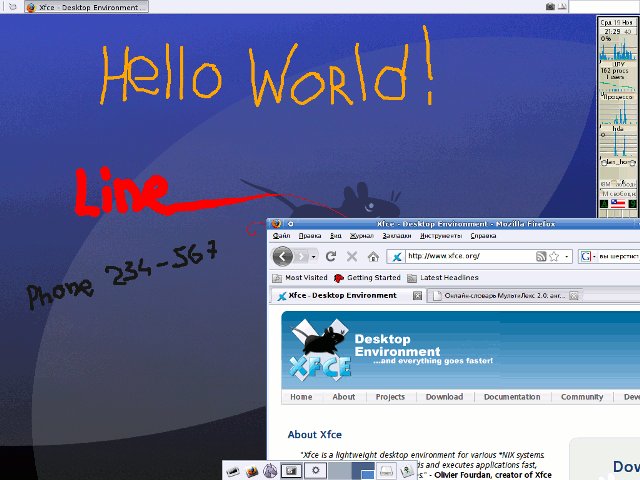
Xfwallmem - the application for XFce desktop environment allows make memory notes directly on your desktop. In fact it is simple graphic editor for drawing on desktop wallpaper.


Original address: https://www.donationcoder.com/forum/index.php?topic=10269.0