DonationCoder.com forum
 
Read-only archive. This is a static copy of the DonationCoder.com forum. Reading and searching work as before; logging in, posting and private messages do not.
Archive of 2026-10-21 · About this archive · Main site

Author Topic: Create New (Customized) Folder Wanted  (Read 15,257 times)

Nighted

  • Meat Popsicle
  • Charter Honorary Member
  • Joined in 2005
  • ***
  • Posts: 572
Create New (Customized) Folder Wanted
« on: October 04, 2007, 03:39 AM »
There are many programs out there that will let you colour a folder or apply a custom icon/background to it AFTER the folder has been created.

I'm looking for something that can do this on the fly, both from a right click context menu and a hotkey (like mdAxelerator for example).

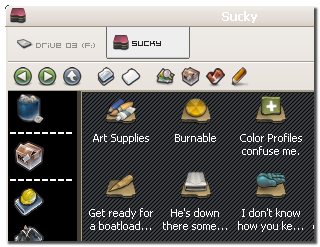
So you could have it set to use a certain icon, background image, and comment and every new folder you create could look something like this:

[attach]
I`m a firm believer in the philosophy of a ruling class, especially since I rule.

SirSmiley

  • Member
  • Joined in 2007
  • **
  • Posts: 64
Re: Create New (Customized) Folder Wanted
« Reply #1 on: October 07, 2007, 02:35 AM »
So, basically you're looking for a variation of Folder Tweaker?
http://qad.dcmembers.com/wp/category/freeware/folder-tweaker/

Nighted

  • Meat Popsicle
  • Charter Honorary Member
  • Joined in 2005
  • ***
  • Posts: 572
Re: Create New (Customized) Folder Wanted
« Reply #2 on: October 07, 2007, 03:10 AM »
Not really. If I wanted that, I'd use this.

I just want to create a new folder and have a default template instantly applied. This could be done be creating the folder and then applying the template, or by copying a folder already completed to the new location (much better).
I`m a firm believer in the philosophy of a ruling class, especially since I rule.

SirSmiley

  • Member
  • Joined in 2007
  • **
  • Posts: 64
Re: Create New (Customized) Folder Wanted
« Reply #3 on: October 07, 2007, 06:05 AM »
;D Actually, I was using the WindowsPaper earlier to see how they structure the desktop.ini.

I understand what you mean "Folder Templates". Can do this in vbs but, tomorrow is a holiday here maybe by tomorrow night I'll have something.

Nighted

  • Meat Popsicle
  • Charter Honorary Member
  • Joined in 2005
  • ***
  • Posts: 572
Re: Create New (Customized) Folder Wanted
« Reply #4 on: October 07, 2007, 10:30 AM »
Excellent! I'm interested to see how you would implement this.
I`m a firm believer in the philosophy of a ruling class, especially since I rule.

SirSmiley

  • Member
  • Joined in 2007
  • **
  • Posts: 64
Re: Create New (Customized) Folder Wanted
« Reply #5 on: October 07, 2007, 04:37 PM »
Before I head out, here's some basics of it for people to play around with.

Desktop.ini Structure
Code
[.ShellClassInfo]
ConfirmFileOp=0
InfoTip=This is a test of InfoTip.
IconFile=Antares_Favorites_Folder_Black.ico
IconIndex=0
[ExtShellFolderViews]
{BE098140-A513-11D0-A3A4-00C04FD706EC}={BE098140-A513-11D0-A3A4-00C04FD706EC}
[{BE098140-A513-11D0-A3A4-00C04FD706EC}]
ICONAREA_IMAGE=blkBgd.bmp
ICONAREA_TEXT=33023

Basic VBScript
Code: (vb)
Dim templateFldr	'Template Folder
Dim targetFldr		'TargetFldr
Dim nFldr			'New Folder	
templateFldr="C:\Programming\Sandbox\Folder Templates\template1"	'Template
targetFldr="C:\Programming\Sandbox\"	'Target folder. Must have the back slash otherwise contents will be copied
nFldr=targetFldr&"template1"	'New Folder Template

Call copyFolder(templateFldr,targetFldr)

Function copyFolder(iFldr,oFldr)
   Set objFSO = CreateObject("Scripting.FileSystemObject")
   objFSO.CopyFolder iFldr,oFldr
   Set oFldr=objFSO.GetFolder(nFldr)
   oFldr.attributes=4	'Sets attribute of Folder to System in order for the desktop.ini to work
   Set oFldr=nothing
   Set objFSO=nothing
End Function

SirSmiley

  • Member
  • Joined in 2007
  • **
  • Posts: 64
Re: Create New (Customized) Folder Wanted
« Reply #6 on: October 08, 2007, 05:43 PM »
Okay, so I'm working on this in VBScript. Haven't actually written an AHK script yet, but hopefully can do this.

Here's a few questions, thoughts issues.

Copying a "Folder Template" is obviously easier and faster.

Let's say you have ten icons that you have five different backgrounds with each icon then you end up with  50 icons and 50 backgrounds instead of 10 icons and 5 background images.

So, basically you're wasting space & creating redundancy. For example I have four test template folders that already sit at 1.2mb and two don't even have backgrounds. I do realize these are full perhaps vista compliant icons but, not everyone wants to edit each icon down to the standard sizes.

IMO two separate ini files would save some space & present you with the option to vary icons, backgrounds, text colours, etc. while being efficient below are the two ini file structures. txt0, txt1,txt5,txt6,txt7 probably can be removed from the templates.ini

Just wanted to hear peoples thoughts on this.

Code
[Template1]
icon=icon1
bgdimg=img1
resfldr=0	'1 for yes|0 for no
txt0=[.ShellClassInfo]
txt1=ConfirmFileOp=0
txt2=InfoTip=This is a test of InfoTip.
txt3=IconFile=Antares_Favorites_Folder_Black.ico
txt4=IconIndex=0
txt5=[ExtShellFolderViews]
txt6={BE098140-A513-11D0-A3A4-00C04FD706EC}={BE098140-A513-11D0-A3A4-00C04FD706EC}
txt7=[{BE098140-A513-11D0-A3A4-00C04FD706EC}]
txt8=ICONAREA_IMAGE=blkBgd.bmp
txt9=ICONAREA_TEXT=33023

Code
[Icons]
icon1="C:\Path to my icons\icon.ico

[Backgrounds]
bgd1="C:\Path to my backgrounds\bgd.bmp

Nighted

  • Meat Popsicle
  • Charter Honorary Member
  • Joined in 2005
  • ***
  • Posts: 572
Re: Create New (Customized) Folder Wanted
« Reply #7 on: October 09, 2007, 12:28 AM »
Well, you only need two types of INI I suppose, one for portable folders, and another for those wanting to keep everything in a local cache.

Size shouldn't really be relevant. Anyone who'd want to use this can probably make their own icons and decide what resolutions they want to include, or download packages made by others.

If you really wanted to be finicky and go for the most efficient way to produce results without bloat, then storing the folder images in PNG format would be the way to go. Finding a small PNG to ICO converter is simple. But this now you would have to build the icon and create the folder first before moving it to the new location.

I added up 50 folders, with background images and a max icon resolution of 64x64px and it was only about 3MB. 3MB is nothing today and most XP users would be happy with this anyway. I think speed and simplicity is the most important factor.
I`m a firm believer in the philosophy of a ruling class, especially since I rule.

SirSmiley

  • Member
  • Joined in 2007
  • **
  • Posts: 64
Re: Create New (Customized) Folder Wanted
« Reply #8 on: October 09, 2007, 03:11 AM »
Actually one desktop.ini is fine if you're putting all the resources in that folder just use relative links like this:
Code
[.ShellClassInfo]
ConfirmFileOp=0
InfoTip=This is a test of InfoTip.
IconFile=resources\Antares_Favorites_Folder_Silver.ico
IconIndex=0
[ExtShellFolderViews]
{BE098140-A513-11D0-A3A4-00C04FD706EC}={BE098140-A513-11D0-A3A4-00C04FD706EC}
[{BE098140-A513-11D0-A3A4-00C04FD706EC}]
ICONAREA_IMAGE=resources\blkBgd.bmp
ICONAREA_TEXT=33023

Oh, and this is perhaps the quickest way. Take this code & save as a vbs file then place it into your sendto folder. Right click in sendto menu to run it. This should do until I or someone gets something better coded.

Code: (vb)
Dim WshShell, objFSO
Dim templateFldr	'Template Folder
Dim targetFldr		'TargetFldr
Dim nFldr			'New Folder	
Dim nFldrname		'New Folder Name

'Path to the specific template folder
templateFldr="C:\Programming\Sandbox\Folder Templates\Templates\template2"

Set WshShell = CreateObject("WScript.Shell")
Set objFSO = CreateObject("Scripting.FileSystemObject")

On Error Resume Next

'Get the folder to work with
If WScript.Arguments.Count = 0 Then
	WScript.Quit
ElseIf WScript.Arguments.Count = 1 Then
	targetFldr = WScript.Arguments.Item(0)
	targetFldr= objFSO.GetParentFolderName(targetFldr)&"\"
	'targetFldr = objFSO.targetFldr&"\"
	'--Input for New Folder Name
	 nFldrname=InputBox("Folder Template","Enter Name for New Folder","New Folder")
		If nFldrname="" Then
			WScript.Quit
		Else
			nFldr=targetFldr & nFldrname	'New Folder Template
			'--Call the Copy Folder Function
			Call copyFolder(templateFldr,nFldr)
		 End If
End If

Set objFSO = Nothing
Set WshShell = Nothing

Function copyFolder(iFldr,oFldr)
   objFSO.CopyFolder iFldr,oFldr
   Set oFldr=objFSO.GetFolder(nFldr)
   oFldr.attributes=4	'Sets attribute of Folder to System in order for the desktop.ini to work
   Set oFldr=nothing
   Set objFSO=nothing
End Function

Original address: https://www.donationcoder.com/forum/index.php?topic=10233.0