

About this Software
This is exclusive software developed by mouser. None of our software contains spyware, adware, or toolbars of any kind.
Need a License Key?
Some of our larger programs require a license key for long-term use.

Commitment To Integrity
None of our software contains toolbars, spyware, adware, or bundled software of any kind. We will refund any donation at any time with no questions asked. All donations are processed securely by trusted financial services; we do not receive your credit card or personal information when you donate, and we will not share your email address with anyone. For more information please read our Privacy Policy.
Occasionally a friend of DC without a web site will release a program and ask us to host it. We've create the Miscelaneous Member Software Archive for this purpose.
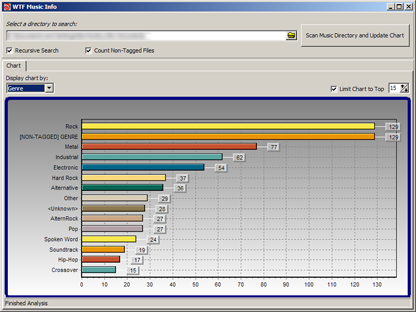
There you will find some programs by DC member seedling, including: Random MixTape Maker, which takes a large collection of your mp3 files and creates playlists with a specified target duration; WTF Music Info, which will scan your music directories and give you a nice, graphical view of your music library.
- Number of programs available: 3
- Last updated: 2008
- Visit the miscelaneous DC member archive page to browse apps and download them here: http://www.dcmembers.com/archive.
30 Days of DonationCoder Screencasts - Day 23 - Keyboard Interface Options in FARR DAY 23: Today's video takes a look at the Keyboard Interface Options of FARR: https://www.donation...c/3ds/fr12/fr12.html The entire screencast video series can be seen here: https://www.donationcoder.com/3ds/ |
||

30 Days of DonationCoder Screencasts - Day 22 - The External Tools Tab in FARR DAY 22: Today's video takes a look at the External Tools Tab in FARR: https://www.donation...c/3ds/fr11/fr11.html Sorry today's video is so lame.. they get better soon. The entire screencast video series can be seen here: https://www.donationcoder.com/3ds/ |
||
30 Days of DonationCoder Screencasts - Day 21 - The General Options Tab in FARR DAY 21: Today's video takes a look at the General Options tab of FARR: https://www.donation...c/3ds/fr10/fr10.html The entire screencast video series can be seen here: https://www.donationcoder.com/3ds/ |
||
30 Days of DonationCoder Screencasts - Day 20 - Directory Browsing in FARR DAY 20: The video shows how to use the directory browsing features of FARR: https://www.donation.../dc/3ds/fr9/fr9.html The entire screencast video series can be seen here: https://www.donationcoder.com/3ds/ |
||
30 Days of DonationCoder Screencasts - Day 19 - FARR Mini-toolbar DAY 19: The video shows how to use and configure the built-in mini-toolbar in FARR: https://www.donation.../dc/3ds/fr8/fr8.html The entire screencast video series can be seen here: https://www.donationcoder.com/3ds/ |
||
30 Days of DonationCoder Screencasts - Day 18 - FARR General Display Options DAY 17: The video discusses the general display options in FARR: https://www.donation.../dc/3ds/fr7/fr7.html The entire screencast video series can be seen here: https://www.donationcoder.com/3ds/ |
||