DonationCoder.com forum
 
Read-only archive. This is a static copy of the DonationCoder.com forum. Reading and searching work as before; logging in, posting and private messages do not.
Archive of 2026-10-21 · About this archive · Main site

Author Topic: WinCalendarTime - windows clock enhancer  (Read 19,362 times)

lanux128

  • Global Moderator
  • Joined in 2005
  • *****
  • Posts: 6,277
    • Coding Snacks
    • Volunteers/Staff
    • Gathering Badge
    • Participated in NANY Challenge Once
    • Linux User
WinCalendarTime - windows clock enhancer
« on: November 22, 2006, 06:07 AM »
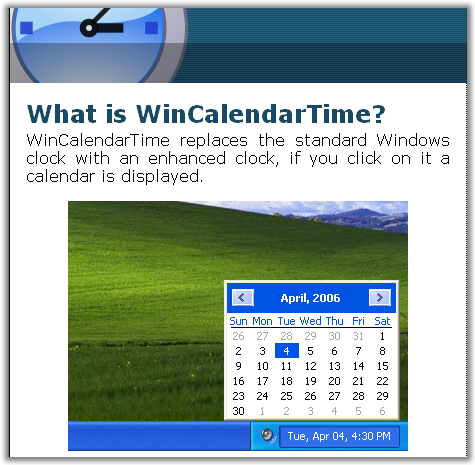
spotted this on the net: WinCalendarTime.
not as feature-packed as TClock and its ilk but this is a tool that can be appreciated for its simplicity.

[attach=#]
mouser

  • First Author
  • Administrator
  • Joined in 2005
  • *****
  • Posts: 40,931
    • Gathering Badge
    • Plugin Coding Medal
    • Participated in NANY Challenge Seventeen Times
    • Cody Award
    • Coding Snacks
    • Volunteers/Staff
Re: WinCalendarTime - windows clock enhancer
« Reply #1 on: November 22, 2006, 06:53 AM »
nice.

Dr-Leech

  • Psychedelic Coder
  • Member
  • Joined in 2006
  • **
  • Posts: 151
Re: WinCalendarTime - windows clock enhancer
« Reply #2 on: December 09, 2006, 10:51 PM »
great and extreme lightweight

GeekK

  • Participant
  • Joined in 2006
  • *
  • Posts: 3
Re: WinCalendarTime - windows clock enhancer
« Reply #3 on: December 10, 2006, 01:17 PM »
Perfect for me, if I could just change the foreground color.. (I use a windows skin).

jgpaiva

  • Artificial Idiocy
  • Global Moderator
  • Joined in 2006
  • *****
  • Posts: 4,727
    • Cody Award
    • Participated in NANY Challenge Once
    • Coding Snacks
    • Portugal Inhabitant
    • Linux User
Re: WinCalendarTime - windows clock enhancer
« Reply #4 on: December 10, 2006, 01:21 PM »
I don't think i could give up alfaclock for anything ;)

lanux128

  • Global Moderator
  • Joined in 2005
  • *****
  • Posts: 6,277
    • Coding Snacks
    • Volunteers/Staff
    • Gathering Badge
    • Participated in NANY Challenge Once
    • Linux User
Re: WinCalendarTime - windows clock enhancer
« Reply #5 on: December 11, 2006, 04:36 AM »
I don't think i could give up alfaclock for anything
the same for me jgpaiva, i've been using TClock and its various clones since Win9x.. but these programs come with a slew of features and i can't really recommend them to an average user..

that's why i've been looking a slim & lightweight clock tool that has a built-in calendar (something that should be in the OS itself).. :)

Nighted

  • Meat Popsicle
  • Charter Honorary Member
  • Joined in 2005
  • ***
  • Posts: 572
Re: WinCalendarTime - windows clock enhancer
« Reply #6 on: December 18, 2006, 01:31 PM »
Don't forget LClock. ;)

Or if you want the ultimate, pay money and get Chameleon Clock. Then you can enjoy my skin, Alienz (included with the installer), numbers I carefully recreated from the computers in the movie Aliens. ;)
I`m a firm believer in the philosophy of a ruling class, especially since I rule.

rjbull

  • Charter Member
  • Joined in 2005
  • ***
  • Posts: 3,217
Re: WinCalendarTime - windows clock enhancer
« Reply #7 on: December 18, 2006, 02:32 PM »
Horst Schaeffer's Calendar

or

Kana Solution's Kana Reminder, or Kana Solution's better-featured beta (but no help file yet for the beta)

Nighted

  • Meat Popsicle
  • Charter Honorary Member
  • Joined in 2005
  • ***
  • Posts: 572
Re: WinCalendarTime - windows clock enhancer
« Reply #8 on: December 18, 2006, 04:16 PM »
I actually tried AlfaClock (and BetaClock) this morning and although it has some nice features, I'm not impressed by the fact that it uses 12 megs of RAM...

LClock has reminders (AlfaClock doesn't), a skinable calendar and more features than WinCalendarTime and uses about a half meg of RAM mo
I`m a firm believer in the philosophy of a ruling class, especially since I rule.

jgpaiva

  • Artificial Idiocy
  • Global Moderator
  • Joined in 2006
  • *****
  • Posts: 4,727
    • Cody Award
    • Participated in NANY Challenge Once
    • Coding Snacks
    • Portugal Inhabitant
    • Linux User
Re: WinCalendarTime - windows clock enhancer
« Reply #9 on: December 18, 2006, 04:23 PM »
I actually tried AlfaClock (and BetaClock) this morning and although it has some nice features, I'm not impressed by the fact that it uses 12 megs of RAM...
Weird... My alfaclock only takes 1.7mb of mem and 2.5mb of virtual mem. I'd ditch it right away if it took 12mb or ram! :)

tomos

  • Charter Member
  • Joined in 2006
  • ***
  • Posts: 11,970
    • Gathering Badge
    • Participated in NANY Challenge Once
Re: WinCalendarTime - windows clock enhancer
« Reply #10 on: December 18, 2006, 05:21 PM »
LClock looks very nice but it looks like you can only show the time, not time & date ??
I'd miss the date - never know what it is  :)

Theres a link from there to a light version of TClock but very little info there too
Might just have to try one out ..
Tom

bobdec

  • Charter Member
  • Joined in 2006
  • ***
  • Posts: 10
Re: WinCalendarTime - windows clock enhancer
« Reply #11 on: December 18, 2006, 07:15 PM »
That looks good. You might want to check out one I found and use it is FREE and it has some other neat features
Bob

bobdec

  • Charter Member
  • Joined in 2006
  • ***
  • Posts: 10
Re: WinCalendarTime - windows clock enhancer
« Reply #12 on: December 18, 2006, 07:16 PM »
Sorry forgot to put in the link for PTBSync
http://www.softpedia.com/get/Desktop-Enhancements/Clocks-Time-Management/PTBSync.shtml
Bob

superboyac

  • Is your software in my list?
  • Charter Member
  • Joined in 2005
  • ***
  • Posts: 6,347
Re: WinCalendarTime - windows clock enhancer
« Reply #13 on: December 18, 2006, 11:15 PM »
I don't think i could give up alfaclock for anything ;)
Wincalendar looks nice.  I'm with jgpaiva...alfaclock is the best.  But Wincalendar is very nice if you're looking for something more simple than alfaclock.

A few months ago, I spent a lot more time than I care to admit looking for a simple time/calendar replacement without too many excessive features.  I settled on alfaclock because it is highly customizeable and free.  You know you've hit the bottom of the obsessively anal barrel when you spend a week looking for a clock replacement for Windows.  I know I don't need to see the seconds in the time, but I just want to!

lanux128

  • Global Moderator
  • Joined in 2005
  • *****
  • Posts: 6,277
    • Coding Snacks
    • Volunteers/Staff
    • Gathering Badge
    • Participated in NANY Challenge Once
    • Linux User
Re: WinCalendarTime - windows clock enhancer
« Reply #14 on: December 19, 2006, 02:26 AM »
LClock looks cool.. looks like a continuation of TClock with more eye-candy.. good find, Nighted! going to try it out..

lanux128

  • Global Moderator
  • Joined in 2005
  • *****
  • Posts: 6,277
    • Coding Snacks
    • Volunteers/Staff
    • Gathering Badge
    • Participated in NANY Challenge Once
    • Linux User
Re: WinCalendarTime - windows clock enhancer
« Reply #15 on: December 19, 2006, 03:02 AM »
after a quick run-down, i find that LClock isn't in active development, the last update was in September 2004. also, it can't display date/time, only time as tomos had said earlier..

looks like i'm going to have to stick with TClock, despite the fact, that both aren't actively updated anymore..

AndyM

  • Charter Member
  • Joined in 2006
  • ***
  • Posts: 616
Re: WinCalendarTime - windows clock enhancer
« Reply #16 on: December 19, 2006, 03:43 AM »
Also ClocX:

http://clocx.php5.cz/

lanux128

  • Global Moderator
  • Joined in 2005
  • *****
  • Posts: 6,277
    • Coding Snacks
    • Volunteers/Staff
    • Gathering Badge
    • Participated in NANY Challenge Once
    • Linux User
Re: WinCalendarTime - windows clock enhancer
« Reply #17 on: December 19, 2006, 04:29 AM »
Also ClocX:

ClocX is quite nice but it doesn't seem to have a systray mode, where it will replace Windows default clock..

Original address: https://www.donationcoder.com/forum/index.php?topic=6237.0