DonationCoder.com forum
 
Read-only archive. This is a static copy of the DonationCoder.com forum. Reading and searching work as before; logging in, posting and private messages do not.
Archive of 2026-10-21 · About this archive · Main site

Author Topic: How to attach in Winrar  (Read 8,383 times)

shadowman

  • Participant
  • Joined in 2010
  • *
  • Posts: 22
How to attach in Winrar
« on: September 02, 2011, 09:27 AM »
Hello,
                i have a huge collection of data which are important to me, so to make things easier i Zip them with Winrar: their were a couple of .RAR files:
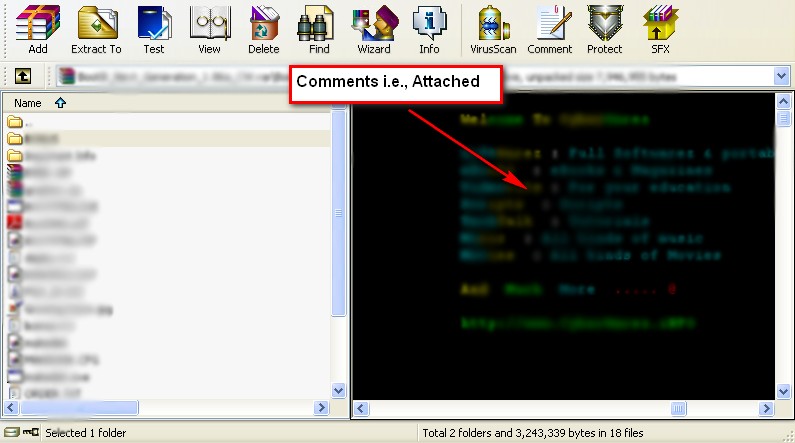
          so i   want to attach image like pic : please check the image. I can't figure it how can i achieve that so that i can easily archive my data: without having to    browse through them and manually test.  Any suggestion is helpful.


How can i achieve this. :)
OS:Win XP SP3 and Win7 Pro

shadowman

  • Participant
  • Joined in 2010
  • *
  • Posts: 22
Re: How to attach in Winrar
« Reply #1 on: September 02, 2011, 01:07 PM »
I know how to attach text files from Winrar, but rtf or doc files are not supported.
       I wonder how does those people attach files or image as seen on the snapshot, i know it is an image : because if it were text i could select all the text which it didn't happen here.

The image you see is in the comment section: sorry for wrong query: actually i know how to attach file or archive file (if you are thinking or archiving... i know that) but what i really meant was : How do i actually put up an image like in the snap in the comment box......
HOPE SOMEONE UNDERSTOOD...

Any advice from regular people of Donationcoder.....
OS:Win XP SP3 and Win7 Pro
« Last Edit: September 02, 2011, 01:27 PM by shadowman »

shadowman

  • Participant
  • Joined in 2010
  • *
  • Posts: 22
Re: How to attach in Winrar
« Reply #2 on: October 11, 2011, 04:26 PM »
If the people havn't understood.
i wanted smething like to create in Winrar. How can i achive this.
OS:Win XP SP3 and Win7 Pro

Renegade

  • Tell me something you don't know...
  • Charter Member
  • Joined in 2005
  • ***
  • Posts: 13,291
    • Participated in NANY Challenge Three Times
    • Furry Fandom Badge - Furry Fandom
    • Linux User
Re: How to attach in Winrar
« Reply #3 on: October 11, 2011, 04:53 PM »
I don't get it...

Do you mean "how do I edit archive comments"?

Slow Down Music - Where I commit thought crimes...

Freedom is the right to be wrong, not the right to do wrong. - John Diefenbaker

hulkbuster

  • Participant
  • Joined in 2009
  • *
  • Posts: 259
Re: How to attach in Winrar
« Reply #4 on: October 11, 2011, 04:59 PM »
Ohh... the dude wants all the colour and things in his comment box.  Right.

I think u need to click on the Load comment from the file button and see if any of the doc or rtf extension file is accepted and try on.

I don't know, give it a try.
ClipDiary 5.3/ Smadav 2018/ Some Sense

f0dder

  • [Well, THAT escalated quickly!]
  • Charter Honorary Member
  • Joined in 2005
  • ***
  • Posts: 9,153
    • Participated in NANY Challenge Once
Re: How to attach in Winrar
« Reply #5 on: October 11, 2011, 06:48 PM »
- carpe noctem

cranioscopical

  • Friend of the Site
  • Supporting Member
  • Joined in 2006
  • **
  • Posts: 4,776
    • Cody Award
    • Official Forum Clown
    • rotten turkey sandwich - Rotten Turkey Sandwich
Re: How to attach in Winrar
« Reply #6 on: October 11, 2011, 07:13 PM »
i know it is an image : because if it were text i could select all the text which it didn't happen here

Can I ask something? When you say that, you're not trying to edit the comment directly are you? You're using the info/comment tab?
Chris

shadowman

  • Participant
  • Joined in 2010
  • *
  • Posts: 22
Re: How to attach in Winrar
« Reply #7 on: October 12, 2011, 05:18 AM »


These are just few winrar archive i made it: i know to add comments but having a colourful comment was all i wanted. Which most of the people half the time was confused to understand my post.

http://lmgtfy.com/?q=winrar+comments+color

:)

Thank you fodder for the links, it was so simple searching from Google.  Case closed thank you for your help. You are the man.
OS:Win XP SP3 and Win7 Pro

Original address: https://www.donationcoder.com/forum/index.php?topic=27834.0