DonationCoder.com forum
 
Read-only archive. This is a static copy of the DonationCoder.com forum. Reading and searching work as before; logging in, posting and private messages do not.
Archive of 2026-10-21 · About this archive · Main site

Last post Author Topic: NANY 2010 Release: ClipTrap  (Read 189,014 times)

skwire

  • I eat Coding Snacks for breakfast...
  • Global Moderator
  • Joined in 2005
  • *****
  • Posts: 5,297
    • Participated in NANY Challenge Seventeen Times
    • Coding Snacks
    • Superboy Coder
    • Cody Award
    • Volunteers/Staff
    • Gathering Badge
NANY 2010 Release: ClipTrap
« on: December 12, 2009, 08:51 PM »
NANY 2010 Entry Information

Application Name ClipTrap
Short Description Aggregate text copied to the clipboard
Supported OSes Windows 7 (Probably works, but untested on, Windows XP/Vista/8)
Web Page ClipTrap
Download Link Zip file (portable)
System Requirements Windows OS
Version HistoryChangelog
Author Jody Holmes (Skwire)
Screencast (courtesy of mouser, thanks!)


Description
ClipTrap watches the clipboard and keeps track of copied text in its window.  I initially wrote it for my workplace where we use terminal emulators (SecureCRT, PuTTY, etc.) constantly and often need to capture several successive bits of output from various routers, switches, and other devices on the network.  I fleshed it out and prettied it up for NANY 2010.  I use this in conjunction with ArsClip, a fantastic clipboard caching tool.

Features
  • Customizable font.
  • Minimize to tray option.
  • Unicode capable.

Planned Features
I cater to the people so suggest something.   :D

Screencast

Screenshots
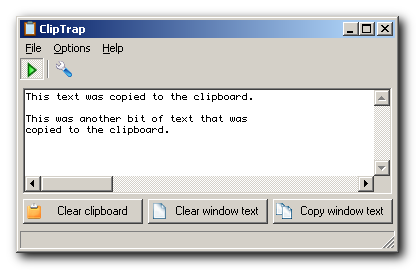
2009-12-12_121110.png

Usage
Installation
Unpack the archive to its own folder and run ClipTrap.exe.

Uninstallation
Delete the folder you unpacked the archive to.  Nothing is written to the registry.

Known Issues
It wouldn't be software if it didn't have issues.  Let me know if you find any.

« Last Edit: December 14, 2014, 10:46 PM by skwire »

ewemoa

  • Honorary Member
  • Joined in 2008
  • **
  • Posts: 2,922
    • Plugin Coding Medal
    • Participated in NANY Challenge Three Times
Re: NANY 2010 Release: ClipTrap
« Reply #1 on: December 22, 2009, 06:39 AM »
Interesting idea :)

I tried it out for a bit and it seemed to work fine for the most part.

I encountered a problem when trying to work w/ certain kinds of strings -- e.g. some CJK-ish stuff didn't seem to go over very well.

The following series of steps appears to reproduce the problem in my environment:

  • Ensure ClipTrap is running
  • Visit translate.google.com
  • For text to translate, enter "test" - no double quotes
  • Choose to translate from English to Japanese
  • Select and copy the result of the translation -- should be two characters
  • In ClipTrap, observe that the second character seems different

Do you encounter the same issue?

skwire

  • I eat Coding Snacks for breakfast...
  • Global Moderator
  • Joined in 2005
  • *****
  • Posts: 5,297
    • Participated in NANY Challenge Seventeen Times
    • Coding Snacks
    • Superboy Coder
    • Cody Award
    • Volunteers/Staff
    • Gathering Badge
Re: NANY 2010 Release: ClipTrap
« Reply #2 on: December 23, 2009, 09:35 PM »
Do you encounter the same issue?

No, I don't.  However, I run my computers with Japanese as the default language and also have them set up with Japanese set as the language to use for non-Unicode applications.  It's possible that is what allows me to see the Kanji for shiken properly.

ewemoa

  • Honorary Member
  • Joined in 2008
  • **
  • Posts: 2,922
    • Plugin Coding Medal
    • Participated in NANY Challenge Three Times
Re: NANY 2010 Release: ClipTrap
« Reply #3 on: December 23, 2009, 10:13 PM »
Thanks for the response.

Perhaps I can try ClipTrap out on a machine with a Japanese environment taking into account some of what you mentioned.

BTW, I happened across a thread titled "UNICODE version of AutoHotkey" at the AHK forum.  Are you familiar with this?


ewemoa

  • Honorary Member
  • Joined in 2008
  • **
  • Posts: 2,922
    • Plugin Coding Medal
    • Participated in NANY Challenge Three Times
Re: NANY 2010 Release: ClipTrap
« Reply #4 on: December 24, 2009, 01:10 AM »
I've done some testing.

Here's what a I found:

Quote
Japanse OS + Japanese set as the language to use for non-Unicode applications
-Japanese text seems OK
-Korean text doesn't

Korean OS
-Korean text seems OK
-Japanese text doesn't

English OS + Japanese set as the language to use for non-Unicode applications
-Japanese text seems OK
-Korean text doesn't

English OS + Korean set as the language to use for non-Unicode applications
-Korean text seems OK
-Japanese text doesn't

So if I had to guess I'd say that the language to use for non-Unicode applications seems to be relevant...

skwire

  • I eat Coding Snacks for breakfast...
  • Global Moderator
  • Joined in 2005
  • *****
  • Posts: 5,297
    • Participated in NANY Challenge Seventeen Times
    • Coding Snacks
    • Superboy Coder
    • Cody Award
    • Volunteers/Staff
    • Gathering Badge
Re: NANY 2010 Release: ClipTrap
« Reply #5 on: December 24, 2009, 01:50 PM »
BTW, I happened across a thread titled "UNICODE version of AutoHotkey" at the AHK forum.  Are you familiar with this?

Yes, I am; I was letting it mature a bit before attempting much with it.  However, in light of this issue, I'll give it a go compiling ClipTrap with it and see if it solves anything.  Thanks for your in-depth testing as well.  I very much appreciate it.

ewemoa

  • Honorary Member
  • Joined in 2008
  • **
  • Posts: 2,922
    • Plugin Coding Medal
    • Participated in NANY Challenge Three Times
Re: NANY 2010 Release: ClipTrap
« Reply #6 on: December 24, 2009, 10:02 PM »
However, in light of this issue, I'll give it a go compiling ClipTrap with it and see if it solves anything.

Woohoo!  Looking forward to this.  I have my fingers crossed -- well, I did for an instant ;)

skwire

  • I eat Coding Snacks for breakfast...
  • Global Moderator
  • Joined in 2005
  • *****
  • Posts: 5,297
    • Participated in NANY Challenge Seventeen Times
    • Coding Snacks
    • Superboy Coder
    • Cody Award
    • Volunteers/Staff
    • Gathering Badge
Re: NANY 2010 Release: ClipTrap
« Reply #7 on: December 25, 2009, 01:33 AM »

ewemoa

  • Honorary Member
  • Joined in 2008
  • **
  • Posts: 2,922
    • Plugin Coding Medal
    • Participated in NANY Challenge Three Times
Re: NANY 2010 Release: ClipTrap
« Reply #8 on: December 25, 2009, 05:36 AM »
Thanks for the new build.

Initially it didn't look so good, but configuring the font to MS Mincho seemed to make things work out.

So it's looking more usable :Thmbsup:

ewemoa

  • Honorary Member
  • Joined in 2008
  • **
  • Posts: 2,922
    • Plugin Coding Medal
    • Participated in NANY Challenge Three Times
Re: NANY 2010 Release: ClipTrap
« Reply #9 on: January 02, 2010, 05:26 AM »
I was using ClipTrap nicely today when I accidentally clicked on the "Clear window text" button before making use of the content I was accumulating :(

Any possibility of an undo or option to confirm clearing of the window text?

skwire

  • I eat Coding Snacks for breakfast...
  • Global Moderator
  • Joined in 2005
  • *****
  • Posts: 5,297
    • Participated in NANY Challenge Seventeen Times
    • Coding Snacks
    • Superboy Coder
    • Cody Award
    • Volunteers/Staff
    • Gathering Badge
Re: NANY 2010 Release: ClipTrap
« Reply #10 on: January 02, 2010, 03:23 PM »
Website | Download
v1.0.1 - 2010-01-02
    + Added an option that will allow for confirmation of the "Clear window text" button.  Go to Options, Configure to set it.  (Thanks, ewemoa)
    + Added a Unicode build to the zip.

ewemoa

  • Honorary Member
  • Joined in 2008
  • **
  • Posts: 2,922
    • Plugin Coding Medal
    • Participated in NANY Challenge Three Times
Re: NANY 2010 Release: ClipTrap
« Reply #11 on: January 02, 2010, 10:03 PM »
Thanks!

Seems to work fine here :)

skwire

  • I eat Coding Snacks for breakfast...
  • Global Moderator
  • Joined in 2005
  • *****
  • Posts: 5,297
    • Participated in NANY Challenge Seventeen Times
    • Coding Snacks
    • Superboy Coder
    • Cody Award
    • Volunteers/Staff
    • Gathering Badge
Re: NANY 2010 Release: ClipTrap
« Reply #12 on: January 02, 2010, 11:10 PM »
Good to hear.  Thanks for the feedback.

Isaac Patch

  • Charter Member
  • Joined in 2005
  • ***
  • Posts: 3
Re: NANY 2010 Release: ClipTrap
« Reply #13 on: January 05, 2010, 02:30 PM »
Hi. I love ClipTrap. So small and useful, I have it in my Startup folder. Is there a way to make it start up, already minimized to the tray? Thanks, Ike

skwire

  • I eat Coding Snacks for breakfast...
  • Global Moderator
  • Joined in 2005
  • *****
  • Posts: 5,297
    • Participated in NANY Challenge Seventeen Times
    • Coding Snacks
    • Superboy Coder
    • Cody Award
    • Volunteers/Staff
    • Gathering Badge
Re: NANY 2010 Release: ClipTrap
« Reply #14 on: January 06, 2010, 11:12 AM »
Website | Download
v1.0.2 - 2010-01-06
    + Added "Minimize on startup" option.  Go to Options, Configure to set it.  (Thanks, Isaac Patch)

Isaac Patch

  • Charter Member
  • Joined in 2005
  • ***
  • Posts: 3
Re: NANY 2010 Release: ClipTrap
« Reply #15 on: January 06, 2010, 09:27 PM »
Thank you Skwire. Minimizing at start up works like a charm.

ewemoa

  • Honorary Member
  • Joined in 2008
  • **
  • Posts: 2,922
    • Plugin Coding Medal
    • Participated in NANY Challenge Three Times
Re: NANY 2010 Release: ClipTrap
« Reply #16 on: January 13, 2010, 12:41 PM »
I experienced not seeing the ClipTrap window today even after choosing "Show ClipTrap".  It turns out that I had rotated my screen :)  A little tweaking of the ini file plus restarting the application seemed to fix things.

I don't know if it's worth trying to do anything about it, but I thought I'd mention it on the off-chance someone else ever encounters the issue.

skwire

  • I eat Coding Snacks for breakfast...
  • Global Moderator
  • Joined in 2005
  • *****
  • Posts: 5,297
    • Participated in NANY Challenge Seventeen Times
    • Coding Snacks
    • Superboy Coder
    • Cody Award
    • Volunteers/Staff
    • Gathering Badge
Re: NANY 2010 Release: ClipTrap
« Reply #17 on: January 13, 2010, 04:49 PM »
That's why I keep a "center window" hotkey in my main AHK script...for those windows that get stuck off-screen.  Or, you can use this procedure to bring off-screen windows back.

1) Focus the window by clicking its taskbar button.
2) Press alt-space, m, down-arrow.
3) Now, without clicking your mouse at all, move the mouse around.  Your window should be stuck to the pointer and easy to retrieve.

tomos

  • Charter Member
  • Joined in 2006
  • ***
  • Posts: 11,970
    • Gathering Badge
    • Participated in NANY Challenge Once
Re: NANY 2010 Release: ClipTrap
« Reply #18 on: January 13, 2010, 07:09 PM »
1) Focus the window by clicking its taskbar button.
2) Press alt-space, m, down-arrow.
3) Now, without clicking your mouse at all, move the mouse around.  Your window should be stuck to the pointer and easy to retrieve.

that's a neat trick :)
Tom

ewemoa

  • Honorary Member
  • Joined in 2008
  • **
  • Posts: 2,922
    • Plugin Coding Medal
    • Participated in NANY Challenge Three Times
Re: NANY 2010 Release: ClipTrap
« Reply #19 on: January 14, 2010, 01:25 AM »
That's why I keep a "center window" hotkey in my main AHK script...for those windows that get stuck off-screen.

Nice!  Sounds like a good idea for a separate tool/script -- does it work for multi-display situations too?

Quote
Or, you can use this procedure to bring off-screen windows back.
1) Focus the window by clicking its taskbar button.
2) Press alt-space, m, down-arrow.
3) Now, without clicking your mouse at all, move the mouse around.  Your window should be stuck to the pointer and easy to retrieve.

I've tried this one before with success -- though I don't remember whether I've tried it with multiple displays.

In any case -- thanks for the tips  :Thmbsup:

skwire

  • I eat Coding Snacks for breakfast...
  • Global Moderator
  • Joined in 2005
  • *****
  • Posts: 5,297
    • Participated in NANY Challenge Seventeen Times
    • Coding Snacks
    • Superboy Coder
    • Cody Award
    • Volunteers/Staff
    • Gathering Badge
Re: NANY 2010 Release: ClipTrap
« Reply #20 on: January 14, 2010, 05:04 AM »
Nice!  Sounds like a good idea for a separate tool/script -- does it work for multi-display situations too?

It will center the window to the main display.  Here's the code snippet:

Code: (autoit)
WinGetPos, , , Width, Height, A
WinMove, A, , ( A_ScreenWidth / 2 ) - ( Width / 2 ), ( A_ScreenHeight / 2 ) - ( Height / 2 )

Nothing to it, really.

ewemoa

  • Honorary Member
  • Joined in 2008
  • **
  • Posts: 2,922
    • Plugin Coding Medal
    • Participated in NANY Challenge Three Times
Re: NANY 2010 Release: ClipTrap
« Reply #21 on: January 14, 2010, 09:15 AM »
Thanks for the code!

It seems to work fine in my limited testing of two screens :)


P.S. Using your code seems more robust than the alt-space / window menu alternative.  I tested with an Emacs window and found that it doesn't bring up a window menu in response to alt-space.  Perhaps this type of situation is rare, but I find it nice to have this alternative.

sunsetdan

  • Participant
  • Joined in 2010
  • *
  • Posts: 1
Re: NANY 2010 Release: ClipTrap
« Reply #22 on: January 19, 2010, 11:32 AM »
Thank you skwire.
Seems to work great so far.. 8)

skwire

  • I eat Coding Snacks for breakfast...
  • Global Moderator
  • Joined in 2005
  • *****
  • Posts: 5,297
    • Participated in NANY Challenge Seventeen Times
    • Coding Snacks
    • Superboy Coder
    • Cody Award
    • Volunteers/Staff
    • Gathering Badge
Re: NANY 2010 Release: ClipTrap
« Reply #23 on: January 19, 2010, 11:40 AM »
Thank you skwire.
Seems to work great so far.. 8)

You're welcome; glad you've found it useful.

skwire

  • I eat Coding Snacks for breakfast...
  • Global Moderator
  • Joined in 2005
  • *****
  • Posts: 5,297
    • Participated in NANY Challenge Seventeen Times
    • Coding Snacks
    • Superboy Coder
    • Cody Award
    • Volunteers/Staff
    • Gathering Badge
Re: NANY 2010 Release: ClipTrap
« Reply #24 on: July 31, 2010, 04:27 AM »
Website | Download
v1.0.3 - 2010-07-30
    ! Fixed a couple of 120 DPI graphical glitches.  (Thanks, cmpm)

Original address: https://www.donationcoder.com/forum/index.php?topic=20966.0