DonationCoder.com forum
 
Read-only archive. This is a static copy of the DonationCoder.com forum. Reading and searching work as before; logging in, posting and private messages do not.
Archive of 2026-10-21 · About this archive · Main site

Author Topic: What are the options for restricting access to applications?  (Read 13,966 times)

netmatt

  • Participant
  • Joined in 2008
  • *
  • Posts: 8
I found AppLocker by SmartX, but was hoping to find something Open Source so that I had a better understanding of how this works, and can perhaps tailor it if I need to?  :D

Matt

Jimdoria

  • Charter Member
  • Joined in 2006
  • ***
  • Posts: 257
Re: What are the options for restricting access to applications?
« Reply #1 on: April 25, 2009, 05:38 AM »
If you're on Windows, it may be possible to do this using NTFS file permissions. It's built right in.
- Jimdoria ~@>@

There are two kinds of people in the world: Those who divide everybody into two kinds of people, and those who don't.

app103

  • That scary taskbar girl
  • Global Moderator
  • Joined in 2006
  • *****
  • Posts: 5,888
    • Participated in NANY Challenge Six Times
    • Coding Snacks
    • Gathering Badge
    • Cody Award
    • Volunteers/Staff
Re: What are the options for restricting access to applications?
« Reply #2 on: April 25, 2009, 06:28 AM »
If you're on Windows, it may be possible to do this using NTFS file permissions. It's built right in.

That's how I got rid of the obnoxious ad window every time the free version of Avira updates.

Example of how to do that is here. Follow the same steps to do it with any other application you don't want to run.

MilesAhead

  • Supporting Member
  • Joined in 2009
  • **
  • Posts: 7,736
    • Coding Snacks
Re: What are the options for restricting access to applications?
« Reply #3 on: April 26, 2009, 09:01 PM »
Interesing info in the article. I'll have to try that on W7.  For Vista I only have Home Premium so that option isn't there. I use a freebie App killer to kill off stuff I don't want to run ever, like mobsync.exe.


« Last Edit: April 26, 2009, 09:03 PM by MilesAhead »

Shades

  • Member
  • Joined in 2006
  • **
  • Posts: 2,954
Re: What are the options for restricting access to applications?
« Reply #4 on: April 26, 2009, 11:44 PM »
Booting into safe mode with the Administrator in XP Home and typing: 'secpol.msc' (or 'gpedit.msc') in the run dialog from the start menu doesn't work?

One reason more to be happy with XP Pro  :-\
The easy path is usually downhill...

MilesAhead

  • Supporting Member
  • Joined in 2009
  • **
  • Posts: 7,736
    • Coding Snacks
Re: What are the options for restricting access to applications?
« Reply #5 on: April 27, 2009, 12:09 AM »
Booting into safe mode with the Administrator in XP Home and typing: 'secpol.msc' (or 'gpedit.msc') in the run dialog from the start menu doesn't work?

One reason more to be happy with XP Pro  :-\

Don't know. I don't have xp home to try it.

mahesh2k

  • Supporting Member
  • Joined in 2007
  • **
  • Posts: 1,426
    • Participated in NANY Challenge Twice
Re: What are the options for restricting access to applications?
« Reply #6 on: April 27, 2009, 12:21 AM »
I've problem on my hard disk, that one folder is not being deleted. there is some ads_data file inside the folder because of which it is not getting deleted :( . is there any way i can delete that folder? folder contains nothing other than that file. can i override the attribute and delete that folder?

app103

  • That scary taskbar girl
  • Global Moderator
  • Joined in 2006
  • *****
  • Posts: 5,888
    • Participated in NANY Challenge Six Times
    • Coding Snacks
    • Gathering Badge
    • Cody Award
    • Volunteers/Staff
Re: What are the options for restricting access to applications?
« Reply #7 on: April 27, 2009, 12:26 AM »
Booting into safe mode with the Administrator in XP Home and typing: 'secpol.msc' (or 'gpedit.msc') in the run dialog from the start menu doesn't work?

One reason more to be happy with XP Pro  :-\

XP Home doesn't have group policies so 'secpol.msc' (or 'gpedit.msc') wll not work.

If you read the full instructions on the page I linked to, it explained how to do it for XP Home.

Windows XP Home users can try this method (slightly edited to make it more generic):

  • Boot into Safe Mode.
  • Log in as Administrator.
  • Navigate to [FileYouWantToBlock.exe] in Explorer.
  • Right click on it in explorer and select Properties -> Security -> Advanced -> Edit
  • Select the option to not let it execute for all users.

PhilB66

  • Supporting Member
  • Joined in 2007
  • **
  • Posts: 1,522
Re: What are the options for restricting access to applications?
« Reply #8 on: April 27, 2009, 01:41 AM »
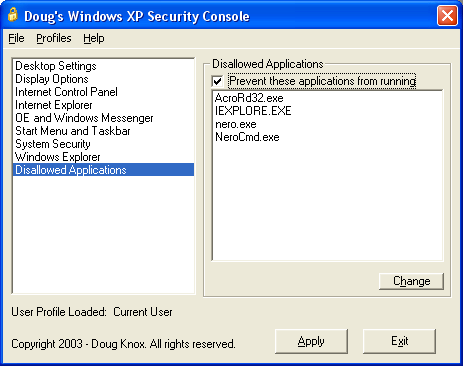
Doug Knox Windows® XP Security Console does that.

[attach]

Shades

  • Member
  • Joined in 2006
  • **
  • Posts: 2,954
Re: What are the options for restricting access to applications?
« Reply #9 on: April 27, 2009, 04:54 AM »
PhilB66 to the rescue!!   :)


@App103:
What you say makes sense, but as 'secpol.msc' appears to be the small little brother of 'gpedit.msc' I was thinking (or maybe hoping) that the small edition was included in XP Home Premium.

The oooops is completely on my side of the court :-[
The easy path is usually downhill...
« Last Edit: April 27, 2009, 05:13 AM by Shades »

MilesAhead

  • Supporting Member
  • Joined in 2009
  • **
  • Posts: 7,736
    • Coding Snacks
Re: What are the options for restricting access to applications?
« Reply #10 on: April 27, 2009, 05:52 PM »
Doug Knox Windows® XP Security Console does that.
(see attachment in previous post)

Wish somebody made one for Vista.  The best freebie I think I've seen so far for Vista is a utility called Shadow Explorer

The mechanism for shadow copies is there in the lesser versions of Vista(at least it's in Home Premium anyway) and this little GUI is like an undelete program.  Browses through dates of shadow copy sets until you find the file you want to restore.  Comes in handy occasionally for those of use without the Property Page that gets old versions of files.

Original address: https://www.donationcoder.com/forum/index.php?topic=17989.0