|
The SpecialFX menu lets you apply some effects to your image to enhance regions.
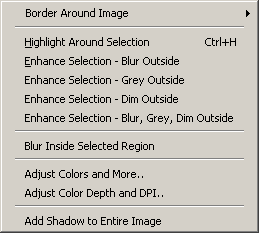
| • | Border Around Image - Brings up the Border Dialog where you can apply a bunch of cool border effects. |
| • | Highlight Around Selection - Creates a highlight box around the current selection (same as choosing highlight box button on toolbar). |
| • | Enhance Selection - Blur Outside - Blurs all parts of the image outside of the current selection. Useful for drawing attention to a region. |
| • | Enhance Selection - Grey Outside - Greyscales all parts of the image outside of the current selection. |
| • | Enhance Selection - Dim Outside - Dims the brightness of all parts of the image outside of the current selection. |
| • | Enhance Selection - Blur, Dim, Grey Outside - Applies blur, grey, and dim to all parts of the image outside of the current selection. A toolbar button exists for this. |
| • | Blur Inside Selected Region - Blurs the currently selected region (very useful for hiding sensitive information in an image). A toolbar button exists for this. |
|